




Color LaserJet 2700N
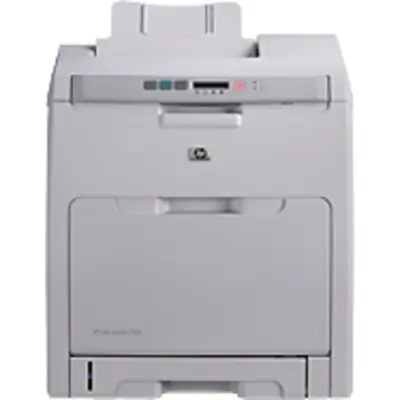
Adding Ethernet to the 2700 formula changed who the printer belonged to: the Color LaserJet 2700N let a small office share one color machine instead of scattering several lesser ones across desks. Network-ready out of the box, it runs the same HP 314A toner as its base model — Q7560A black, Q7561A cyan, Q7562A yellow and Q7563A magenta. The singles and sets below are compatible replacements for those codes.
For a growing business, one shared printer is a financial decision as much as a technical one: a single set of cartridges to stock, a single machine to maintain, and color output available to everyone on the network. The trade-off is that its toner now serves the whole office's appetite, so the 2700N empties cartridges at a pace its stay-at-one-desk sibling never sees. Buying for it means buying for a small team — a fact the stocking advice below takes seriously.
Toner Cartridges for Color LaserJet 2700N
- Q7560A — Black single, for the documents a shared printer lives on; page yield on the product page
- Q7561A — Cyan single, swapped when charts and graphics start to thin; page yield on the product page
- Q7562A — Yellow single, the quiet drain behind highlighted pages; page yield on the product page
- Q7563A — Magenta single, replaced on its own schedule; page yield on the product page
- Q7560A / Q7561A / Q7562A / Q7563A — 4 Color Set — The full 314A cycle in one box; page yield on the product page
- Q7560A / Q7561A / Q7562A / Q7563A — Premium 4 Color Set — Premium build of the same four codes; page yield on the product page
- Color LaserJet 2700N — 4 Color Set — Four-color set listed for this model; page yield on the product page
Which cartridge should you buy?
The most economical habit for a 2700N is also the simplest: print everyday documents in monochrome and save the color cartridges for pages that need them — black-only jobs leave cyan, yellow and magenta untouched. Beyond that, replace colors individually as they fade, and reach for a four-color set when the levels bunch together or you are setting up a spare cycle for the office. This page lists the set in standard and premium builds with identical codes, so the choice between them is about the build, not the fit. Compatible cartridges here are covered by a 1-year warranty and 1-year returns.
Chip, toner and everyday use
Each cartridge's chip reports its own level to the printer, and on a networked machine that matters: whoever administers the printer can see a color running low before a colleague's deadline does. Act on the first warning by ordering that single color. Spares keep best in their sealed packaging, upright, somewhere cool and out of the sun. If a color prints pale ahead of its warning, a slow side-to-side rock of the cartridge levels the toner and typically carries output through the job at hand.
Frequently Asked Questions
Does the 2700N use the same toner as the Color LaserJet 2700?
Exactly the same — the Color LaserJet 2700 and the network model share the whole 314A family. The N adds Ethernet, not a new cartridge.
What is the most economical way to run a shared 2700N?
Default to monochrome for internal documents and reserve color for client-facing pages. Black-only printing spends only the black cartridge, so a 314A color set lasts far longer.
Which code is the black cartridge?
Black is Q7560A. The colors follow as Q7561A cyan, Q7562A yellow and Q7563A magenta — match the code on the unit you remove.
One color is out on the shared printer — must the set be replaced?
No. Swap the finished color alone and the office is printing again in a couple of minutes; the other three cartridges keep their remaining life.
More printers that use the same cartridges
Also running the 314A family, in reverse order: HP 314A, Color LaserJet 3000tn, Color LaserJet 3000dtn, Color LaserJet 3000N, Color LaserJet 3000DN, Color LaserJet 3000, Color LaserJet 2700.