




Color Laser Laser 1133
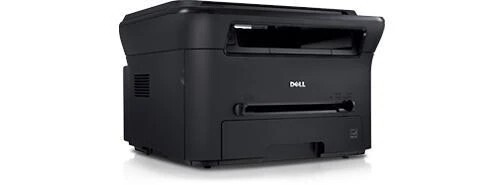
The Dell 1133 folds three office jobs into one compact box: a 3-in-1 mono laser multifunction that prints, copies and scans at up to 22 pages per minute, with 1200 x 1200 dpi output and a footprint that stays desktop-sized. For all three jobs it relies on one consumable, the 330-9523 black cartridge — standard cartridges are rated at 1,500 pages.
The 1133 is the answer for a small office that needs an MFP but not a floor-standing one: the front desk that copies IDs and signs in visitors, the bookkeeper who scans invoices in the morning and prints statements in the afternoon. Because copying draws on the same cartridge as printing, the toner budget here follows total pages through the machine, not just pages sent from a computer — a distinction owners of print-only models never have to make.
Toner Cartridges for 1133
| Cartridge | Color | Page Yield |
|---|---|---|
| 330-9523 — Black, single cartridge | Black | Standard yield — 1,500 pages |
| 330-9523 — Black, 2 Pack | Black | Standard yield — 1,500 pages |
| 330-9523 — Black, 3 Pack | Black | Standard yield — 1,500 pages |
| 330-9523 — Black, 5 Pack | Black | Standard yield — 1,500 pages |
| 330-9523 — Black, 10 Pack | Black | Standard yield — 1,500 pages |
Which cartridge should you buy?
One cartridge number covers this machine, and the family offers it in a standard 1,500-page rating and a high-yield 2,500-page version. The listings above are the standard cartridge in five pack sizes. Copying is the swing factor in your choice: an office that mostly prints can plan on the standard cartridge and a modest pack, while a desk that copies forms and files all day is really running two machines worth of pages through one cartridge, and should stock the 5 or 10 pack — or step up to the high-yield rating — to keep swaps rare and the cost per page down. Singles remain the sensible first purchase while you learn your own monthly volume. Compatible cartridges here are backed by a 1-year warranty and 1-year returns.
Chip, toner and everyday use
The cartridge chip lets the 1133 track toner and warn you before quality suffers, and swapping one is a front-access job that takes a minute. Remember the split in how this machine spends toner: scanning uses none at all, while every copy uses exactly as much as a print of the same page. Yield figures assume 5% coverage, so a day of copying dark, dense originals counts double against the rating compared with light text. If output fades, rock the cartridge gently side to side to even out the toner before condemning it. Store spares in their sealed boxes, upright, in a cool spot near the machine.
Frequently Asked Questions
Does scanning on the 1133 use toner?
No. Scanning only reads the page with light; nothing is printed, so no toner is consumed. Copying is different — a copy is a print, and it uses toner just like a page sent from your computer.
Which cartridge does the Dell 1133 take?
The 330-9523 black cartridge — the same one used by the 1130 printers and the 1135N multifunction. It is sold above as a single cartridge and in 2, 3, 5 and 10 packs.
Is one cartridge really all this machine needs?
Yes. Printing, copying and scanning all hang on that single toner cartridge; there is no separate drum or second consumable on this page to keep track of. When the machine asks for toner, the 330-9523 is the whole order.
Standard or high yield for a copy-heavy desk?
High yield, or standard cartridges in a large pack. Copy volume adds quietly — a few dozen copies a day is a ream a week — and the 2,500-page high-yield rating exists precisely for machines that work that way.
More printers that use the same cartridges
Family members sharing this cartridge:
Color Laser Laser 1130N, Color Laser Laser 1135N, Color Laser Laser 1130, Laser 1130, Multifunction 1135N