




Color Laser Laser 1130N
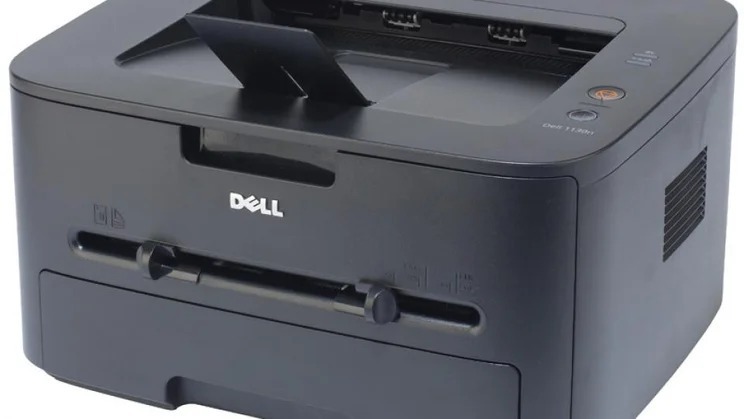
The Dell 1130N takes the compact 1130 mono laser and adds an integrated print server, turning a personal desktop printer into a shared network resource rated at up to 24 pages per minute on letter paper, with a 12,000-page monthly duty cycle. It runs on the single 330-9523 black cartridge — the standard version is rated at 1,500 pages — and that one cartridge absorbs the output of the whole team.
Sharing changes the toner equation. A personal printer idles most of the day; a networked one in a small office prints for five or six people, and nobody in that group feels personally responsible for the cartridge until it is empty. The 1130N therefore rewards a house rule: a spare cartridge lives next to the printer at all times, and whoever sees the low-toner warning is the person who swaps it, not the person who reports it.
Toner Cartridges for 1130N
| Cartridge | Color | Page Yield |
|---|---|---|
| 330-9523 (single) | Black | 1,500 pages per cartridge |
| 330-9523 (2 Pack) | Black | 1,500 pages per cartridge |
| 330-9523 (3 Pack) | Black | 1,500 pages per cartridge |
| 330-9523 (5 Pack) | Black | 1,500 pages per cartridge |
| 330-9523 (10 Pack) | Black | 1,500 pages per cartridge |
Which cartridge should you buy?
For a shared printer, the pack size matters more than the cartridge choice, because there is only one cartridge: the standard 330-9523 at 1,500 pages, with a 2,500-page high-yield version in the same family. A two-person office will do fine with a 2 or 3 pack. A busier team should buy the 5 or 10 pack and store them by the machine — the per-cartridge cost is lower, and the real saving is never having the office printer down while a single cartridge ships. If the whole team prints heavily every day, the high-yield rating is worth asking about before you commit to standard cartridges in bulk. Every compatible cartridge on this page comes with a 1-year warranty and 1-year returns.
Chip, toner and everyday use
Each cartridge is chipped, so the 1130N recognizes it on install and every connected computer can see the toner status before sending a job. That visibility is your early-warning system on a shared machine — when the level drops, order then, not when output fades. Yields are rated at 5% coverage, and office printing with charts, letterheads and shaded tables runs richer than that, so a shared cartridge will usually finish short of its headline number. When a cartridge does fade mid-week, a gentle side-to-side rock redistributes the toner and buys time. Keep reserve cartridges sealed, upright and indoors where the printer lives.
Frequently Asked Questions
Can everyone on our network print to the 1130N?
Yes. Once it is plugged into the network, any computer on that network can print to it from any room — that built-in print server is the whole point of the N model, and all of those jobs draw on the same one cartridge.
Which cartridge does the 1130N use?
The 330-9523 black cartridge, sold here as a single and in 2, 3, 5 and 10 packs. It is the same cartridge the rest of the 1130 family uses, including the 1133 multifunction model.
Why does a shared printer seem to eat toner so fast?
Because the page count is the sum of everyone printing to it. Five people each printing modestly add up to a heavy single load, and the cartridge cannot tell the difference — it just sees pages.
Standard or high yield for a small team?
Standard 1,500-page cartridges suit a team printing a few hundred pages a month. If the printer works all day, every day, the 2,500-page high-yield version means fewer swaps and a lower cost per page.
More printers that use the same cartridges
The rest of the family runs on this cartridge too:
Color Laser Laser 1133, Color Laser Laser 1135N, Color Laser Laser 1130, Laser 1130, Multifunction 1135N