





 See Compatible Printers
 Read more about our ink!
Dell
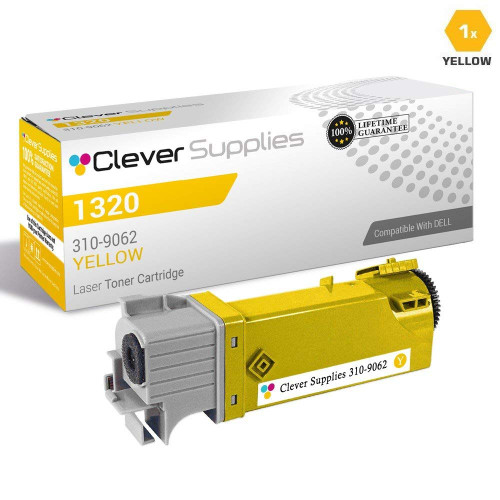
Compatible Dell 310-9062 Toner Cartridge Yellow
- Page Yield:
- 2,000 Pages
- Availability:
- In Stock
- Shipping:
- Calculated at Checkout

Amazon Price:

- Page Yield:
- 2,000 Pages
- Availability:
- In Stock
- Shipping:
- Calculated at Checkout
- Compatible Printers
- Specifications
- SKU:
- 310-9062
- Printer Brand:
- Dell
- OEM Number:
- 310-9062
- Ink Color:
- Yellow
- Page Yield:
- 2,000 Pages
- Printer Type:
- Laser Cartridge
- Condition:
- New Compatible
- Description
- Yields up to 2000 pages
- Compatible Dell 310-9062 Toner Cartridge Yellow consistently produces high-resolution printouts with enhanced graphics and sharp text
- Unlike bargain brand toners Dell 310-9062 Toner Compatible Cartridge Yellow is specifically engineered to work in Dell printers for optimum quality and performance
- Consistent print quality
- High quality of customer service and reduced administration costs
- Packaging: Each
- Compatible with: Dell 1320 1320c and 1320cn laser printer
- Print technology: Laser
- Dell 310-9062 interacts with the printer providing outstanding results
- Coverage percent: 5%
- Replaces the Following Manufacturer Numbers: 310-9062 KU054 RY856 TP114 310-9063 PN124
- Reviews

/> 

Compatible Dell 310-9062 Toner Cartridge Yellow delivers consistent quality with high-resolution printouts sharper images and text
Dell Yellow toner cartridge consistently produces high-resolution printouts with enhanced graphics and sharp text. Toner cartridge is compatible with 1320 1320c and 1320cn laser printers and yields up to 2000 pages.
Features:
Frequently Asked Questions
What does one printed page actually cost with the 310-9062?
Let's do the math openly: this cartridge costs $23.74 and is rated at 2,000 pages, which works out to roughly 1.19 cents per page for the yellow channel. That is not the cheapest per-page figure in the Dell range, and we won't pretend otherwise — the 1320 is a compact color laser with small cartridges, and small cartridges always carry a higher per-page cost than big production units. What you are paying for here is a correct-fit yellow cartridge for an older machine, without having to hunt down new-old-stock OEM boxes.
How long will 2,000 pages of yellow last in a home office?
It depends entirely on how much color you print. At roughly 100 color pages a month — the odd photo document, a school project, a presentation — 2,000 pages can stretch close to 20 months. At 50 color pages a week it is more like 10 months. Yellow also gets consumed quietly in the background of almost every color page, since most images and graphics mix yellow into skin tones, greens and warm colors, so it can run down even when you rarely print anything that looks yellow.
Our prints have started looking blue-purple. Is that the yellow running out?
Very often, yes. When yellow fades, the colors that depend on it fall apart first: greens turn teal or blue, warm tones go cold, and skin tones take on a purple cast — while black text stays perfectly sharp, because the black cartridge is a separate unit. If your text looks fine but your colors have gone cold and blue-ish, the 310-9062 yellow is the first suspect, well before anything mechanical.
Is the 310-9062 a genuine Dell cartridge?
No — it is a compatible cartridge built to the 310-9062 specification, not a Dell-branded OEM unit, and the listing says so plainly. It is made to fit and work in the Dell 1320 in place of the original yellow cartridge. Every one we sell is covered by a 1-year warranty, so if a cartridge fails or prints poorly within that year, you are not stuck with it.
Do I have to replace the other colors at the same time?
No. Each color in the 1320 is its own cartridge — black (310-9058), cyan (310-9060), magenta (310-9064) and this yellow (310-9062) — and each one is replaced only when it runs out. Swap the yellow, keep printing with the others, and replace each remaining color as its own turn comes.
What if the cartridge arrives damaged or prints badly?
You are covered two ways: a 1-year warranty on the cartridge itself, and 1-year free returns under our shipping & returns policy. Orders ship from our warehouses in IL, PA, GA and CA, and if you want help diagnosing a print problem before you reorder, our support team is available Monday to Friday, 9 AM to 5 PM CST.
The numbers 310-9060, 310-9062 and 310-9064 look almost identical — how do I avoid ordering the wrong color?
Read the full number, digit by digit, off the cartridge you removed. In the 1320 family the colors sit one digit apart: cyan is 310-9060, this yellow is 310-9062, magenta is 310-9064, and black is 310-9058. A glance can easily transpose them, and the wrong color is useless in the wrong slot. Before you order, match all seven digits on the old cartridge's label against the listing — ten seconds that prevent the commonest 1320 ordering error.
How should I keep a spare yellow cartridge for the 1320?
Sealed in its bag, lying flat, somewhere cool and dry, away from direct sunlight, radiators and damp. Toner is stable for long periods stored that way, and in a light-use home office a spare 310-9062 can wait the better part of a year behind the installed cartridge. Heat, humidity and a torn seal are what shorten its life; keep those away from the shelf and the spare will print like new when its turn comes.
The first pages from the new yellow look a little uneven — is the cartridge faulty?
Probably not. A freshly fitted cartridge needs a few prints for its toner to settle and distribute evenly, so the first page or two can look patchy even from a healthy unit. Print several pages, including something with a solid yellow area, and judge from those: output that strengthens into an even fill is a cartridge settling in. If the yellow still prints streaky after a good handful of pages, that is worth raising under the 1-year warranty.
What should I do with the spent 310-9062 once it comes out?
Keep it until the new cartridge has printed cleanly for a few days. The empty unit's label is your exact reorder reference — and with four near-identical numbers in this family, copying 310-9062 straight off the cartridge matters — while the old unit itself is evidence if the color problem predates the swap. Once the replacement is proven, recycle the spent cartridge or dispose of it under local rules for toner cartridges rather than general waste, and do not refill it.
About This 310-9062 Yellow Cartridge
The Dell 310-9062 is the yellow cartridge for the Dell 1320 color laser: a 2,000-page unit at $23.74, which is about 1.19 cents per page — a figure we state plainly rather than dress up, because compact printers like the 1320 simply run smaller, pricier-per-page cartridges. This compatible version gives 1320 owners a way to keep a perfectly good older machine in service with a cartridge that is warranted for a full year and returnable free for a full year. If your color prints have gone cold, blue or purple while your text stays crisp, this is very likely the cartridge your printer is asking for.
Related Items

Dell
Compatible Dell 1320 Toner Cartridge Yellow (310-9062)
/>

Dell
Compatible Dell 1320 Toner Cartridges 3 Color Set (310-9060, 310-9064, 310-9062)
/>

Dell
Compatible Dell 310-7895 Toner Cartridge Yellow
/>


Dell
Compatible Dell 1320 Toner Cartridges 6 Color Set (310-9060, 310-9064, 310-9062)
/>