






 See Compatible Printers
 Read more about our ink!
Hewlett Packard
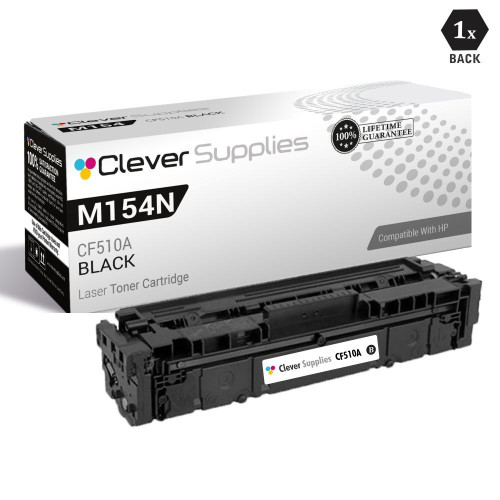
CS Compatible Replacement for HP M154nw Toner Cartridges Black (CF510A)

Amazon Price:

- Page Yield:
- Black: 1100
- Availability:
- In Stock
- Shipping:
- Calculated at Checkout
- Compatible Printers
- Specifications
- SKU:
- CS-HP--M154nw-BK
- Printer Brand:
- Hewlett Packard
- OEM Number:
- CF510A
- Ink Color:
- Black
- Page Yield:
- Black: 1100
- Printer Type:
- Laser Cartridge
- Condition:
- New Compatible
- Description
- Reviews

/> 

Clever Supplies brand products are made in the USA! Why pay more for cheaper product with a high defective rate? You will end up having to send it back to the manufacturer. Get a quality product that you KNOW will work. Purchase the Clever Supplies Products Compatible for HP M154nw (CF510A) Black and experience the difference! All Clever Supplies brand products are backed by '100% Quality Satisfaction' 1 year warranty against defects in materials and workmanship for all toner products. Free tech support for a Clever Supplies problems for all Clever Supplies brand products. The use of Clever Supplies brand replacement laser toner cartridges and supplies does not void printer warranty. Premium Quality Replacement Toner Cartridge is made by ISO9001 Certified Factory to Meet or Exceed OEM Standards. These units are manufactured 100% brand new with all new parts including OPC drums, wiper blades, a smart chip and other internal parts, they are an economical alternative to expensive OEM CF510A Compatible Toner Cartridges. This is a Compatible for HP toner cartridges Black guaranteed to perform with HP Laser Printers. It replaces the original HP M154nw toner cartridge Black. The compatible replacement for CF510A. We offer a 100% Quality Satisfaction Guarantee on our Compatible for CF510Alaser toner cartridges and supplies. For use in the following printers:Color LaserJet Pro M154nw, Color LaserJet Pro M154nw, Color LaserJet Pro MFP M180n, Color LaserJet Pro MFP M181fw
Frequently Asked Questions
What black cartridge fits the M154nw?
The Color LaserJet Pro M154nw takes the CF510A black cartridge, the HP 204A black, rated at up to 1,100 pages. This listing is a single cartridge at $31.74 — the black unit only, for the network model in this family.
How can I check the toner level without walking to the printer?
Because the M154nw sits on the network, its embedded web server shows a supplies page from any desk: type the printer's IP address into a browser and the black gauge appears next to the CF510A code. On a shared printer, that remote check is how you know a cartridge is due before someone's print job finds out the hard way.
Why does black seem to disappear faster on a shared printer?
A networked printer collects everyone's text work — contracts from one desk, labels from another, forms from a third. Each page is light on its own, but the black cartridge carries all of it. The 1,100-page rating is per cartridge; a busy shared machine simply walks through it sooner.
The printer says the cartridge is low. Should I swap it now?
Low is a warning, not a stop. Keep printing while the output stays dark, and order the replacement so it is on hand. Swapping the moment the warning appears throws away the pages still left in the old cartridge.
Does a new cartridge need any setup on the network?
None at all. The network settings live in the printer, not the cartridge. Pull the old CF510A out, slide the new one in, and the M154nw carries on with the same address, the same queue and the same shared name.
What if the cartridge arrives with a problem?
It is backed by a 1-year warranty and 1-year free returns. Orders leave from warehouses in Illinois, Pennsylvania, Georgia and California; delivery and return details are on the shipping and returns page, and support runs Monday through Friday, 9 AM to 5 PM CST.
Will changing the black cartridge disrupt jobs other people have already sent?
No. Jobs already in the M154nw's queue simply wait while the door is open and print once the new CF510A is seated — nothing needs to be resent, and the printer keeps its network address, queue and shared name throughout. The practical courtesy is timing: swap between jobs rather than while a long run is physically printing, and the colleague whose pages come out right after the change gets them at full density instead of watching them fade.
Output from the shared printer has started fading — what is the quickest check?
Take the black cartridge out and rock it gently from side to side a few times, then refit it and reprint the page that looked pale. On a busy shared machine the remaining toner settles unevenly as the cartridge empties, and redistributing it often restores even output for a useful run of pages. If the fade comes straight back, the CF510A is genuinely spent — and on a network printer, that is the moment the replacement should already be in the cabinet.
How does the supplies gauge behave right after a new cartridge goes in?
The embedded web server re-reads the fitted unit once the door closes, and the black gauge settles at full for the fresh CF510A. Judge the swap by output as well as the gauge: print a familiar text page and look for dark, even type from top to bottom of the sheet. A correct gauge reading with weak print, or strong print with an odd reading, is worth a reseat of the cartridge before anything else is suspected.
How do I make sure a colleague does not reinstall the empty cartridge?
Mark it before it leaves your hands. On a shared printer the spent unit often sits near the machine while someone fetches the new one, and an unmarked black cartridge looks identical to a full one. A piece of tape or a note on the box reading “empty” with the date prevents the next person from helpfully fitting the dead CF510A during a rush. Keep the empty until the replacement has proven itself, then let it go.
About This Black Cartridge for the M154nw
A shared printer has no single owner, which makes its black cartridge everyone's problem and nobody's job — until it runs dry mid-morning. This listing exists so the person who notices the low gauge can fix it in one step: one CF510A black cartridge (204A), up to 1,100 rated pages, $31.74.
Keeping one sealed spare in the supply cabinet turns a shared-printer outage into a one-minute swap, and the code to reorder — CF510A — is printed right on the cartridge you pull out.
It fits 3 printers in total: the Color LaserJet Pro M154nw, the Color LaserJet Pro M154a and the Color LaserJet Pro MFP M180n. The family rounds out with the CF511A cyan cartridge, the CF513A magenta cartridge, the CF512A yellow cartridge and the 204A four-color set, each listed on its own page.
Related Items

Hewlett Packard
CS Compatible Replacement for HP M154a Toner Cartridges Black (CF510A)
/>



Hewlett Packard
CS Compatible Replacement for HP M180n Toner Cartridges Black (CF510A)
/>


Hewlett Packard
CS Compatible Replacement for HP M181fw Toner Cartridges Black (CF510A)
/>

Hewlett Packard
CS Compatible Replacement for HP 204A Toner Cartridges Black (CF510A)
/>