







 See Compatible Printers
 Read more about our ink!
Ricoh
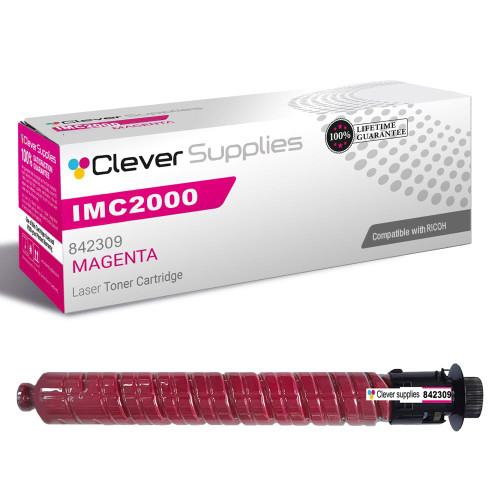
Compatible Ricoh IMC2000 (842309) Toner Cartridge Magenta
- Page Yield:
- Color: 10500
- Availability:
- In Stock
- Shipping:
- Free Shipping

Amazon Price:

- Page Yield:
- Color: 10500
- Availability:
- In Stock
- Shipping:
- Free Shipping
- Compatible Printers
- Specifications
- SKU:
- CS-Ricoh-IMC2000-M
- Printer Brand:
- Ricoh
- OEM Number:
- 842309
- Ink Color:
- Magenta
- Page Yield:
- Color: 10500
- Printer Type:
- Laser Cartridge
- Condition:
- New Compatible
- Description
- Reviews



Enhance your document quality with the Ricoh IMC2000 toner cartridge series, including 842307 Black, 842310 Cyan, 842309 Magenta, and 842308 Yellow. Each cartridge is engineered to deliver sharp black text and vibrant, accurate colors for high-impact prints. Built for consistent and dependable performance, the Ricoh IMC2000 toner cartridge ensures every page maintains professional quality. Whether you're printing charts, brochures, or everyday documents, these cartridges provide smooth, reliable output with excellent clarity. Compatible with IM C2000 and IM C2500 multifunction printers, these toner cartridges install effortlessly and work seamlessly with your Ricoh device. Their efficient design helps minimize maintenance while supporting continuous productivity. Trust the Ricoh IMC2000 toner cartridge to meet the demands of busy office environments. With long-lasting performance and vivid print quality, these cartridges are a smart choice for reliable, everyday color printing.
Also fits: This cartridge also fits the Ricoh IM C2000 and IM C2500 — the same machines also sold as the Savin IM C2000 / IM C2500, Lanier IM C2000 / IM C2500, Gestetner IM C2000 / IM C2500 and Nashuatec IM C2000 / IM C2500. For the side-by-side comparison of this family’s six boxes — set, 2-pack and singles, priced at checkout — see our Ricoh 842307 buying guide.
Frequently Asked Questions
Why do reds and skin tones look wrong when magenta gets low?
Magenta is the red-making component in every color print — reds are built from magenta plus yellow, and faces, brick, wood, and warm tones all lean on it heavily. As the cartridge fades, reds wash toward orange and photographs of people start looking pale and cold, often before any low-toner warning appears.
How many pages should I expect from this magenta cartridge?
It is rated at 10,500 pages, which assumes the standard roughly 5% coverage per color. A photo-heavy workflow covers far more of each page, so a marketing or real-estate office printing brochures all day will see noticeably fewer pages than a general office printing the occasional color chart.
What does magenta work out to per page?
At $64.98 over 10,500 rated pages, roughly 0.62 cents per page for the magenta component. That is the highest per-page figure of the four cartridges on this platform, which is typical — color components cost more per page than the 16,500-page black cartridge.
The listing names the IMC2000. Is magenta limited to that one model?
It is not. The 842309 magenta cartridge is shared by the entire Ricoh IM C2000 and IM C2500 platform, and the title simply picks one model from that family to name. Whichever machine in the family you run, this is its magenta cartridge.
Should I replace magenta on its own or wait for the other colors?
On its own, as soon as it is done. The three colors deplete at different rates depending on what you print, and there is no benefit to retiring a healthy cyan or yellow early. Individual replacement keeps each cartridge's full yield working for you.
How am I protected if the cartridge disappoints?
Every cartridge is covered by a one-year warranty, and you have a full year of free returns as well. Terms are spelled out on our shipping and returns page, and our team answers Monday through Friday, 9 AM to 5 PM CST.
We have a heavy brochure run coming up. Should we have a spare magenta on hand first?
It is the prudent move. Brochures and photographs cover far more of each page than the roughly 5% coverage behind the 10,500-page rating, so magenta drains noticeably faster under that load — and it is the cartridge your reds and skin tones depend on. If recent prints already show reds washing toward orange, order the spare before the run rather than discovering the shortfall with a deadline attached.
How should a spare magenta cartridge be stored?
Sealed in its box, stored flat in a cool, dry cabinet, away from sunlight and heat. Toner is a dry powder and keeps patiently under those conditions, so a spare bought ahead of a busy season will be ready when the installed 842309 finishes. Keep it off the top of the printer, where the machine's own heat works on it all day.
Can we finish a non-critical run on a magenta cartridge that is clearly fading?
For internal drafts and text-heavy documents, yes — run it down and save the fresh cartridge for work that will be seen. The fade shows up in reds, warm tones, and photographs long before plain text suffers, so the sensible split is: tired magenta for the office's own paperwork, fresh magenta for anything client-facing. Just do not let the fading cartridge anywhere near a photo-heavy job, where its weakness is the whole page.
What do we do with the spent magenta cartridge?
Put it in the box the replacement arrived in and recycle it through a local toner recycling program or an office-supply take-back bin. Hold onto it until the new cartridge has printed some real color work — if reds still look wrong with fresh magenta installed, swapping the old cartridge back for one test page is the fastest way to show the problem lives elsewhere.
About This Magenta Toner Cartridge
This is a Clever Supplies compatible magenta toner cartridge (842309) rated at 10,500 pages for the Ricoh IM C2000/C2500 color MFP platform, listed here under the IMC2000 name. It carries the reds, warm tones, and skin tones in this platform's color output at about 0.62 cents per page. The companion black, cyan, and yellow cartridges are on our Ricoh toner page, and orders leave from IL, PA, GA, or CA depending on stock.
Related Items


Ricoh
Compatible Ricoh C2500 (842309) Toner Cartridge Magenta



Ricoh
Compatible Ricoh C2000 (842309) Toner Cartridge Magenta


Ricoh
Compatible Ricoh IMC2000 (842307, 842310, 842309, 842308) Toner Cartridge 4 Color Set


Ricoh
Compatible Ricoh IMC2000 (842307) Toner Cartridge Black