






 See Compatible Printers
 Read more about our ink!
Hewlett Packard
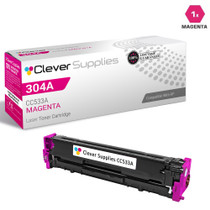
Compatible HP CP2025 (CC533A) Toner Cartridge Magenta
- Page Yield:
- Color: 2800
- Availability:
- In Stock
- Shipping:
- Calculated at Checkout

Amazon Price:

- Page Yield:
- Color: 2800
- Availability:
- In Stock
- Shipping:
- Calculated at Checkout
- Compatible Printers
- Color LaserJet CM2320fxi
- Color LaserJet CM2320n
- Color LaserJet CM2320nf
- Color LaserJet CP2025dn
- Color LaserJet CP2025n
- Color LaserJet CP2025x
- LaserJet CM2320fxi
- LaserJet CM2320n
- LaserJet CM2320nf
- LaserJet CP2025dn
- LaserJet CP2025n
- LaserJet CP2025xi>
- Color LaserJet CM2320
- Color LaserJet CM2320MFP
- Color LaserJet CP2020
- Color LaserJet CP2025
- Color LaserJet CP2026
- HP 304A
- Specifications
- SKU:
- CLS-HP-CP2025-M
- Printer Brand:
- Hewlett Packard
- OEM Number:
- CC533A
- Ink Color:
- Magenta
- Page Yield:
- Color: 2800
- Printer Type:
- Laser Cartridge
- Condition:
- New Compatible
- Description
- Reviews



Embark on a colorful printing journey with the HP 304A Color LaserJet Series, featuring a diverse selection of printers and multifunction devices to suit various needs. The Color LaserJet CM2320N and CM2320NF models offer multifunction capabilities, including printing, scanning, copying, and faxing, ideal for office environments. For enhanced functionality, consider the Color LaserJet CM2320FXI, which features advanced scanning and document management features. Experience vibrant color printing with the Color LaserJet CP2025DN and CP2025X models, which offer high-quality prints and efficient performance. The Color LaserJet CP2020 and CP2025N deliver reliable printing solutions, perfect for small businesses and workgroups. Explore the Color LaserJet CM2320MFP for versatile printing, scanning, and copying capabilities in one compact device. Maximize your printing potential with the CC530A Black, CC531A Cyan, CC533A Magenta, and CC532A Yellow toner cartridges, compatible with the HP 304A toner cartridge and toner cartridge options. These cartridges ensure consistent and reliable print quality for a variety of printing tasks. Whether it's documents, presentations, or marketing materials, the HP 304A Color LaserJet Series delivers professional results every time. Choose a printing solution that meets your business needs with the Color LaserJet CM2320, CP2025, and CP2020 models. With their advanced features, versatile capabilities, and compatibility with HP 304A toner cartridges, these printers are the perfect choice for businesses seeking high-quality color printing solutions.
Cross-reference: HP CC533A, the 304A magenta toner cartridge (2,800 pages), is the same cartridge Canon sells as Canon Cartridge 118 (black 2662B001AA, cyan 2661B001AA, yellow 2659B001AA, magenta 2660B001AA) for the Canon imageCLASS LBP7200Cdn, LBP7660Cdn, MF8350Cdn and MF8380Cdw printers. Canon rates Cartridge 118 black at 3,500 pages and each color at 2,800 pages (ISO/IEC standard).
Frequently Asked Questions
What is this CP2025 magenta listing selling, exactly?
One CC533A magenta cartridge from the 304A family — a single, sealed unit for the magenta slot. It is the listing you want when the printer's own report singles out magenta and the remaining colors still show healthy percentages.
Why do faces look jaundiced in our printed photos?
Because skin is built mostly from magenta and yellow. When magenta thins out, faces slide toward a greenish-yellow cast even though the photo file is fine. Confirm it on the printer's demo page: if the red and skin-tone blocks there are also off, the cartridge — not the camera — is responsible.
How many pages is it rated to print?
2,800 pages at standard coverage. Photo and brochure work will consume it more quickly than office documents; that is a property of the pages, not a shortfall in the cartridge.
Does the CP2025 spend this magenta on anything but print jobs?
No. It is a dedicated printer, with no copier or scanner sharing the supply, so magenta consumption maps one-to-one onto what the office actually prints. That makes a low reading easy to trust and easy to plan around.
Where does it fit, and which other machines use it?
It drops into the magenta position of the Color LaserJet CP2025, and the same CC533A is shared by the CP2020 series and the CM2320 MFP line. The slot accepts only the magenta cartridge, so a mix-up during install cannot happen.
What happens after I order it at $34.27?
It leaves from whichever of our Illinois, Pennsylvania, Georgia or California warehouses has it on the shelf, covered by a 1-year warranty and 1-year free returns. Support is reachable Monday through Friday, 9 AM to 5 PM CST; the fine print for the store's HP range sits on the shipping and returns page.
Faces still look off even with a fresh magenta fitted. What else could be responsible?
Check yellow before blaming the new cartridge. Skin tones are built mostly from magenta and yellow together, so a yellow slot that is also running dry will keep faces jaundiced after magenta has been restored. Read both percentages on the printer's status report: if the demo page's red block now prints true but faces stay greenish, the remaining gap is yellow, and the CC533A you just fitted was never the whole story.
We print a brochure batch next week. When should this cartridge go in?
Before the run, not during it. If the status report shows magenta running low, fit the fresh CC533A while the job is still a plan rather than a stack of paper. A mid-batch cartridge change is how the first fifty brochures end up warmer than the last fifty. Print one proof page from the batch, judge the skin tones and reds on it, and only then let the run go.
Our photos look flatter than the same files printed elsewhere. Is it the cartridge or the paper?
Test on a smoother, brighter sheet before blaming the cartridge. Photographic color sits on the surface of the page, and rough office stock mutes it no matter which magenta is installed — the same file can look rich on one paper and tired on another. If the page sharpens on better stock, the CC533A was never the problem; judge photo work on the paper you actually intend to ship.
What is the clean way to retire the old magenta cartridge?
Straight into the bag and box the new cartridge came out of, before it leaves the printer area. That contains any loose toner, and it also keeps a color-coded empty from being mistaken for a usable spare the next time someone raids the supply shelf. Set it with the office's collected used cartridges for disposal rather than back among the sealed stock, and the shelf stays honest.
About This CP2025 Magenta Cartridge
Of the three colors, magenta is the one a CP2025's owner tends to meet through people: a face in a brochure, a headshot in a proposal, a red logo that must match the one on the building. Those are unforgiving tests, and a half-empty magenta fails all of them quietly. This cartridge is the precise remedy — one slot, one swap, 2,800 rated pages of warm color restored — sized for a printer whose problem is specific, diagnosed and confined to a single cartridge.
It fits 6 printers in total: the Color LaserJet CM2320fxi, the Color LaserJet CM2320n, the Color LaserJet CM2320nf, the Color LaserJet CP2025dn, the Color LaserJet CP2025n and the Color LaserJet CP2025x. Companion listings cover the companion cartridges: the CC530A black cartridge, the CC531A cyan cartridge, the CC532A yellow cartridge and the 304A four-color set.
Related Items
Hewlett Packard
CS Compatible Replacement for HP CC533A Toner / HP 304A Toner Cartridge Magenta
/>



Hewlett Packard
Compatible HP CP2025 (CC530A CC531A CC532A CC533A) Toner Cartridge 5 Color Set


Hewlett Packard
Compatible HP CP2025 (CC531A CC532A CC533A) Toner Cartridge 3 Color Set


Hewlett Packard
Compatible HP CP2025 (CC531A) Toner Cartridge Cyan