





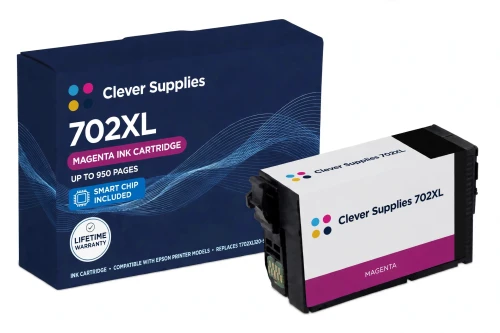
 See Compatible Printers
 Read more about our ink!
Epson
Compatible Epson 702XL T702XL320 Magenta Ink Cartridge
- Page Yield:
- Up to 950 pages (ISO/IEC 24711)
- Shipping:
- Calculated at Checkout

Amazon Price:

- Page Yield:
- Up to 950 pages (ISO/IEC 24711)
- Shipping:
- Calculated at Checkout
- Compatible Printers
- Specifications
- SKU:
- CS-EP-702-MXL
- Condition:
- New Compatible
- OEM Part #:
- T702XL320-S
- Color:
- Magenta
- Ink Type:
- Pigment
- Page Yield:
- Up to 950 pages (ISO/IEC 24711)
- Chip:
- Yes — chip included, new compatible chip; printer firmware updates can affect recognition
- Warranty:
- Lifetime Warranty
- Returns:
- 1-Year Free Returns
- Description
- Reviews
Most magenta cartridges are bought in a hurry, mid-job, with a chart or a photo waiting — so this page is built around the install moment. Our compatible T702XL320-S carries DURABrite Ultra pigment magenta rated up to 950 pages (ISO/IEC 24711). Open the pack only when you are ready, keep fingers off the chip contacts, press it into the magenta slot until it clicks, and let the printer charge before you send the waiting job.



One family rule matters more here than the mechanics: on the WF-3720 platform, printer firmware updates can affect recognition of compatible cartridges, and this cartridge's chip is included with that reality attached, not hidden from it. If the printer has just updated its firmware and questions a fresh cartridge, reseating and restarting is the first move — on Epson's own support page for this platform, that sequence is literally the opening FAQ. The siblings are T702XL120-S black (1,100 pages), T702XL220-S cyan and T702XL420-S yellow (950 pages each).
It fits the WorkForce Pro WF-3720, WF-3730 and WF-3733 only; the WF-4720 / WF-4730 / WF-4740 use 802 cartridges. Covered by our lifetime warranty, with free returns for the first year.
Shop the Epson 702 family: T702XL120 Black Ink Cartridge · T702XL220 Cyan Ink Cartridge · T702XL420 Yellow Ink Cartridge · Set of 4 BCMY Ink Cartridge · Set of 9 3 Black 2 Cyan 2 Magenta 2 Yellow Ink Cartridge
Browse by series: WorkForce
Frequently Asked Questions
What is the first thing to do if the printer questions this cartridge?
Reseat and restart. Power the printer off, lift the T702XL320-S out, check the chip contacts are clean and dry without wiping them hard, press it back until it clicks, and power on again. On this platform a recent firmware update is the usual background to a recognition message, and the reseat clears most false alarms.
How many pages should I expect?
Up to 950 pages at the ISO/IEC 24711 rating Epson publishes for this code. Colour coverage is the swing factor: a magenta-heavy chart or photo run will use it far faster than a text page with a small logo.
Is a chip included?
Yes. This cartridge carries a new compatible chip. If your printer's firmware has been updated, recognition issues can occasionally occur — that is this family's documented behaviour, stated here instead of in fine print. Install, confirm recognition, and keep automatic firmware updates paused until the cartridge is working.
Which printers take the T702XL320?
WorkForce Pro WF-3720, WF-3730 and WF-3733 — the three models Epson's own documentation lists for the 702 family. It fits no 802 printer, including the deceptively close WF-4730 and WF-4740.
Why did magenta run out when the other colours still show ink?
Slots empty at their own rates. Magenta carries the reds, skin tones and much of the warmth in charts and photos, so on graphics-heavy work it can lead the colours down. The printer draws a little from every cartridge in cleaning cycles too, which is why no two colours land on empty together.
What kind of ink is it?
DURABrite Ultra pigment ink, in all four colours of this family. Pigment magenta holds up against smudging, water splashes and fading on plain office paper in a way dye inks do not — the reason the WorkForce Pro line uses it.
Can I install this XL magenta beside standard-capacity cartridges?
Yes. Epson lists both the standard 702 tier (300 pages per colour) and this XL tier (950 per colour) for all three printers, and the tiers mix freely by slot. Our shelf stocks the XL tier; a standard cartridge already in the machine is no obstacle.
Is there a standard-capacity version of this cartridge on this shelf?
No. The 702 compatible ladder is XL-only, so the standard T702320-S is named on this page for matching against the cartridge you are removing, not sold here. What you are buying is the XL code, T702XL320-S.
How much ink is in it, in millilitres?
We leave the Volume field blank rather than guessing: no verified millilitre figure for this family exists in our official-source inventory. Judge the cartridge by the figure that is verified — up to 950 pages on the ISO pattern.
Is it a genuine Epson cartridge?
No — a Clever Supplies compatible built to the T702XL320-S specification, labelled compatible on the box and this page. It is not manufactured by Epson, and it is not presented as genuine anywhere on the packaging.
What does the lifetime warranty actually cover here?
Performance: a cartridge that will not print properly from new, leaks, or cannot clear a recognition warning after the reseat-and-restart steps is replaced under the lifetime warranty. Free returns apply within the first year.
Single, Set of 4, or Bulk Set of 9?
The single when magenta alone is spent — the common case. The Set of 4 when several slots are near empty together, and the Bulk Set of 9 (three blacks, two of each colour) when this printer is an office workhorse you would rather stock once than nurse along.
Related Items

Epson
Compatible Epson 702XL T702XL120 Black Ink Cartridge
This is the cartridge this family is bought for — and the one where we put the honest warning first, not last. Our compatible T702XL120-S holds DURABrite Ultra pigment black ink rated up to 1,100...

Epson
Compatible Epson 702XL T702XL420 Yellow Ink Cartridge
Yellow is the colour nobody notices until a print comes out wrong — greens go blue, skin tones go cold, and the culprit is an empty yellow slot. Our compatible T702XL420-S carries DURABrite Ultra...
Epson
Compatible Epson 702XL T702XL220 Cyan Ink Cartridge
Start with the number people get wrong about this cartridge: 950 pages, not 1,100. Our compatible T702XL220-S cyan carries DURABrite Ultra pigment ink rated up to 950 pages (ISO/IEC 24711). The...

Epson
Compatible Epson 702XL Set of 4 BCMY Ink Cartridge
A full reset in one box — and, on this shelf, a genuinely all-XL one. This set holds one each of T702XL120-S black, T702XL220-S cyan, T702XL320-S magenta and T702XL420-S yellow, all DURABrite Ultra...