






 See Compatible Printers
 Read more about our ink!
Epson
Compatible Epson 302XL Set of 5 Black Photo Black Cyan Magenta Yellow Ink Cartridge
- Page Yield:
- Black up to 550; Cyan, Magenta and Yellow up to 650 each (ISO/IEC 24711); Photo Black has no Epson-published ISO page yield
- Shipping:
- Calculated at Checkout

Amazon Price:

- Page Yield:
- Black up to 550; Cyan, Magenta and Yellow up to 650 each (ISO/IEC 24711); Photo Black has no Epson-published ISO page yield
- Shipping:
- Calculated at Checkout
- Compatible Printers
- Specifications
- SKU:
- CS-EP-302-SET5
- Condition:
- New Compatible
- OEM Part #:
- T302XL020-S / T302XL120-S / T302XL220-S / T302XL320-S / T302XL420-S
- Color:
- Black + Photo Black + Cyan + Magenta + Yellow
- Ink Type:
- Pigment (Black) + Dye (Photo Black, Cyan, Magenta, Yellow)
- Page Yield:
- Black up to 550; Cyan, Magenta and Yellow up to 650 each (ISO/IEC 24711); Photo Black has no Epson-published ISO page yield
- Chip:
- New compatible chip (each cartridge)
- Warranty:
- Lifetime Warranty
- Returns:
- 1-Year Free Returns
- Description
- Reviews
One box, the whole five-position reset: this set holds all five 302XL cartridges — T302XL020-S pigment black, T302XL120-S photo black, T302XL220-S cyan, T302XL320-S magenta and T302XL420-S yellow — every one of them high-capacity. It is the complete Claria Premium layout in a single purchase: the pigment black your documents print with, and the four dye cartridges your photos are built from. Buying the five singles separately costs more; the set is priced below their sum, the way the LD ladder builds it.


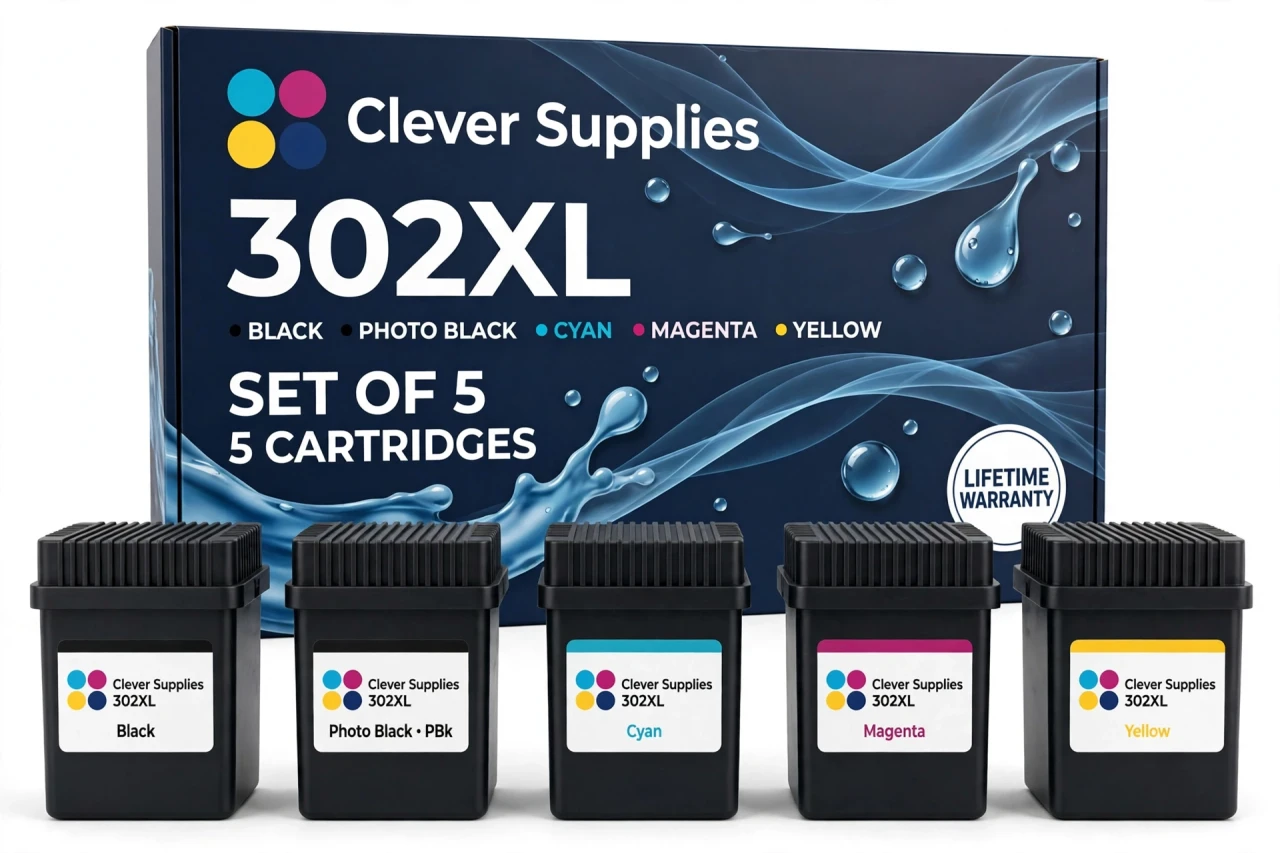
Yields, stated per cartridge and never added together: black up to 550 pages; cyan, magenta and yellow up to 650 pages each (ISO/IEC 24711); photo black is rated for photo printing — Epson publishes no ISO page yield for it, and we don't invent one. Each cartridge carries a new compatible chip, and the honest note applies to the whole set: this cartridge carries a new compatible chip. If your printer's firmware has been updated, recognition issues can occasionally occur — reseat and restart first if a warning appears.
The set serves the Expression Premium XP-6000 and XP-6100 — and no other model: not the older XP-600/XP-610 (273 family), and nothing in the 312 line. Every cartridge is covered individually by our lifetime warranty, with free returns for the first year.
Shop the Epson 302 family: T302XL020 Black Ink Cartridge · T302XL120 Photo Black Ink Cartridge · T302XL220 Cyan Ink Cartridge · T302XL320 Magenta Ink Cartridge · T302XL420 Yellow Ink Cartridge · Set of 11 3 Black 2 Photo Black 2 Cyan 2 Magenta 2 Yellow Ink Cartridge
Browse by series: Expression
Frequently Asked Questions
What exactly is in the Set of 5 box?
Five XL cartridges: 1 × T302XL020-S Black (pigment), 1 × T302XL120-S Photo Black, 1 × T302XL220-S Cyan, 1 × T302XL320-S Magenta and 1 × T302XL420-S Yellow. The same breakdown is printed on the front of the box.
Why does a complete set need two different blacks?
Because the printer has two black slots doing different work: pigment black (020) for documents and dye photo black (120) for photographs. Both belong in a complete reset of the printer.
How many pages does each position in the set print?
Per cartridge, never summed: the black up to 550 pages; cyan, magenta and yellow up to 650 each (ISO/IEC 24711). Photo black has no Epson-published page yield — it is consumed by photo coverage, not page count.
How does this set differ from Epson's own combo packs?
This set is XL in every position. Epson's own combo packs pair standard colors with a standard or XL black — and those are genuine-Epson packs, not this set.
Which printers is this set made for?
The Expression Premium XP-6000 and XP-6100. It does not fit the older XP-600 or XP-610 (273 family), and nothing here is 312 ink.
Is it cheaper than five singles?
Yes — the set is priced at $79.43 against $88.45 for the five XL singles bought separately, following the LD ladder's own set discount.
Some of my cartridges are still half full. Do I install the whole set now?
No need. Install only what you need and store the rest sealed and upright. A set on the shelf is a spare kit, not an obligation to swap everything today.
What about the chips in a set like this?
Each cartridge carries a new compatible chip. Should a firmware update trigger a recognition message, reseat whichever cartridge is flagged and restart the printer before you contact us; if the message persists, the lifetime warranty applies to that cartridge.
Pigment or dye — what is inside the set?
Both, by design: the black is Claria Premium pigment, while photo black, cyan, magenta and yellow are dye — Epson's layout for the family.
Is this a genuine Epson set?
No — it is the Clever Supplies compatible set, built to the five 302XL specifications and labeled compatible on the box and this page.
What if one cartridge in the set fails?
It is replaced on its own under the lifetime warranty. The rest of the set is unaffected and stays in your printer.
How do returns work on this set?
Returns are free within the first year, and every cartridge in the box carries the lifetime warranty.
What should I check when the Set of 5 arrives?
Match the box against the five codes before anything goes into the printer: T302XL020-S black, T302XL120-S photo black, T302XL220-S cyan, T302XL320-S magenta and T302XL420-S yellow. The two blacks deserve a second look — they occupy different slots and do different work, so they are not interchangeable despite the near-identical codes and similar packaging.
Does the order matter when I install several cartridges from the set?
No fixed order is required. Each slot reads its own cartridge, so swap the positions you are changing in whatever sequence suits you, seating each one firmly until it clicks. Judge the reset on the third or fourth page rather than the first — after several swaps the printer needs a few prints before output settles into its normal quality.
Related Items
Epson
Compatible Epson 302XL Set of 11 3 Black 2 Photo Black 2 Cyan 2 Magenta 2 Yellow Ink Cartridge
Eleven cartridges is a stocking decision, not a refill. This bulk box holds three T302XL020-S pigment blacks and two each of T302XL120-S photo black, T302XL220-S cyan, T302XL320-S magenta and...

Epson
Compatible Epson 302XL T302XL120 Photo Black Ink Cartridge
This black does not print your documents — it finishes your photographs. Our compatible T302XL120-S is the 302 family's dye photo black: where the pigment black (code 020) lays down dense, matte...
Epson
Compatible Epson 302XL T302XL220 Cyan Ink Cartridge
Cyan carries the cool half of everything these printers print — skies, water, and the blue-green range where home photos live. Our compatible T302XL220-S holds Claria Premium dye ink rated up to 650...

Epson
Compatible Epson 302XL T302XL020 Black Ink Cartridge
This is the document black — the only pigment cartridge in the 302 family. Our compatible T302XL020-S holds Claria Premium pigment black ink rated up to 550 pages (ISO/IEC 24711), more than double...