






 See Compatible Printers
 Read more about our ink!
Epson
Compatible Epson 279XL T279XL320 Magenta Ink Cartridge
- Page Yield:
- Up to 740 pages (ISO/IEC 24711)
- Shipping:
- Calculated at Checkout

Amazon Price:

- Page Yield:
- Up to 740 pages (ISO/IEC 24711)
- Shipping:
- Calculated at Checkout
- Compatible Printers
- Specifications
- SKU:
- CS-EP-279-MXL
- Condition:
- New Compatible
- OEM Part #:
- T279XL320-S
- Color:
- Magenta
- Ink Type:
- Dye
- Page Yield:
- Up to 740 pages (ISO/IEC 24711)
- Chip:
- New compatible chip (ink-level monitoring)
- Warranty:
- Lifetime Warranty
- Returns:
- 1-Year Free Returns
- Description
- Reviews
Magenta is where reds and pinks come from, and in photo work it is usually the color that empties second. Our compatible T279XL320-S holds Claria Photo HD dye ink rated up to 740 pages (ISO/IEC 24711) — more than double the standard T279320's 360 — working with its lighter partner, light magenta, to keep sunsets, flowers and skin tones free of visible steps.


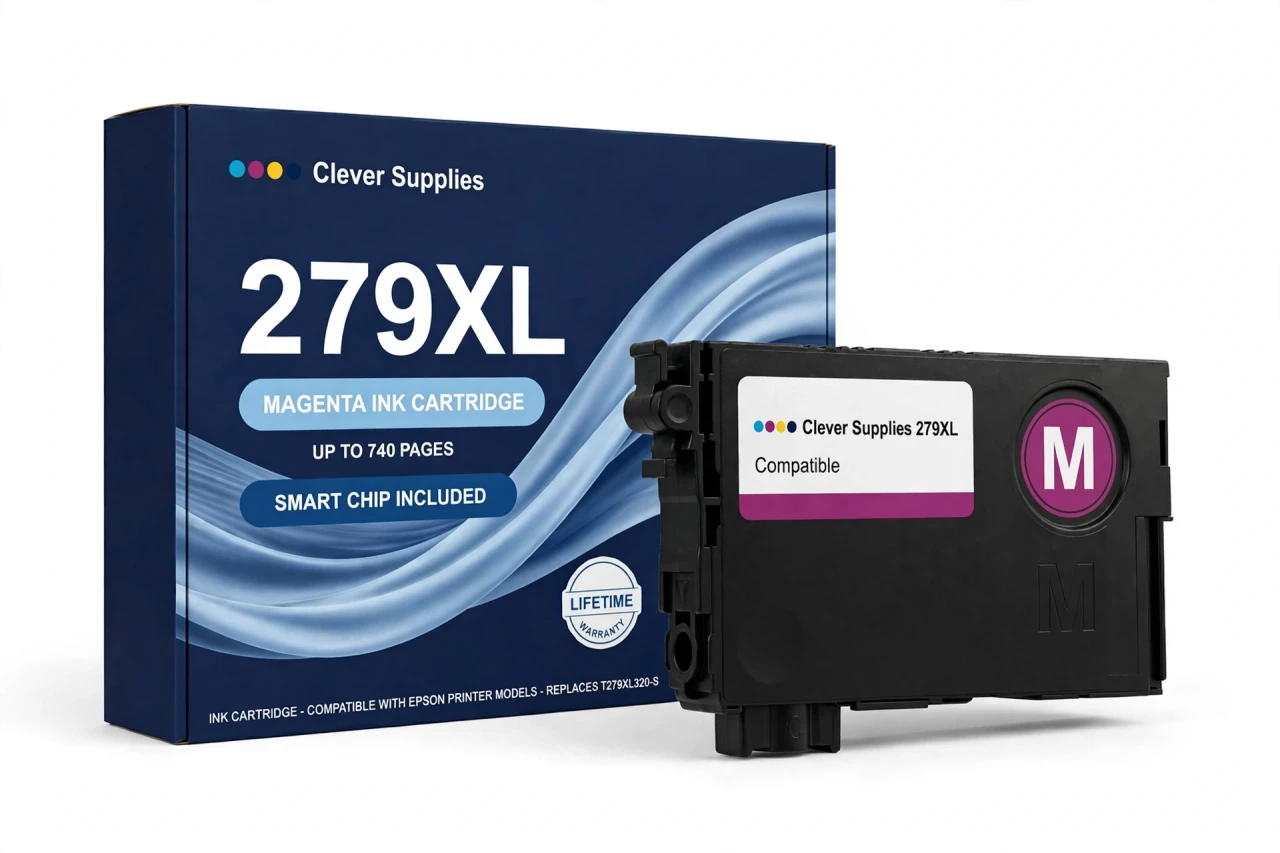
The cartridge carries a new compatible chip that reports ink levels to the printer. Stated plainly: this cartridge carries a new compatible chip. If your printer's firmware has been updated, recognition issues can occasionally occur — if the XP-980 ever questions the cartridge, reseat it firmly and restart the printer before assuming the cartridge is at fault. The rest of the family: T279XL120-S black (up to 500 pages), T279XL220-S cyan, T279XL420-S yellow, T279XL520-S light cyan and T279XL620-S light magenta, each color rated up to 740 pages.
It fits one printer only — the Expression Photo XP-980 — and no 277-family model: the XP-960 and its siblings take different cartridges. Covered by our lifetime warranty, with free returns for the first year.
Shop the Epson 279 family: T279XL120 Black Ink Cartridge · T279XL220 Cyan Ink Cartridge · T279XL420 Yellow Ink Cartridge · T279XL520 Light Cyan Ink Cartridge · T279XL620 Light Magenta Ink Cartridge · Set of 6 Black Cyan Magenta Yellow Light Cyan Light Magenta Ink Cartridge · Set of 13 3 Black 2 Cyan 2 Magenta 2 Yellow 2 Light Cyan 2 Light Magenta Ink Cartridge
Browse by series: Expression
Frequently Asked Questions
Which printers accept the T279XL320?
Only the Expression Photo XP-980. No other XP model takes 279 cartridges — the XP-960, XP-970, XP-950, XP-860 and XP-850 all run the 277 family instead.
Do I genuinely need magenta and light magenta installed at the same time?
Yes. The XP-980 provides a slot for each and expects both occupied. The T279XL320 magenta delivers the saturated reds and pinks; the T279XL620 light magenta handles the pale end of the range. They are distinct cartridges carrying distinct codes, and one cannot cover for the other.
How many pages does it print, and why do full-bleed photos change the answer?
Up to 740 pages on Epson's ISO/IEC 24711 rating for the genuine cartridge. The test pattern spreads ink evenly, though; borderless photos pull magenta down faster, while plain documents sip it far more slowly.
Is there a chip fitted to this cartridge?
There is — a new compatible chip that reports ink levels to the printer. Firmware updates can occasionally interfere with recognition; reseating the cartridge and restarting the printer usually clears the resulting false warning.
The screen says the magenta is not recognized. What is the first move?
Power down, remove the cartridge, wipe the chip contacts dry, then reseat it until it clicks and power back up. In most cases a firmware update just beforehand is the trigger; if the warning persists anyway, the lifetime warranty replaces the cartridge.
What ink will I be printing with?
Claria Photo HD dye ink, Epson's six-color dye-based photo line. The dye formulation runs through the entire 279 family, black included.
Is this listing the high-capacity magenta?
Yes — the XL tier, rated 740 pages against 360 for the standard T279320. Our range for this family is XL-only, with the tier printed on the box rather than hidden in fine print.
Can this XL magenta share a printer with standard-capacity cartridges?
It can. Each slot minds its own cartridge, so an XL magenta beside standard-capacity neighbors runs without issue. Our own range happens to be XL in every position, but the printer never demands a matched set.
How many millilitres of ink does it hold?
That figure is not published. Epson's US documentation gives no millilitre volume for the 279 family, so the Volume field stays blank instead of borrowing a reseller's number. The 740-page ISO yield is the verifiable figure.
Is the T279XL320 made by Epson?
No — it is a Clever Supplies compatible produced to the T279XL320-S specification, labeled compatible on the box and on this page. Epson did not manufacture it.
What does the lifetime warranty cover on this cartridge?
Leaks, poor print quality from new, and a cartridge that stays unrecognized after troubleshooting are all replaced under the lifetime warranty, with free returns during the first year.
Only magenta is low. Which option should I pick?
The single cartridge. When several colors are approaching empty together, the Set of 6 (all XL) or the bulk Set of 13 brings the cost per cartridge down — both linked from this page.
Related Items
Epson
Compatible Epson 279XL T279XL620 Light Magenta Ink Cartridge
If light cyan keeps skies smooth, light magenta does the same for faces. Our compatible T279XL620-S holds Claria Photo HD dye ink rated up to 740 pages (ISO/IEC 24711) — more than double the standard...


Epson
Compatible Epson 279XL T279XL120 Black Ink Cartridge
One black does both jobs in this printer. Our compatible T279XL120-S is the only black the XP-980 takes — there is no separate photo black in the 279 family — and it carries Claria Photo HD dye black...

Epson
Compatible Epson 279XL T279XL420 Yellow Ink Cartridge
Yellow rarely gets the credit, but it underlies almost every warm tone the XP-980 prints — sunlight, wood, and most of what makes skin look alive. Our compatible T279XL420-S holds Claria Photo HD dye...

Epson
Compatible Epson 279XL T279XL220 Cyan Ink Cartridge
Cyan is half the sky in every landscape you print. Our compatible T279XL220-S holds Claria Photo HD dye ink rated up to 740 pages (ISO/IEC 24711) — more than double the standard T279220's 360 — and...