




ImageRunner 1022I
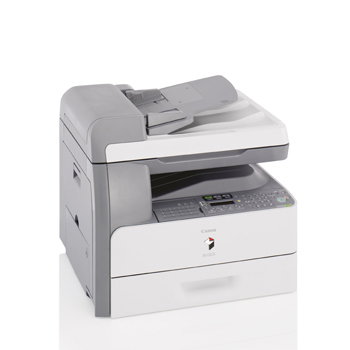
With the i suffix comes networking as standard. The Canon imageRUNNER 1022i is the connected 22-ppm member of the family — a 230-volt chassis with automatic duplexing and print, copy and scan, plus Ethernet-ready operation for shared office use. There is no fax board here; that is the iF's job. It feeds on the Canon GPR-22 cartridge, which delivers up to 8,400 pages, and a second supply item — a separate drum unit — handles the imaging on its own renewal interval.
A networked copier belongs to everyone, and its toner bill shows it: jobs arrive from every desk, walk-up copies pile on top, and nobody feels personally responsible for the cartridge gauge. That is the 1022i's natural habitat — the shared workgroup machine in the corridor. The compensation is visibility: a connected machine reports its status to the network, so whoever orders supplies can see a low cartridge coming instead of discovering it mid-queue.
Toner Cartridges for ImageRunner 1022I
| Cartridge | Color | Page Yield |
|---|---|---|
| Canon GPR-22 Toner Cartridges — 3 Pack | Black | 8,400 pages per cartridge |
| Canon GPR-22 Toner Cartridges — 5 Pack | Black | 8,400 pages per cartridge |
| Canon GPR-22 Toner Cartridge | Black | 8,400 pages |
| Canon GPR-22 Premium Quality Toner Cartridges — 5 Pack | Black | 8,400 pages per cartridge |
Second supply item: the Canon GPR-22 Drum Unit handles imaging inside the 1022i and is renewed on its own interval, independent of toner changes.
Which cartridge should you buy?
Shared machines deserve standing orders. A single GPR-22 cartridge (8,400 pages) disappears quickly when a whole team prints through one device, so the 3-pack or 5-pack is the practical default — lower cost per cartridge and a spare that is already in the building when the low-toner warning appears. Assign the reorder to one person; shared printers run dry precisely because everyone assumes someone else ordered. The drum stays a separate, occasional line item. Compatible cartridges here carry a 1-year warranty and 1-year returns.
Chip, toner and everyday use
On a networked machine, good cartridge habits are shared habits: whoever swaps the toner should seat it firmly until the chip registers, and leave the empty by the machine so the next order gets placed. Yields are quoted around 5% coverage, and a corridor copier's mix — spreadsheets one hour, dense handouts the next — will swing real life above and below the rating. If several users report streaks while toner remains, stop changing cartridges: that is the drum's signature, and it keeps its own count.
Frequently Asked Questions
What does the i in imageRUNNER 1022i add?
Networking as standard equipment. Where the base models treat Ethernet as an optional adapter, the 1022i is built for shared, network-ready operation from the start.
Does the imageRUNNER 1022i have fax?
No. Fax belongs to the iF variant in this family. The 1022i covers print, copy and scan with automatic duplexing, and takes the same GPR-22 cartridge as its fax-equipped sibling.
Which toner does the 1022i use?
The Canon GPR-22, rated for up to 8,400 pages. On a shared machine that figure goes quickly, which is why this page leads with multi-pack options alongside the single cartridge.
Is the drum a separate purchase on the 1022i?
Yes — the GPR-22 drum unit is its own component with its own interval. Replace it when image quality drops despite adequate toner, not on the toner's schedule.
More printers that use the same cartridges
The networked variant shares its appetite with the entire 1018–1025 clan; every model on the same cartridge is: ImageRunner 1025N, ImageRunner 1025IF, ImageRunner 1025, ImageRunner 1024IF, ImageRunner 1024I, ImageRunner 1024F, ImageRunner 1024A, ImageRunner 1024, ImageRunner 1023N, ImageRunner 1023IF, ImageRunner 1023, ImageRunner 1022IF, ImageRunner 1022F, ImageRunner 1022A, ImageRunner 1022, ImageRunner 1019, ImageRunner 1018J, ImageRunner 1018.