




What Toner Does the Brother MFC-EX575 Use?
Posted by Clever Supplies on Nov 14th 2026
Quick Answer: The Brother MFC-EX575 uses the TN635 family — TN635 standard yield (about 3,000 pages black / 1,800 per color), TN635XL high yield (5,500 / 4,500), or TN635XXL super high yield (7,500 / 6,500) — and it is also one of the few models that accepts Brother's TN637 ultra high-yield cartridges (10,000 pages in black and every color). It does not use TN810 cartridges. Its drum is the DR635CL, rated at about 30,000 pages.
First, a Correction Worth Making Loudly
The MFC-EX575 carries a Workhorse badge and an enterprise feature set, so catalogues and fleet lists routinely file it beside Brother's TN810-platform machines. It is not one of them. Put a TN810 cartridge in front of this all-in-one and nothing about it fits the supply system: the EX575's slots, chips and counters are built around the TN635 family, the same cartridges as the HL-L8430CDW and MFC-L8970CDW line. If a spreadsheet, a predecessor's order history or a marketplace listing pairs this model with TN810, that record is wrong, and ordering from it wastes a delivery cycle.
What the machine actually is: a 33-page-per-minute business color all-in-one (print, copy, scan, fax) for busy work teams, with a 7-inch color touchscreen holding up to 64 shortcuts, an integrated NFC card reader, and fleet device-management tools.
The Unusual Box: It Starts at the Top of the Ladder
Most printers ship with their smallest cartridges and let the owner discover the bigger tiers later. The MFC-EX575 inverts that. Its included cartridges are rated 7,500 pages black and 6,500 per color — exactly the TN635XXL super high-yield ratings — so the machine arrives already running its third tier. A work team can print for months before the first supply conversation, and when that conversation comes, the honest framing is that replacement XXL cartridges merely continue the pace the box set, while the standard and XL tiers below are step-downs in pages per cartridge.
Above even the XXL sits the family's fourth rung: the TN637 ultra high-yield series at 10,000 pages for black and every color alike, which Brother restricts to this model, the HL-L8570CDW and the MFC-L8970CDW. We do not currently sell a compatible TN637 — it is a genuine-only purchase today — so the tiers priced and linked below are the three TN635 sizes our shelf actually carries.
Yields and Prices for the Tiers We Sell
| Cartridge | Yield | Our compatible price* | Cost per page |
|---|---|---|---|
| TN635BK (black) | ~3,000 pages | $50.80 | ≈1.7¢ |
| TN635C / M (each) | ~1,800 pages | $50.80 | ≈2.8¢ |
| TN635Y | ~1,800 pages | $47.34 | ≈2.6¢ |
| TN635XLBK (black) | ~5,500 pages | $53.30 | ≈1.0¢ |
| TN635XLC / M (each) | ~4,500 pages | $53.30 | ≈1.2¢ |
| TN635XLY | ~4,500 pages | $46.48 | ≈1.0¢ |
| TN635XXLBK (black) | ~7,500 pages | $76.47 | ≈1.0¢ |
| TN635XXLC / M / Y (each) | ~6,500 pages | $76.47 | ≈1.2¢ |
*Prices checked on our product pages on November 2, 2026; they can change. Yields are Brother's ratings.
Read the black column closely: XL and XXL land at the same cost per page (about a cent), so the XXL is not a savings play — it is an interval play, 2,000 more pages between swaps at the same running cost. The colors tell the same story at about 1.2 cents either way. The standard tier, at nearly triple the black cost per page, exists for low-volume duty and catalogue matching, not for a Workhorse badge machine in daily use. Standardize on XXL if the team prints steadily — it also matches the cartridges the machine shipped with — and keep the TN637 in mind only if a genuine-cartridge budget and a 10,000-page color interval justify each other.
Every Cartridge, Color by Color
- Black: TN635BK · TN635XLBK · TN635XXLBK
- Cyan: TN635C · TN635XLC · TN635XXLC
- Magenta: TN635M · TN635XLM · TN635XXLM
- Yellow: TN635Y · TN635XLY · TN635XXLY
Scanning Speed, Paper, and Why Neither Changes the Toner Math
The feeder is this model's second engine: 80 pages in the auto document feeder, two-sided scanning at up to 104 images per minute, a legal-size document glass for originals that cannot go through the feeder, and scan-to destinations — cloud services, email, SharePoint, SFTP — chosen from the touchscreen, with searchable, editable Office files produced on the way. Paper starts at 300 sheets (250-sheet tray plus 50-sheet multipurpose tray) and expands to 1,340 sheets with optional trays.
None of that scanning consumes toner; only printed and copied pages do. For a digitization-heavy team, cartridge life tracks the print queue, not the machine's hours.
Replacing a Cartridge
1. Leave the power on and open the front cover. 2. Slide out the drum unit assembly; each toner sits in its own color-coded slot. 3. Press the green lock lever, lift the depleted cartridge out, and set it aside. 4. Rock the new cartridge gently side to side, remove the protective cover, and press it into the matching slot until the lever clicks. 5. Slide the assembly home and close the cover; confirm the new level on the 7-inch display.
Ordering the Set — or Not
There is a set price to lead with here after all: the TN635XL four-color set is $158.14, a $48.24 saving over the $206.38 its cartridges total as singles, and standard and XXL four-packs hang beside it. For this machine, though, treat the bundle as a sometimes tool. A scan-first, print-second office rarely empties four cartridges together, so per-color restocking in the tier you have standardized on remains the everyday pattern. Reach for the set when a print-heavy stretch has run several gauges into the red at once; keep one spare black in your chosen tier on the shelf either way, since black leads on almost every duty pattern.
Drum, Belt and Waste Box
The four cartridges ride in a single DR635CL drum unit rated at about 30,000 pages. Further back sit the BU635CL belt unit and the WT229CL waste toner box, each rated at about 50,000 pages. We do not currently stock compatible versions of any of the three, so they are given here without links, for planning only; the touchscreen counts each one down and warns in good time, and each is a genuine-part purchase when due.
Frequently Asked Questions
A listing sold me TN810 cartridges for this model. Will they work? No. The MFC-EX575 is a TN635-family machine (TN635 / TN635XL / TN635XXL, plus TN637). TN810 belongs to a different Brother platform — return the cartridges rather than forcing the issue.
Does the MFC-EX575 really accept the TN637? Yes. Brother lists the TN637 ultra high-yield series (10,000 pages black and color) for this model, the HL-L8570CDW and the MFC-L8970CDW only. Our store sells no compatible TN637 today, so that tier is genuine-only.
Why are my first cartridges lasting so much longer than the standard rating? Because the box contains super high-yield cartridges rated 7,500 pages black and 6,500 per color — not the 3,000 / 1,800 standard tier. Judge replacements against the XXL row of the table.
XL or XXL — which should a busy team standardize on? At our current prices they cost the same per page, so choose by interval: XXL for fewer swaps and continuity with the in-box set, XL if cartridge spend per order matters more than swap frequency.
What is the legal-size glass for if the feeder scans at 104 ipm? Bound, fragile and oversized originals — contracts in folders, ledger pages, book spreads — that a feeder cannot take. Scanning them still uses no toner.
 brother tn635xl tn635xlbk tn635xlc tn635xly tn635xlm toner c
 brother tn635 tn635bk toner cartridge black
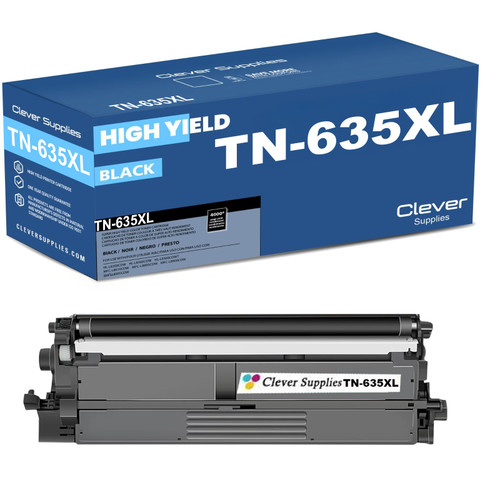 brother tn635xl tn635xlbk toner cartridge black
 brother tn635xxl tn635xxlbk toner cartridge black
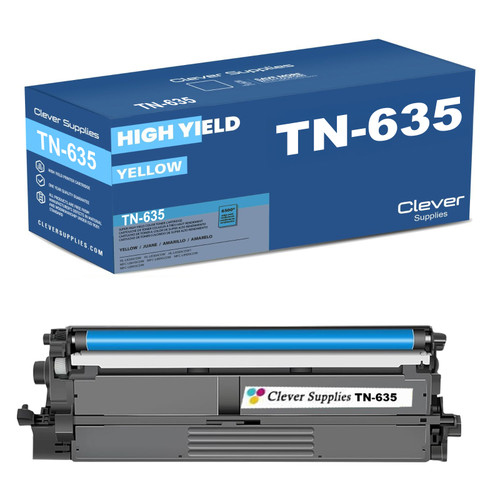 brother tn635 tn635c toner cartridge cyan
Key takeaways
- The top cartridge here is rated at 7,500 pages — fewer swaps between changes.
- Lowest cost per page in this family: ~1¢ with the TN635XL black.
- Toner and drum are separate parts on this printer — replace only the one the printer asks for.
Other Printers That Use TN635
The same three tiers (with the TN637 restriction noted above) serve the HL-L8430CDW, HL-L8430CDWT, HL-L8570CDW, MFC-L8730CDW, MFC-L8930CDW and MFC-L8970CDW. Cartridges move freely among all seven models; TN637 ultra high-yield cartridges, however, work only in this MFC-EX575, the HL-L8570CDW and the MFC-L8970CDW.
Everything for this machine is gathered on our MFC-EX575 toner page.