




WorkCentre 4250XM
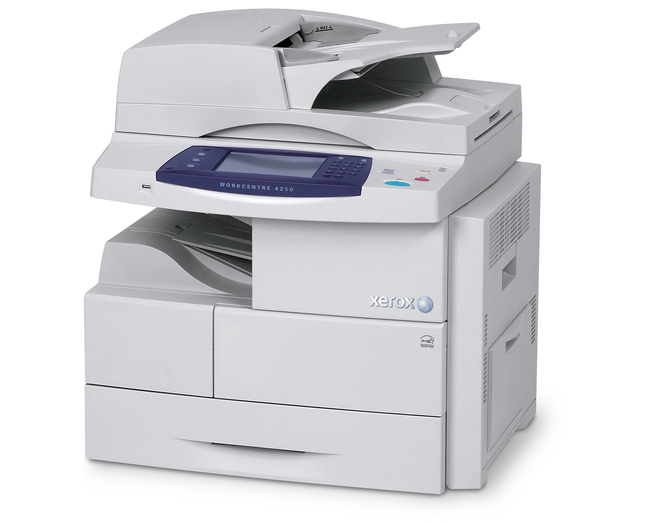
Take the proven WorkCentre 4250 monochrome laser multifunction design, set it up in its 4250XM configuration, and the supply story stays refreshingly simple: one black cartridge, the 106R01409, rated at about 25,000 pages. Long stretches between cartridge changes are the point of this machine, and every listing below — singles through five-packs — is built around that same cartridge.
A shared multifunction earns trust by being ready when someone walks up to it. With roughly 25,000 pages between changes, the toner warning is a rare visitor on the 4250XM, and the office routine barely notices supply day. Staff who also use the WorkCentre 4250XFM or the WorkCentre 4260S elsewhere in the building will find the identical cartridge waiting inside those machines too.
Toner Cartridges for WorkCentre 4250XM
| Cartridge | Color | Page Yield |
|---|---|---|
| 106R01409 — standard single cartridge | Black | About 25,000 pages |
| 106R01409 — WorkCentre 4250XM single cartridge | Black | About 25,000 pages |
| 106R01409 — 3 Pack | Black | About 25,000 pages per cartridge |
| 106R01409 — 5 Pack | Black | About 25,000 pages per cartridge |
| 106R01409 — Premium Quality 5 Pack | Black | About 25,000 pages per cartridge |
| 106R01409 — WorkCentre 4250XM 5 Pack | Black | About 25,000 pages per cartridge |
Which cartridge should you buy?
Because a single cartridge lasts so long, pack size is about ordering rhythm rather than urgency. If the 4250XM is a backup or overflow unit, a single 106R01409 at a time is honestly enough. Where it carries a department's daily load, the 5 Pack — or the Premium Quality 5 Pack — turns toner into a once-in-a-while purchase, and the 3 Pack splits the difference. Judge by cartridges per quarter: if the machine empties one in under three months, buy in multiples and keep the changeover a two-minute job instead of a delivery wait.
Chip, toner and everyday use
A new cartridge announces itself through its chip; the machine reads it on installation and updates its toner gauge. Seat the cartridge until it clicks — a half-seated cartridge is the usual reason a fresh one shows as unrecognized, and reseating fixes it. Do not shake a new cartridge hard; a slow rock from side to side is enough to level the toner. Store the spare sealed and flat, away from radiators and sunny windowsills. When pages eventually fade toward the end of a cartridge's life, that same gentle rock redistributes the last of the toner and normally carries you to the end of the job in hand.
Frequently Asked Questions
How many pages will one cartridge give the 4250XM?
Approximately 25,000 pages at 5% coverage. Heavy coverage shortens that figure in practice, but for ordinary office text the rating is a fair planning guide.
What toner does the WorkCentre 4250XM use?
The Xerox 106R01409 black toner cartridge. There is no second supply for this model on this page — printing, copying, scanning output and faxing all draw on the same cartridge.
Does one cartridge really cover copying as well as printing?
Yes. A multifunction makes its copies with the same toner it prints with, so copies consume the 106R01409 exactly as printed pages do. Budget copy volume into your page counts.
The toner warning appeared in the middle of a run. What now?
Take the cartridge out, rock it gently side to side, and refit it — that usually releases enough toner to finish the job cleanly. Then treat the warning as real and get a replacement on order.
More printers that use the same cartridges
The same 106R01409 cartridge also serves these WorkCentre models: WorkCentre 4250, WorkCentre 4250CM, WorkCentre 4250S, WorkCentre 4250SM, WorkCentre 4250X, WorkCentre 4250XF, WorkCentre 4250XFM, WorkCentre 4250c, WorkCentre 4260, WorkCentre 4260 mfp, WorkCentre 4260S, WorkCentre 4260SM, WorkCentre 4260X, WorkCentre 4260XF, WorkCentre 4260XM.