




SCX-4824FN
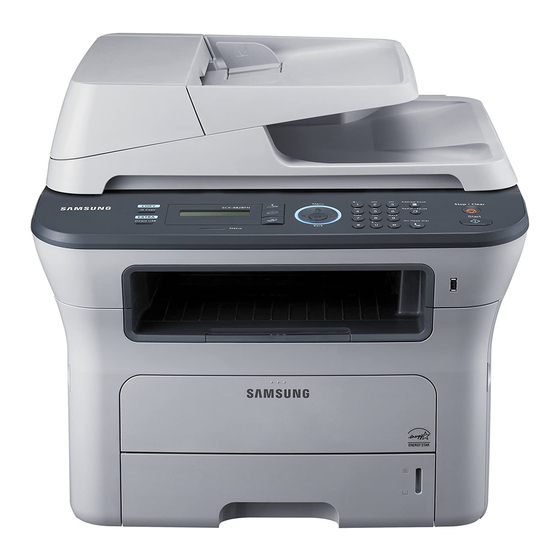
The Samsung SCX-4824FN packs a complete office into a footprint small enough for a desk corner: monochrome printing, scanning, copying and faxing, with a network connection so the whole room can share it. Its toner comes in two sizes that fit the same slot, the standard-yield MLT-D209S and the higher-capacity MLT-D209L. The listings below concentrate on the high-yield cartridge, sold singly, in multi-packs, and under the printer's own name.
Compact multifunctions earn their keep in offices where floor space is the scarcest resource of all. Rather than spreading a printer, a scanner and a fax across three surfaces, the SCX-4824FN stacks those jobs into one box that a small team can gather around. That consolidation also simplifies supplies: one cartridge code, in two yields, covers every page the machine produces, whether it arrived as a print job, a copy or an incoming fax.
Toner Cartridges for SCX-4824FN
| Cartridge | Color | Page Yield |
|---|---|---|
| MLT-D209L high-yield cartridge, single | Black | See product page |
| MLT-D209L high-yield cartridges, 3 pack | Black | See product page |
| MLT-D209L Premium high-yield cartridges, 5 pack | Black | See product page |
| SCX-4824FN high-yield cartridge, single (model-named listing) | Black | See product page |
| SCX-4824FN high-yield cartridges, 5 pack (model-named listing) | Black | See product page |
Which cartridge should you buy?
The two yields interchange freely: pull out an MLT-D209S, slide in an MLT-D209L, and the printer carries on with no settings to change. A sensible path for a new owner is to run the standard cartridge first and watch how long it lasts in your real workload, then decide. Once the pattern is clear, most shared machines settle on the high-yield cartridge because it stretches the interval between orders and lowers the cost of each printed page. If your volume is steady and predictable, the 3 pack or Premium 5 pack removes reordering from your routine almost entirely. Compatible cartridges here carry a 1-year warranty and 1-year returns.
Chip, toner and everyday use
Toner keeps well, but it is not immortal, so stock with a rotation in mind. Write the purchase date on each box with a marker and always install the oldest cartridge first; buying roughly what you will use within a year or two keeps print quality consistent. Store spares sealed, flat and away from heat. If toner ever spills during a swap, never reach for a household vacuum, since fine particles pass through ordinary filters and can damage the motor. A slightly damp cloth or a toner-rated vacuum is the safe cleanup, and shaking a cartridge gently and level over a bin prevents most spills in the first place.
Frequently Asked Questions
Can I switch between the MLT-D209S and MLT-D209L whenever I like?
Yes. Both cartridges fit the same slot and the SCX-4824FN accepts either without any configuration change. Plenty of owners start on the standard yield to learn their consumption, then move to the high-yield cartridge once the rhythm is obvious. The machine reports levels for whichever cartridge is installed.
How many spare cartridges should a small office keep?
One sealed spare is enough for most small teams, with a second if the machine handles time-sensitive work like contracts or shipping labels. Date each box when it arrives and rotate first-in, first-out. Toner does not spoil quickly, but very old stock can develop defects, so buying a mountain of cartridges on a price dip usually backfires.
What should I do if toner spills while I am changing the cartridge?
Keep the cartridge level, set it on paper, and wipe loose powder with a damp cloth. Avoid a standard vacuum cleaner, because toner particles are fine enough to slip through its filter and reach the motor. Cold water removes toner from skin and most fabrics; hot water can set it. Slow, level handling during the next swap will prevent a repeat.
Will a compatible cartridge void my printer's warranty?
Generally no. Warranty rules normally prevent a manufacturer from voiding coverage on the SCX-4824FN simply because a third-party cartridge was installed; the exception is damage that the cartridge itself caused, which the maker may decline to cover. Keep your purchase records and the cartridge packaging until you have printed a test page, and you will be well documented either way.
More printers that use the same cartridges
The MLT-D209 family feeds several Samsung machines beyond this one, including the printers listed here. SCX-4824, SCX-4826, SCX-4826FN, SCX-4826FN MFP, SCX-4828, SCX-4828FN, Samsung-MLTD209, ML-2855, ML-2855ND, SCX-2826FN.