




CLX-6200
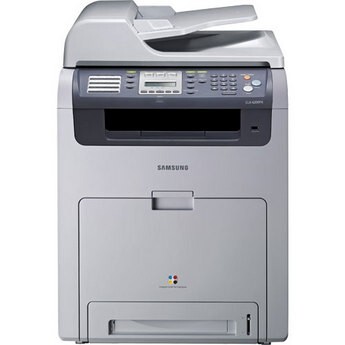
As a color laser multifunction printer, the Samsung CLX-6200 represented the CLP/CLX line in the late 2000s, and it earned its keep in small workgroups that needed dependable color output without a departmental price tag. The CLP-K660 cartridge set powers it, in two tiers: a standard tier whose codes end in A, such as the CLP-K660A black, and the higher-yield B tier — and the B tier is what this page stocks. Black is the CLP-K660B, joined by the CLP-C660B cyan, CLP-M660B magenta and CLP-Y660B yellow high-yield cartridges. All four also come in one box as the CLP-660B High Yield 4 Color Set.
A workgroup machine justifies high-yield toner in a way a personal printer cannot. When five or ten people share one output tray, cartridges are a recurring line item, and every changeover is a small interruption in somebody's day. The B cartridges exist for that arithmetic: same slots, same codes apart from the final letter, more pages between swaps. The CLX-6200 shares its engine and toner system with the rest of its generation, so the shelf you stock for it is a shelf the whole family can use.
Toner Cartridges for CLX-6200
| Cartridge | Color / Type | Page Yield |
|---|---|---|
| CLP-K660B High Yield | Black, high yield | See product page |
| CLP-C660B High Yield | Cyan, high yield | See product page |
| CLP-M660B High Yield | Magenta, high yield | See product page |
| CLP-Y660B High Yield | Yellow, high yield | See product page |
| CLP-660B High Yield 4 Color Set | All four colors, high yield | See product page |
Which cartridge should you buy?
Everything on this page is the high-yield B build, so the decision is about packaging, not capacity. Buy singles when one color is low — on a shared machine that is usually how it happens, with black cycling fastest. Buy the four-color set when the printer is new to your office, when several cartridges are aging together, or when you want a complete spare set in the cabinet so a change never waits on a delivery. If your CLX-6200 still holds A-tier cartridges, the B versions fit the same slots color for color; you can move up a tier one cartridge at a time as each slot empties.
Chip, toner and everyday use
Agree among yourselves who changes the cartridges — most workgroup toner mishaps are really seating mishaps, where a cartridge is pushed in almost all the way and the machine complains. Each cartridge's chip reports its level, and at group volumes the estimate deserves respect: heavy coverage spends toner faster than the gauge's standard assumption, so order when the warning first appears rather than when pages fade. Keep one full spare set in reserve for the month-end run, store it sealed in a cool and dry cabinet, and the CLX-6200 will not be the reason a deadline slips.
Frequently Asked Questions
What is the difference between the CLP-K660A and the CLP-K660B?
The final letter is the yield tier. The A codes are the standard cartridges Samsung launched the family with; the B codes are the higher-yield option. This page lists the B line, which fits the same slots and suits a shared machine's volume.
Can I mix A and B cartridges in the same machine?
Yes — the printer's cartridge list covers both tiers. Keep each color matched to its own code letter, so cyan stays a C code and magenta an M code, and you can run a B black beside A colors or the other way around while you transition.
One color has emptied — do I have to buy the whole set?
No. Each of the four cartridges is replaced on its own. The set is there for full refreshes and for keeping a complete spare on the shelf, not because the machine demands all four at once.
Why does this page only list B cartridges?
Because Clever Supplies stocks the high-yield tier for this family here. For a workgroup printer, the longer interval between changes is the point; the table above is the complete B shelf for the CLX-6200.
More printers that use the same cartridges
The same cartridge family serves these Samsung models: CLP-610, CLP-610ND, CLP-660, CLP-660N, CLP-660ND, CLX-6200FX, CLX-6200ND, CLX-6210, CLX-6210FX, CLX-6240, CLX-6240FX, Samsung-CLP660.