





 See Compatible Printers
 Read more about our ink!
Samsung
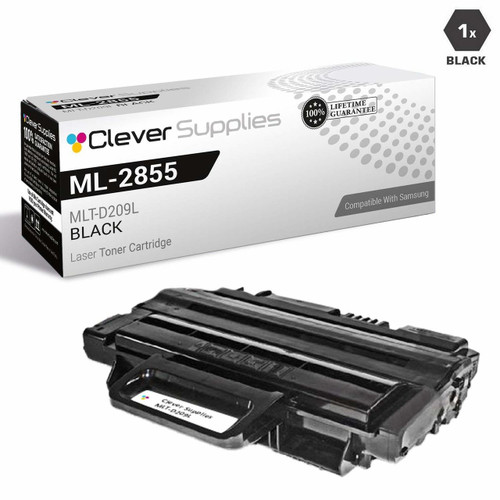
Compatible Samsung SCX-4826FN MFP High Yield Laser Toner Cartridge Black

Amazon Price:

- Page Yield:
- 5,000 Pages
- Availability:
- In Stock
- Shipping:
- Calculated at Checkout
- Compatible Printers
- Specifications
- SKU:
- SCX-4826FN-MFP
- Printer Brand:
- Samsung
- OEM Number:
- MLT-D209L
- Ink Color:
- High Yield Black
- Page Yield:
- 5,000 Pages
- Printer Type:
- Laser Cartridge
- Condition:
- New Compatible
- Description
- Yields up to 5000 pages
- Ink/Toner Color: Black
- Ink/Toner Pack Size: 1/Pack
- Cartridge Yield Type: High Yield
- Ink/Toner Cartridge Type: Compatible
- Compatible with: Samsung ML 2855 ML 2855ND SCX 4824 SCX 4824FN SCX 4826 SCX 4828 SCX 4826FN SCX 4828FN and SCX 2826FN laser printers
- Warranty: 1 year for — all supplies
- Reviews

/> 

Compatible Samsung SCX-4826FN MFP High Yield Laser Toner Cartridge Black is easy to install delivers great print quality and professional results for both text and images
Samsung Black toner cartridge is designed specifically to work with Samsung printers for exceptional reliability and performance. Cartridge offers vibrant print quality and features a 5000-pages standard yield for long-lasting use.
Features:
Frequently Asked Questions
The SCX-4826FN prints, copies, faxes and scans — which of those jobs actually spend this cartridge?
Three of the four. Printing spends it, copying spends it — a copy is simply a page the machine prints for itself — and received faxes spend it, because they come out on paper. Scanning spends nothing: the lamp reads the page and no toner is laid down, so a day of scanning alone leaves the MLT-D209L exactly where it started.
How many of those mixed jobs does one cartridge cover?
The rating is 5,000 pages at standard office coverage, and it is the total across every job type that counts, not 5,000 of each. A front desk that copies forms all morning and prints in the afternoon should budget against that combined figure — the machine does not keep separate tallies, and neither should you.
This listing says MFP — is the cartridge any different from the ordinary SCX-4826FN one?
No. MFP is in the name because the machine is a multifunction, not because the cartridge changes. It is the same MLT-D209L high-yield unit at the same $37.58, built as one combined cartridge that swaps in a single step whichever job emptied it.
Which other machines take this same cartridge?
The MLT-D209L fits a small family beyond this one: the ML-2855ND printer and the SCX-4824FN sit alongside the SCX-4826FN on the compatibility list. Offices running more than one of these can hold a single cartridge type as the shared spare.
Can I keep copying when the toner warning appears?
Usually, yes, for a while. The warning is an estimate, and pages keep printing until the toner genuinely thins out — faded, washed copies are the real signal. The one thing not to do is keep copying important documents on a dying cartridge; reprinting a bad batch wastes more than the cartridge you were trying to stretch.
What protection do I get buying a compatible instead of the Samsung cartridge?
A one-year warranty and free returns across the same twelve months, set out on our shipping & returns page. If the cartridge misbehaves — leaks, streaks or quits early — it goes back without a postage bill and without an argument about whose fault it was.
How can I tell the cartridge is ending, whichever job emptied it?
The signs are the same across print, copy and fax work: output fades evenly, grays replace blacks, and one side of the page often pales first. A gentle side-to-side rock of the MLT-D209L redistributes what toner remains and can restore acceptable pages for a short run — long enough to finish urgent work and fit the replacement calmly, not a way to stretch the cartridge indefinitely.
Is keeping one spare enough for a machine that does four jobs?
For most front desks, yes — one sealed MLT-D209L beside the SCX-4826FN covers the gap between a cartridge fading and a delivery arriving, because the swap itself takes minutes. The case for a second spare is an office that cannot tolerate any pause at all; the case against is shelf space. What matters is that the spare exists before the warning appears, not after.
How do two-sided copies and prints count against the 5,000 pages?
Two sides, two pages. The rating counts every face the machine prints, so a duplexed ten-page document spends ten pages of cartridge life on five sheets, while ten received fax pages spend the same ten on ten sheets. Planning by the machine's page counter keeps the arithmetic honest across the SCX-4826FN's mixed workload; planning by paper use understates duplex consumption by half.
What should happen to the empty unit after the swap?
It goes into the new cartridge's packaging, sealed against loose toner, and then to a cartridge recycling collection rather than office waste. Keep it for a day or two if space allows: with a multifunction, a fault that appears after a cartridge change is most quickly traced by refitting the old MLT-D209L for one test page — if the fault vanishes, the cartridge was the story; if not, the machine is.
About This Cartridge for the Samsung SCX-4826FN MFP
A single MLT-D209L high-yield cartridge listed for the Samsung SCX-4826FN in its MFP role: $37.58, rated at 5,000 pages of combined print, copy and fax output. The cartridge is one sealed unit, so replacing it refreshes everything the machine prints with, in one motion.
Clever Supplies compatibles are built to the cartridge specification for the Samsung workgroup line, and this one feeds a machine that does four jobs with a single toner supply. Orders are dispatched from warehouses in IL, PA, GA and CA, and weekday support runs 9 AM to 5 PM CST if a question comes up after fitting.
Related Items
Samsung
Compatible Samsung SCX-4826FN MFP High Yield Laser Toner Cartridge Black 5 Pack
/>

Samsung
Compatible Samsung SCX-4826FN High Yield Laser Toner Cartridge Black
/>
Samsung
Compatible Samsung SCX-4826FN High Yield Laser Toner Cartridge Black 5 Pack
/>

Samsung
Compatible Samsung SCX-4728FD High Yield Laser Toner Cartridge Black
/>