




MS310DN
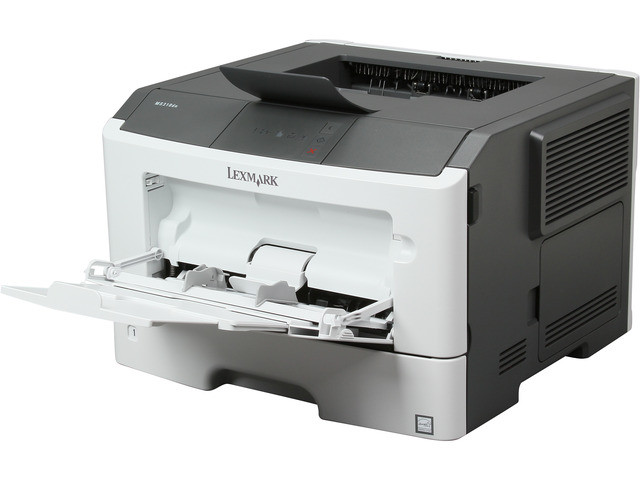
Sharing one printer across a small team is exactly the job the Lexmark MS310DN was built for. This networked monochrome laser carries built-in Ethernet and automatic two-sided printing, and it runs on the high-yield 501H black cartridge, Lexmark part 50F1H00, rated at roughly 5,000 pages. Clever Supplies stocks that cartridge as a single, a 2 pack and a 4 pack, all listed below.
Because the MS310DN sits on the office network rather than tethered to one PC, everyone in the workgroup sends jobs to the same queue and the printer simply gets on with it. Duplex output is standard, so reports and drafts come out double-sided without anyone changing a setting, and the long gap between cartridge swaps suits teams that print steadily month after month rather than in bursts.
Toner Cartridges for MS310DN
| Cartridge | Color | Page Yield |
|---|---|---|
| 501H (50F1H00) — Single cartridge | Black | ~5,000 pages |
| 501H (50F1H00) — 2 Pack | Black | ~5,000 pages |
| 501H (50F1H00) — 4 Pack | Black | ~5,000 pages |
Which cartridge should you buy?
Only one cartridge family fits this printer, which makes the buying decision refreshingly simple: how much toner do you want on hand? The 501H is the high-yield member of the 501 range — the standard 501 (50F1000) is rated near 1,500 pages, while the high-yield version stretches to about 5,000 pages, so each change-out covers far more work and the cost per page drops. A single cartridge suits a small team that prints moderately. The 2 pack keeps a spare on the shelf for the day the low-toner warning appears mid-job, and the 4 pack is the economical route for offices that would rather order once and forget about toner for a long stretch. Whichever size you pick, every cartridge on this page is a premium compatible built for the MS310DN, backed by a 1-year warranty and 1-year returns.
Chip, toner and everyday use
Each compatible cartridge carries a chip the printer reads on installation, so the MS310DN recognizes the cartridge and reports its toner level in the usual way. Seat the cartridge firmly until it clicks, and print a test page to confirm clean output. Yields are quoted at 5% page coverage, so dense pages with heavy graphics will use toner faster than plain text. When output starts to fade near the end of a cartridge's life, removing it and rocking it gently side to side redistributes the remaining toner and usually restores even coverage for a while longer. Store spares flat, sealed and away from heat and direct sunlight.
Frequently Asked Questions
Which toner cartridge does the MS310DN take?
It takes the Lexmark 501H high-yield black cartridge, OEM part 50F1H00, rated at approximately 5,000 pages. The listings on this page are the compatible versions of that cartridge, sold as singles and in 2-pack and 4-pack sizes.
Can the whole office print to the MS310DN?
Yes. The MS310DN connects over Ethernet, so it works as a shared network printer for a small workgroup rather than belonging to a single computer, and its automatic duplexing handles two-sided documents as standard.
How long does one 501H cartridge last in this printer?
Around 5,000 pages at the standard 5% coverage measure. Offices printing graphics-heavy pages will see fewer pages, while light text documents can push the count higher.
Are the cartridges on this page genuine Lexmark products?
No — they are premium compatibles made to fit and work in the MS310DN like the original 50F1H00. Each one is covered by our 1-year warranty, and returns run for a full year as well.
More printers that use the same cartridges
The 501-series toner in this printer is shared across a wide stretch of the Lexmark MS range, so the same shelf stock can serve several models:
MS-510DN, MS-610DE, MS-610DN, MS-610DTE, MS-610DTN, MS310D, MS315dn, MS410D, MS410DN, MS415dn, MS510DN, MS610DE, MS610DN, MS610DTE, MS610DTN.