




MS-610DE
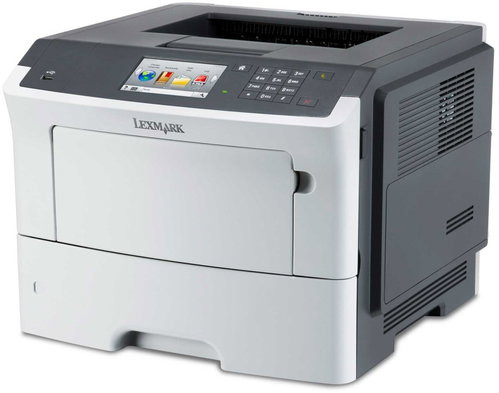
One cartridge keeps the Lexmark MS-610DE — and fourteen other MS models — printing: the black 50F0UA0. This page sells it three ways, as a single cartridge, a 2-pack and a 4-pack, and because the MS610 sits inside a much wider cartridge family, buying toner for this machine is really buying for the whole MS fleet at once.
Few offices run exactly one printer model. More often the MS-610DE shares a building with an MS410 by the warehouse door and an MS310 on somebody’s desk, each bought in a different year. Cartridge families are what keep that mix manageable: every one of those machines takes the 50F0UA0, so the supply shelf holds a single stack of identical boxes instead of a labeled cubby per printer. The listings here are named for the MS510DN, the family’s reference model — the cartridge inside is the one your MS-610DE runs on.
Toner Cartridges for MS-610DE
| Cartridge | Color | Yield |
|---|---|---|
| 50F0UA0 Black — MS510DN listing, Single | Black | See product page |
| 50F0UA0 Black — MS510DN listing, 2 Pack | Black | See product page |
| 50F0UA0 Black — MS510DN listing, 4 Pack | Black | See product page |
Which cartridge should you buy?
Think in machines, not pages. A site with one MS-610DE and nothing else can live happily on singles, ordering as each cartridge empties. A site with three or four family machines should think like a stockroom: a 4-pack on the shelf means any printer in the building can be refilled the same hour it runs dry, and a reasonable rule of thumb is one spare for every two machines in service. The 2-pack splits the difference for a two-printer office. Since every listing holds the identical cartridge, there is no wrong answer — only a question of how much buffer you want.
Chip, toner and everyday use
Fleet printers get their cartridges swapped by whoever happens to be nearest, so the routine has to be foolproof: pull the empty straight out, slide the new 50F0UA0 in until it clicks, close up and print. The chip is read automatically — there is nothing to register and nothing to reset. Rotate your stock so the oldest spare goes in first, and keep the boxes sealed until the moment of the swap; an opened cartridge sitting in a dusty stockroom ages faster than a sealed one on the same shelf.
Frequently Asked Questions
Which toner does the Lexmark MS-610DE use?
The black 50F0UA0 cartridge, the single supply this monochrome machine needs. This page lists it as a single, a 2-pack and a 4-pack under MS510DN listing names.
My other printers are MS410 and MS310 models. Can I stock one cartridge for all of them?
Yes — that is the point of the family. All fifteen models in the list below run on the 50F0UA0, so one stack of spares covers the MS-610DE and its smaller siblings alike.
Why do the listings say MS510DN instead of MS-610DE?
The cartridge is sold under the family’s reference model name. The MS510DN listings hold the same 50F0UA0 cartridge your MS-610DE takes; the name on the listing is about the cartridge family, not a different product.
The printer does not recognize the new cartridge. What now?
Open the machine, take the cartridge out and reseat it firmly until it clicks — incomplete seating is the usual cause. If a compatible still misbehaves after that, it falls under the 1-year warranty and 1-year returns that cover these cartridges.
More printers that use the same cartridges
Read the family by size — the compact MS310 and MS410 models first, then the MS510DN, then the MS610 group in both its naming styles:
MS310D, MS310DN, MS315dn, MS410D, MS410DN, MS415dn, MS510DN, MS610DE, MS610DN, MS610DTE, MS610DTN, MS-510DN, MS-610DN, MS-610DTE, MS-610DTN