




LASERJET PRO 4101FDW
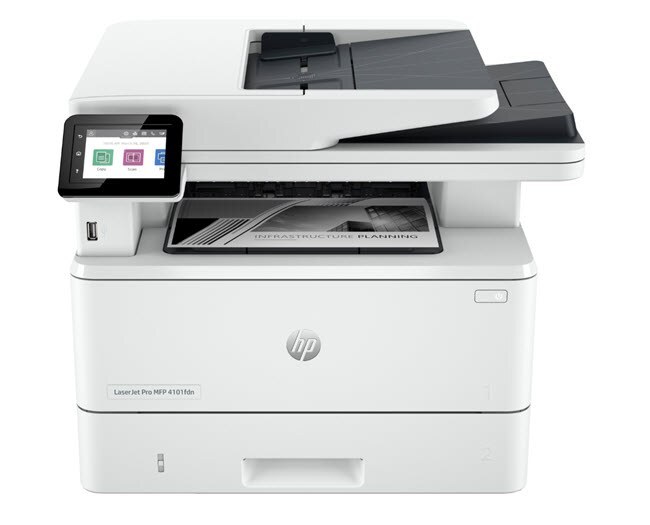
No Ethernet run required: the LaserJet Pro 4101FDW puts print, scan, copy and fax on Wi-Fi, with automatic duplex, and it feeds all of it from one toner family — the standard W1480A or the high-yield W1480X, the pair also sold under the short names 148A and 148X.
Wireless changes where a multifunction printer can live: the 4101FDW can sit on a credenza, in a front office or beside the team that uses it most, rather than wherever a network cable happens to end. Its four functions share the one cartridge, so a machine that scans and copies all day consumes toner even on days when nobody prints from a computer.
Toner Cartridges for LASERJET PRO 4101FDW
| Cartridge | Color | Page Yield |
|---|---|---|
| 148A Black — 4-pack | Black | See product page |
| 148A Black — 2-pack | Black | See product page |
| 148A Black | Black | See product page |
| 148X Black — 4-pack | Black | See product page |
| 148X Black — 2-pack | Black | See product page |
| 148X Black | Black | See product page |
The same cartridges, listed under the names of the other models in this family:
4001: 4001 Black — 2-pack, 4001 Black — 4-pack, 4001 Black.
4001dn: 4001dn Black — 2-pack, 4001dn Black — 4-pack, 4001dn Black.
4001n: 4001n Black — 2-pack, 4001n Black — 4-pack, 4001n Black.
4101: 4101 Black — 2-pack, 4101 Black — 4-pack, 4101 Black.
4101fdn: 4101fdn Black — 2-pack, 4101fdn Black — 4-pack, 4101fdn Black.
MFP 4101fdw: MFP Black — 2-pack, MFP Black — 4-pack, MFP Black.
Pro 4001dw: Pro Black — 2-pack, Pro Black — 4-pack, Pro Black.
More listings of the same pair, grouped by the model each listing is filed under:
- Black — W1480A — Black
- Black — W1480A — Black
- Black — W1480A — Black
- Black — W1480A — Black
- Black — W1480A — Black
- Black — W1480A — 2-pack — Black
- Black — W1480A — 2-pack — Black
- Black — W1480A — 2-pack — Black
- Black — W1480A — 2-pack — Black
- Black — W1480A — 2-pack — Black
- Black — W1480A — 4-pack — Black
- Black — W1480A — 4-pack — Black
- Black — W1480A — 4-pack — Black
- Black — W1480A — 4-pack — Black
- Black — W1480A — 4-pack — Black
- Black — W1480X — Black
- Black — W1480X — Black
- Black — W1480X — Black
- Black — W1480X — Black
- Black — W1480X — Black
- Black — W1480X — 2-pack — Black
- Black — W1480X — 2-pack — Black
- Black — W1480X — 2-pack — Black
- Black — W1480X — 2-pack — Black
- Black — W1480X — 2-pack — Black
- Black — W1480X — 4-pack — Black
- Black — W1480X — 4-pack — Black
- Black — W1480X — 4-pack — Black
- Black — W1480X — 4-pack — Black
- Black — W1480X — 4-pack — Black
Which cartridge should you buy?
You can move freely between the W1480A and the W1480X in this machine — no settings change, no penalty — so the choice is purely about volume. A wireless MFP shared by several people usually justifies the high-yield cartridge, which costs more up front and stretches further between replacements. Lighter, single-desk use is served perfectly well by the standard capacity, and both come in singles and multi-packs. Every compatible cartridge listed here is backed by a 1-year warranty and 1-year returns.
Chip, toner and everyday use
Supply messages on the 4101FDW come from the cartridge's chip, not from the wireless link — a low-toner notice is about the cartridge, however the job arrived. Seat each replacement until it clicks, with the sealing strip pulled completely away, and give the machine a moment to register the new level before the next job. A cartridge near its end can be rocked gently to redistribute toner for a few more pages, and rated yields are estimates based on 5% coverage. Keep a sealed spare within reach of the machine; a printer that can sit anywhere is easy to forget until it stops.
Frequently Asked Questions
Does the 4101FDW use the W1480A or a different cartridge?
It runs on the W1480A at standard capacity and the W1480X at high yield. Keep the code from your empty cartridge handy when you reorder and the match is certain.
Can I switch between A and X cartridges in the 4101FDW?
Freely. The machine accepts either capacity in any order with no settings to adjust; the X simply lasts longer between replacements, which suits a shared wireless machine.
How much is left when the low-toner warning appears?
It depends on coverage, so there is no exact count — but output typically stays acceptable for a while after the warning. Rocking the cartridge gently can even out the toner that remains.
Does copying and faxing drain the same cartridge as printing?
Yes — one cartridge supplies all four functions. A week of heavy copying can empty a cartridge that printing alone would have stretched much further, which is worth remembering when the warning seems to arrive early.
More printers that use the same cartridges
Its two cartridges are shared with the wired and print-only members of the family: LASERJET PRO 4001DN, LASERJET PRO 4001DW, LASERJET PRO 4002DN, LASERJET PRO 4101FDN