




LaserJet 5SI MX
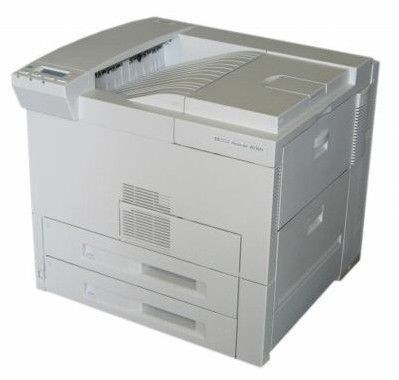
The LaserJet 5SI MX bundled the 5Si workgroup engine with the options offices actually wanted — networking and expanded capability — in one late-1990s package, ready to drop straight into a busy department. Two cartridges serve it: the HP 09A (C3909A) and the high-capacity 09X (C3909XX), which packs more toner into the same cartridge design and stretches the gap between changes.
An MX was bought to be departmental infrastructure from day one, and its printing pattern matches: many users, long runs, tabloid pages mixed into ordinary work. Supplies for such a machine are a logistics decision. The choice between the standard and high-capacity cartridge, and between singles and shelf stock, shapes how often someone has to stop, open the front door and swap a cartridge in the middle of the office's day.
Toner Cartridges for LaserJet 5SI MX
| Cartridge | Color | Page Yield |
|---|---|---|
| 09A Black (C3909A) — single cartridge | Black | See product page |
| LaserJet 5SI MX Black — model listing | Black | See product page |
| 09X Black (C3909XX) — high capacity | Black | See product page |
| 09A Black (C3909A) — 2 pack | Black | See product page |
| 09A Black (C3909A) — 3 pack | Black | See product page |
| 09A Premium Black (C3909A) — 3 pack | Black | See product page |
| 09A MICR Black (C3909A) — single cartridge | Black | See product page |
| 09A Black (C3909A) — 2 pack (MICR listing) | Black | See product page |
| 09A Black (C3909A) — 4 pack (MICR listing) | Black | See product page |
Which cartridge should you buy?
Lead with the capacity question, because the MX is where it pays. The standard 09A is the right cartridge for ordinary departmental volume. Step up to the 09X when the queue is heavy and constant: the higher fill means each change covers more work, which is the cheapest convenience a busy office can buy. Around that choice, pack sizes handle stocking — 2- and 3-packs keep the next change on the shelf, and the premium 3-pack upgrades the build. The MX-named listing is the same cartridge sold under the printer's own name. MICR singles and packs exist for check printing only; everyday output belongs on the standard builds.
Chip, toner and everyday use
Replacing the cartridge in the MX takes about a minute: open the front door, lift the empty cartridge out, take the new one from its bag, pull the sealing tape, and push it firmly home — the printer recognizes it automatically, no menu ritual required. Two habits keep that minute rare and painless. First, never pull the tape until the cartridge is actually going in; the seal is what keeps the toner fresh on the shelf. Second, when output first lightens, rock the installed cartridge gently before condemning it — settled toner prints unevenly long before it is truly gone.
Frequently Asked Questions
Does the LaserJet 5SI MX print in color?
No — it is a monochrome laser, so it prints in black toner only. Its cartridges hold black toner; there are no color cartridges for the MX, which keeps its supply shelf admirably simple.
09A or 09X for a busy MX?
The 09X, once the workload is proven heavy. Both fit the same slot; the X simply carries more toner, so a department that prints all day changes cartridges less often.
How do I replace the toner in the MX?
Open the front door, remove the empty cartridge, unbag the new one and pull its sealing tape, then slide it in until it sits firmly. Close the door and print a test page — recognition is automatic.
More printers that use the same cartridges
The full family on this cartridge, with the cartridge's own category page first: