




Color LaserJet CM4540F MFP
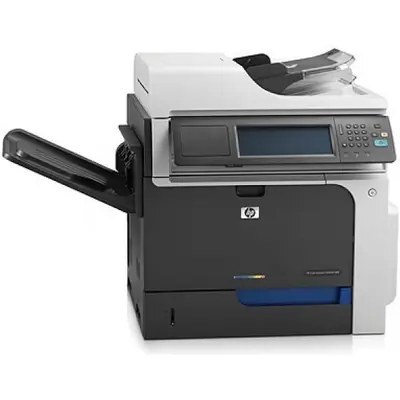
This MFP configuration of the Color LaserJet CM4540F delivered full wide-format document capability — print, copy, scan and fax on A3 pages — and served as a genuine departmental hub. It runs the HP 646X black CE264X with the 646A color trio: CF031A cyan, CF032A yellow and CF033A magenta. The alternate 647A black, CE260A, appears in HP documentation for this model but is not stocked among the listings below.
Fax changes a machine's toner profile in a way print-only offices never see: incoming documents arrive on other people's schedules, around the clock, and every one of them spends black toner. A CM4540F MFP that anchors a department's fax traffic therefore eats black cartridges steadily even in weeks when its printed output looks quiet — the spare-black habit matters more here than on any printer-only model.
Toner Cartridges for Color LaserJet CM4540F MFP
- HP CE264X Toner Cartridge Black/ HP 646X Toner
- HP CF031A Toner Cartridge Cyan/ HP 646A Toner
- HP CF032A Toner Cartridge Yellow/ HP 646A Toner
- HP CF033A Toner Cartridge Magenta/ HP 646A Toner
- HP 646X & 646A Color LaserJet Toner Cartridges 4 Color Set (CE264X/ CF031A/ CF033A/ CF032A)
- HP 646X & 646A Premium Quality Color LaserJet Toner Cartridges 4 Color Set (CE264X/ CF031A/ CF033A/ CF032A)
- HP CM4540f mfp Toner Cartridge Color Laserjet 4 Color Set
- HP CM4540FSKM (CE264X CF031A CF032A CF033A) Toner Cartridge 4 Color Set
- HP CM4540f mfp (CE264X CF031A CF032A CF033A) Toner Cartridge 4 Color Set
- HP CM4540fskm (CE264X CF031A CF032A CF033A) Toner Cartridge 8 Color Set
- HP Enterprise CM4540 mfp (CF032A) Toner Cartridge Yellow
- HP Enterprise CM4540fskm (CE264X CF031A CF032A CF033A) Toner Cartridge 4 Color Set
- HP CM4540F (CE264X CF031A CF032A CF033A) Toner Cartridge 4 Color Set
- HP CM4540 mfp (CF032A) Toner Cartridge Yellow
- HP Enterprise CM4540 mfp (CF031A) Toner Cartridge Cyan
- HP Enterprise CM4540 mfp (CF033A) Toner Cartridge Magenta
- HP Enterprise CM4540 (CF031A CF032A CF033A) Toner Cartridge 3 Color Set
- HP Enterprise CM4540f mfp (CF033A) Toner Cartridge Magenta
- HP Enterprise CM4540f mfp (CF032A) Toner Cartridge Yellow
- HP Enterprise CM4540fskm mfp (CE264X CF031A CF032A CF033A) Toner Cartridge 4 Color Set
Which cartridge should you buy?
Stock this machine black-first. A single CE264X is the working cartridge; the question is how deep the spare shelf should be, and on a fax-receiving hub the honest answer is at least one cartridge deep — an empty black at 4 p.m. stops inbound documents, not just your own printing. The four-color sets in the list cover a full refresh, and the premium set is the higher-grade version of the same four codes. Colors otherwise follow the one-at-a-time rule: CF031A, CF032A and CF033A each empty on their own cycle, and replacing one early only throws away the toner left inside it.
Chip, toner and everyday use
Cartridge changes on a departmental hub happen between other people's jobs, so make them clean ones: wait for the machine to go idle, open the front access, and pull the empty cartridge straight out by its handle. Unpack the replacement away from the paper trays, pull its seal in one motion, and slide it in until it clicks before closing up. Let the calibration cycle finish — interrupting it with a big job is how a good cartridge earns a bad reputation. Keep the spare black sealed in its box near the machine, not inside the supply cabinet across the building.
Frequently Asked Questions
What toner cartridges does the Color LaserJet CM4540F MFP use?
CE264X black and the 646A colors: CF031A cyan, CF032A yellow and CF033A magenta. Match those codes when reordering — the 647A black CE260A is documented for this model but is not one of the listings stocked here.
How do I make a quick copy without touching a computer?
Place the original on the scanner glass or in the document feeder and press copy on the control panel. Set the copy count and start — the machine handles the rest without any computer involved.
How do I install a toner cartridge in the CM4540F MFP?
Open the front access door, pull the empty cartridge straight out by its handle, remove the new cartridge's seal, and slide it in until it clicks. Close the door and let the machine finish its calibration before sending the next job.
Why does the black cartridge seem to empty faster than expected?
On this configuration, fax reception prints around the clock on other people's schedules, and copying adds more black work on top of your own print jobs. Keeping a spare CE264X on hand is the practical fix.
More printers that use the same cartridges
Every CM4540 variant below takes the same 646X black and 646A colors:
- HP 646X & 646A
- Color LaserJet Enterprise CM4540FSKM MFP
- Color LaserJet Enterprise CM4540FSKM
- Color LaserJet Enterprise CM4540F MFP
- Color LaserJet Enterprise CM4540F
- Color LaserJet Enterprise CM4540 MFP
- Color LaserJet Enterprise CM4540
- Color LaserJet CM4540MFP
- Color LaserJet CM4540FSKM MFP
- Color LaserJet CM4540FSKM
- Color LaserJet CM4540F
- Color LaserJet CM4540