




Color LaserJet CM4540F MFP
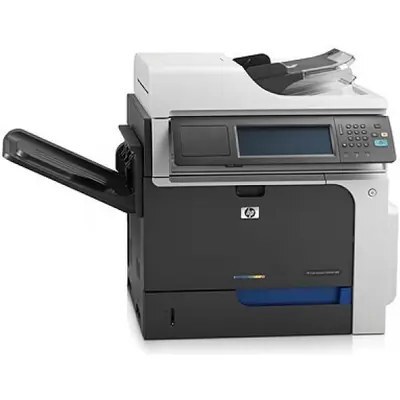
This MFP configuration of the HP Color LaserJet CM4540F delivered full wide-format document capability — print, copy, scan and fax on A3 pages. A genuine departmental hub.
It runs HP 646X CE264X black (647A CE260A alternate) with 646A color CF031A/CF032A/CF033A. Compatible and genuine OEM toner ships fast.
Toner Cartridges for Color LaserJet CM4540F MFP
This printer works with the following toner cartridges:
- HP CE264X
- HP CF031A
- HP CF032A
- HP CF033A
- HP CE260A
More HP Printers
- Color LaserJet CM4540
- Color LaserJet CM4540F
- Color LaserJet CM4540FSKM
- Color LaserJet CM4540FSKM MFP
- Color LaserJet CM4540MFP
- Color LaserJet CP6015
- Color LaserJet CP6015DE
- Color LaserJet CP6015dn
- Color LaserJet CP6015N
- Color LaserJet CP6015X
- Color LaserJet CP6015XH
- Color LaserJet Enterprise CM4540
- Color LaserJet Enterprise CM4540 MFP
- Color LaserJet Enterprise CM4540F
- Color LaserJet Enterprise CM4540F MFP
- Color LaserJet Enterprise CM4540FSKM
- Color LaserJet Enterprise CM4540FSKM MFP
Frequently Asked Questions
What toner cartridges does the Color LaserJet CM4540F MFP use?
The Color LaserJet CM4540F MFP is a color laser printer that takes four separate toner cartridges: CE264X, CF031A, CF032A, CF033A, CE260A. Match these exact codes when buying replacements for the Color LaserJet CM4540F MFP.
How do I make a quick copy on the Color LaserJet CM4540F MFP without touching a computer?
Place the original on the Color LaserJet CM4540F MFP's scanner glass or in its document feeder and press copy on the control panel — no computer needed. Set the copy count and start, and the Color LaserJet CM4540F MFP handles the rest.
How do I install a toner cartridge in the Color LaserJet CM4540F MFP?
Open the front access door of the Color LaserJet CM4540F MFP, pull the empty cartridge straight out by its handle, and slide the new cartridge in until it clicks. Close the door and let the Color LaserJet CM4540F MFP finish its calibration before printing.