




Color LaserJet CM3530FS MFP
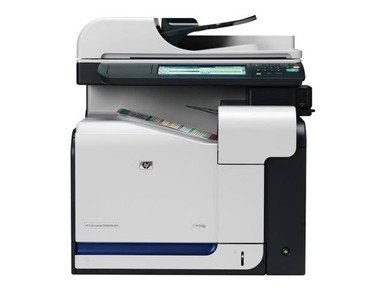
This MFP configuration of the Color LaserJet CM3530FS delivered the complete document toolkit — print, copy, scan and fax in color — and workgroups could retire several aging devices at once in favor of it. Its toner is the HP 504A and 504X family: black CE250A at standard yield or the high-yield CE250X, with CE251A cyan, CE252A yellow and CE253A magenta completing the set.
Consolidation machines live a harder life than the single printers they replaced: every department's copying, scanning and fax traffic lands on the same four cartridges. The CM3530FS MFP's shelf reflects that — alongside the singles there are twin packs of the high-yield black and multi-piece sets, because a shared machine that stops for toner stops everyone at once.
Toner Cartridges for Color LaserJet CM3530FS MFP
- HP 504A Color LaserJet Toner Cartridges/ (CE250A/ CE251A/ CE252A/ CE253A)
- HP CE250A Toner Cartridge Black/ HP 504A Toner
- HP 504X Toner Black Cartridge (CE250X)/ High Yield
- HP 504X Toner Black Cartridges (CE250X)/ High Yield/ Twin Pack
- HP CE251A Toner Cartridge Cyan/ HP 504A Toner
- HP 504X Black High Yield Toner Cartridge/ CE250X
- HP 504X LaserJet Toner Cartridge Black High Yield Twin Pack/ CE250X
- HP CE252A Toner Cartridge Yellow/ HP 504A Toner
- HP CE253A Toner Cartridge Magenta/ HP 504A Toner
- HP CM3530fs mfp Toner Cartridge Color Laserjet 4 Color Set
- HP CP3520 (CE250A CE251A CE252A CE253A) Toner Cartridge 4 Color Set
- HP CP3525 (CE250A CE251A CE252A CE253A) Toner Cartridge 4 Color Set
- HP 5500 (CE250A CE251A CE252A CE253A) Toner Cartridge 2 Black
- HP CM3530mfp (CE250A CE251A CE252A CE253A) Toner Cartridge 5 Color Set
- HP CM3530mfp (CE250A) Toner Cartridge Black
- HP CM3530mfp (CE251A) Toner Cartridge Cyan
- HP CP3525 (CE250A) Toner Cartridge 2 Black
- HP CP3525 (CE250A CE251A CE252A CE253A) Toner Cartridge 5 Color Set
- HP CP3525n (CE250A) Toner Cartridge 2 Black
- HP CP3525n (CE250A) Toner Cartridge 3 Black
- HP CP3525n (CE250A) Toner Cartridge 5 Black
- HP CP3525n (CE250A CE251A CE252A CE253A) Toner Cartridge 5 Color Set
- HP CP3525n (CE250A CE251A CE252A CE253A) Toner Cartridge 8 Color Set
- HP CP3525dn (CE250A CE251A CE252A CE253A) Toner Cartridge 4 Color Set
- HP CM3530 (CE250A) Toner Cartridge 3 Black
- HP CP3525dn (CE250A) Toner Cartridge 2 Black
- HP CP3525x (CE250A) Toner Cartridge Black
- HP 504A (CE250A CE251A CE252A CE253A) Toner Cartridge 4 Color Set
- HP 504A (CE250A CE251A CE252A CE253A) Toner Cartridge 4 Color Set
- HP 3800DN (CE250A CE251A CE252A CE253A) Toner Cartridge 4 Color Set
- HP CP3505N (CE250A CE251A CE252A CE253A) Toner Cartridge 4 Color Set
- HP CM3530mfp (CE251A) Toner Cartridge Magenta
- HP CP3525n (CE251A CE252A CE253A) Toner Cartridge 3 Color Set
- HP CP3525n (CE251A CE252A CE253A) Toner Cartridge 6 Color Set
- HP CP3525n (CE251A) Toner Cartridge Cyan
- HP CP3525dn (CE251A) Toner Cartridge Cyan
- HP CP3525x (CE251A) Toner Cartridge Cyan
- HP CM3530mfp (CE251A CE252A CE253A) Toner Cartridge 3 Color Set
- HP CM3530mfp (CE252A) Toner Cartridge Yellow
- HP CP3525 (CE253A) Toner Cartridge Magenta
- HP CP3525 (CE252A) Toner Cartridge Yellow
- HP CP3525n (CE253A) Toner Cartridge Magenta
- HP CP3525n (CE252A) Toner Cartridge Yellow
- HP CP3525dn (CE253A) Toner Cartridge Magenta
- HP CP3525dn (CE252A) Toner Cartridge Yellow
- HP CP3525x (CE253A) Toner Cartridge Magenta
Which cartridge should you buy?
The black decision comes first. Standard CE250A fits a workgroup whose output is mostly color or mixed; the high-yield CE250X earns its premium on any machine doing steady black document volume, and its twin pack is the set-and-forget option for a shared MFP. Colors are simpler: CE251A, CE252A and CE253A are single-capacity, so replace each as it empties rather than refreshing the trio together. Four-color and five-color sets below make sense at installation time or after a usage audit shows several cartridges low together — not as a reflex whenever one color fades.
Chip, toner and everyday use
Install with the machine's front access open and the old cartridge pulled straight out by its handle; the replacement slides in on the same track until it clicks, and the MFP calibrates before the next job. A cartridge the machine does not recognize has usually stopped short of its seat — reseat it once before anything else. Toner that prints light after months in the machine often just needs redistributing: lift the cartridge out, rock it slowly side to side, and put it back. Unopened spares keep their quality sealed, flat and away from radiators and windows.
Frequently Asked Questions
What are the correct toner cartridge numbers for the Color LaserJet CM3530FS MFP?
Black is CE250A, or CE250X in the high-yield 504X version; the colors are CE251A cyan, CE252A yellow and CE253A magenta. Match those codes when ordering — cartridges from other HP families will not fit this machine.
How should I store a spare 504A or 504X cartridge?
Leave the seal intact and the cartridge in its packaging, in normal room conditions, until the MFP calls for it. An unopened cartridge keeps well as a backup; an opened one stored loose on a shelf does not.
Is it safe to run compatible toner in this MFP long term?
Compatible 504A and 504X cartridges are built to the same fit and code specification as the originals, and using one does not void the printer's hardware warranty on its own. The compatible cartridges here are covered by a 1-year warranty and 1-year returns.
If only the black is empty, do the colors need changing too?
No — the four cartridges are independent. Replace the black alone and leave any color that still has toner in place; changing a half-full cartridge wastes the toner left in it.
More printers that use the same cartridges
The same 504A and 504X cartridges serve the whole CM3530 and CP3525 group:
Color LaserJet CM3530, Color LaserJet CM3530FS, Color LaserJet CM3530MFP, Color LaserJet CP3520, Color LaserJet CP3525, Color LaserJet CP3525DN, Color LaserJet CP3525N, Color LaserJet CP3525X, HP 504A.