




WorkForce WF-2760
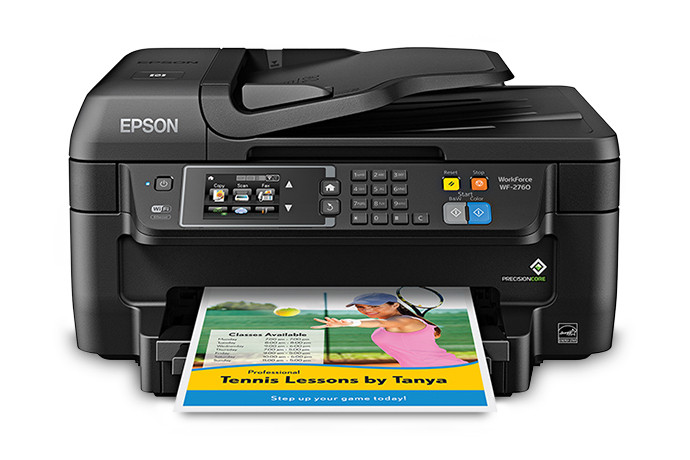
Ask what a WF-2760 prints in a week and the answer is volume: long document runs first, color and photo jobs second. The cartridges stocked below match that order — four individual DURABrite Ultra pigment cartridges from the 220 family, in the high-capacity tier: black (T220XL120) up to 500 pages, cyan, magenta and yellow up to 450 pages each. Every Clever Supplies compatible 220XL cartridge here carries a new chip and a lifetime warranty.
| Cartridge | Type | Color | Approx. Yield |
|---|---|---|---|
| Epson T220XL120 (compatible) | Pigment ink cartridge, XL | Black | 500 pages |
| Epson T220XL220 (compatible) | Pigment ink cartridge, XL | Cyan | 450 pages |
| Epson T220XL320 (compatible) | Pigment ink cartridge, XL | Magenta | 450 pages |
| Epson T220XL420 (compatible) | Pigment ink cartridge, XL | Yellow | 450 pages |
| Epson 220XL Set of 4 (compatible) | Full cartridge set, XL | Black / Cyan / Magenta / Yellow | 500 black, 450 per color |
| Epson 220XL Set of 9 (compatible) | Bulk cartridge set, XL (3B + 2C + 2M + 2Y) | Black / Cyan / Magenta / Yellow | 500 black, 450 per color |
WF-2760 Ink — 220XL for the Hardest-Working Model
Epson lists the WF-2760 with the complete 220 code set — standard T220120 / T220220 / T220320 / T220420 and high-capacity T220XL120 / T220XL220 / T220XL320 / T220XL420 — with DURABrite Ultra pigment ink in every position. Rated yields (ISO/IEC 24711): standard black up to 175 pages and each color up to 165; XL black up to 500 pages and each color up to 450. We stock the XL tier, because on a work printer that is the tier that keeps cartridge changes rare.
Epson's own WF-2760 product page is the family's reference document: it lists all eight 220 / 220XL codes with their yields and DURABrite Ultra pigment ink — and it is also where the classic error is recorded, owners fitting 288 cartridges and meeting a recognition error. This printer takes 220, only 220. With its touchscreen and document feeder, the WF-2760 is the hardest-working printer in this family — the model where the XL tier and the 9-cartridge bulk set make the most sense.
Which 220XL should you buy?
- One color ran out: replace just that color — black, cyan, magenta and yellow singles are $10.49 each.
- Full refresh: the Set of 4 ($35.94) replaces all four positions in one box.
- Print every week: the Set of 9 ($67.07) stocks three blacks and two of each color — the pattern home offices actually consume.
Chip, ink and everyday use
High-volume document work is hard on ink, so the details matter: a new compatible chip on every cartridge keeps the WF-2760's ink levels reading normally, and the one-time on-screen confirmation is the printer checking a non-Epson cartridge, not flagging an error. The ink itself is pigment-based DURABrite Ultra type — pages come out dry to the touch, survive a highlighter without smudging, and outlast dye ink on office documents that get handled. Until install day, keep spare cartridges sealed in their bags, away from air and direct light.
More printers that use 220XL ink
Expression Home XP-320 · Expression Home XP-420 · Expression Home XP-424 · WorkForce WF-2630 · WorkForce WF-2650 · WorkForce WF-2660 · WorkForce WF-2750