




Multifunction 1815DN
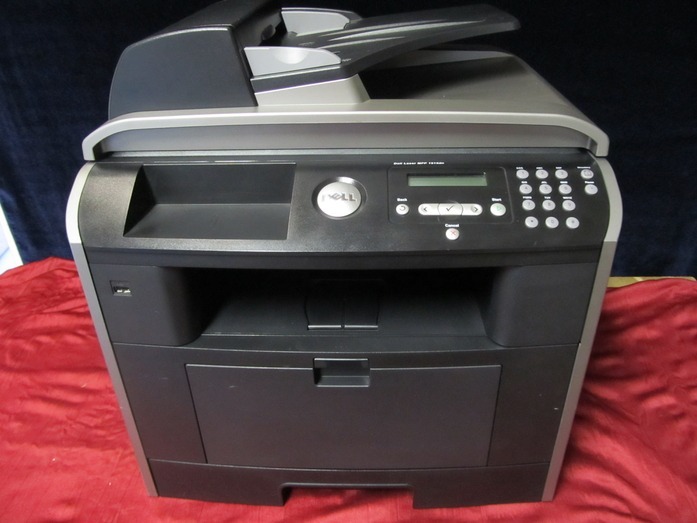
The Dell 1815DN is a monochrome multifunction built for offices that still run on paper: it prints, copies, scans and faxes from one networked unit, at around 27 pages per minute, with automatic two-sided printing as standard. Everything it produces comes from a single black cartridge family headed by the high-yield 310-7945 and the 310-7943, so restocking a shared machine never turns into a guessing game.
A multifunction like this one rarely belongs to a single user. It sits in the middle of a small workgroup, absorbing copy jobs between print runs and fax traffic in between, which means its cartridge empties on the office's schedule rather than one person's. That shared rhythm is why the multi-packs below exist: a five- or ten-pack on the shelf turns a toner emergency into a two-minute swap, and the per-cartridge cost drops at the same time.
Toner Cartridges for Dell 1815DN
| Cartridge | Color | Page Yield |
|---|---|---|
| 310-7945 | Black | High Yield |
| Dell 1815DN High Yield Black | Black | High Yield |
| Dell 1815DN High Yield Black 5 Pack | Black | High Yield — 5 Pack |
| 310-7945 Premium High Yield Black 5 Pack | Black | High Yield — 5 Pack |
| 310-7943 | Black | See product page |
| 310-7943 — 2 Pack | Black | See product page |
| 310-7943 — 3 Pack | Black | See product page |
| 310-7943 — 5 Pack | Black | See product page |
| 310-7943 — 10 Pack | Black | See product page |
Which cartridge should you buy?
Start with the code printed on the cartridge you are pulling out. The high-yield 310-7945 suits offices that print and copy daily, because a bigger fill stretches the interval between changes on a machine several people depend on. The 310-7943 listings cover the same engine in single units and in two-, three-, five- and ten-packs; the larger bundles are the sensible buy when the 1815DN is the only printer on the floor and downtime is not an option. Dell's supply list for this model also shows the alternate numbers PF658, PF656, RF223 and NF485 — if one of those is what is printed on your spent cartridge, match that code when you reorder. Every compatible cartridge here is backed by a 1-year warranty and 1-year returns.
Chip, toner and everyday use
The 1815DN reads the chip on the cartridge to report its toner level, so after a swap the gauge needs a moment to register the new unit; if the level still shows empty, pull the cartridge out and seat it again firmly until it clicks. Keep a spare in its sealed bag, stored flat and out of direct light — a multifunction that faxes cannot wait for a delivery. When pages start to fade unevenly, rock the installed cartridge gently side to side a few times: that redistributes the toner inside and usually restores even coverage long enough to finish the job and order the next one.
Frequently Asked Questions
Which cartridges does the Dell 1815DN use?
It runs on the 310-7945 and 310-7943 black cartridge family. Dell also lists PF658, PF656, RF223 and NF485 as supply numbers for this model, so check the code on the cartridge you remove and order the match.
Does the 1815DN print two-sided?
Yes — the DN suffix marks built-in automatic duplexing plus networking. Two-sided output uses exactly the same cartridges, it simply spreads each fill across both faces of the sheet.
Copies come out blank even though the scanner works — what is wrong?
Blank copies with a functioning scanner point at the print side, not the scan side: usually an empty cartridge or a new cartridge whose sealing strip was never pulled. Check the installed cartridge first before suspecting the scanner.
Is a 10-pack too much for a small office?
Not if the 1815DN is shared. Toner does not spoil on the shelf when it stays sealed and stored flat, and a workgroup machine can work through a bundle steadily — buying ahead simply removes reorder gaps.
More printers that use the same cartridges
The same black cartridge family also feeds these Dell models, so a spare bought for one machine can cover another: Dell 310-7945, Laser 1815, Laser 1815N, Multifunction 1815.