




Color Laser Laser 1100
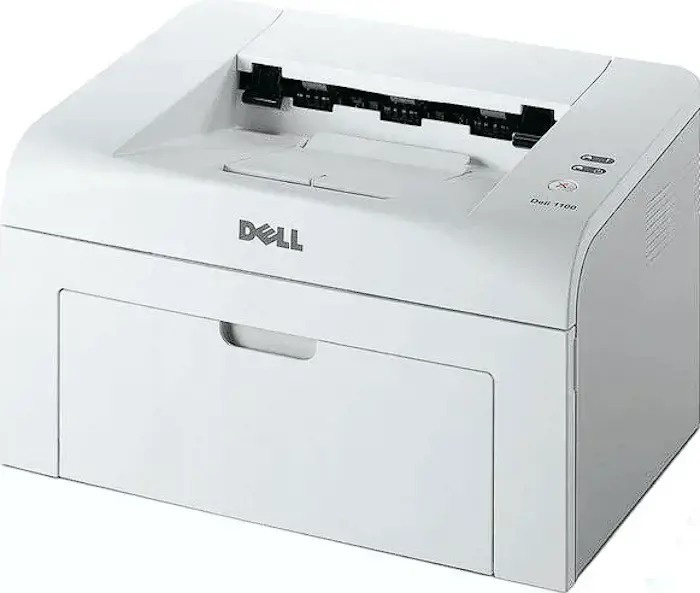
The Dell 1100 is the small mono laser that brought laser printing to desks that could never justify it before: a 15-page-per-minute engine, a first page out in about ten seconds, and one-button operation that strips printing down to the essentials. A single black cartridge does all the work — the 310-6640 — so there is exactly one consumable to buy, store and replace on this machine.
This is a home and homework printer at heart. School assignments, tax forms, boarding passes, return labels and the odd contract make up its working life, and its 5,000-page monthly duty cycle covers that kind of use comfortably. Owners tend to keep these printers for years, which makes the humble cartridge shelf next to it the whole maintenance plan: one cartridge in the machine, one in the closet, nothing else to think about.
Toner Cartridges for 1100
| Cartridge | Color | Page Yield |
|---|---|---|
| 310-6640 | Black | See product page |
| 310-6640 — 2 Pack | Black | See product page |
| 310-6640 — 3 Pack | Black | See product page |
| 310-6640 — 5 Pack | Black | See product page |
| 310-6640 — 10 Pack | Black | See product page |
Which cartridge should you buy?
There is only one cartridge number to remember here, so the real question is how many to keep at home. A single cartridge suits light, occasional printing and keeps the upfront cost smallest. The 2 pack is the popular middle ground: one cartridge printing, one waiting in the closet, and no emergency store run when a school project lands the night before it is due. The 3 and 5 packs fit home offices that print every week — invoices, coursework, church or club paperwork — while the 10 pack serves small offices and landlords who run the same dependable printer for years and prefer to order once. The per-cartridge cost falls as the pack grows, and every compatible cartridge here is covered by a 1-year warranty and 1-year returns.
Chip, toner and everyday use
The 1100 keeps things simple: the cartridge is chipped so the printer can report its status, and replacement is a lift-out, drop-in swap through the front of the machine. Cartridge page ratings are measured at roughly 5% coverage, so a month of full-page flyers will empty one sooner than a month of letters — that is normal, not a defect. When print starts to fade, take the cartridge out and rock it gently from side to side; the toner settles back over the roller and often restores even print for a while longer. Store your spare upright in its sealed box, somewhere cool and out of the sun, and it will be ready whenever the installed one gives out.
Frequently Asked Questions
Which toner cartridge does the Dell 1100 take?
Only one: the 310-6640 black cartridge, sold above as a single and in 2, 3, 5 and 10 packs. If you are matching against the cartridge coming out of the printer, that is the number printed on its label.
Is the Dell 1100 a color printer?
No, it is a monochrome laser. It prints in black only, which is exactly why a single cartridge covers everything it does — there are no color cartridges to buy for this model.
Does the Dell 1110 use the same cartridge?
Yes. The 1110 runs on the same 310-6640 cartridge, so households or offices keeping both models need only one kind of toner on the shelf.
How long will one cartridge last in home use?
It depends on what you print: pages with light text coverage stretch a cartridge much further than dense pages with big graphics. Check the product page for the rated yield, and treat that 5,000-page monthly duty cycle as a limit for the machine, not a promise about cartridge life.
More printers that use the same cartridges
The 310-6640 cartridge family also serves these Dell pages:
Color Laser Laser 1110, Dell 310-6640, Laser 1100, Laser 1110