




Color Laser C2665DNF
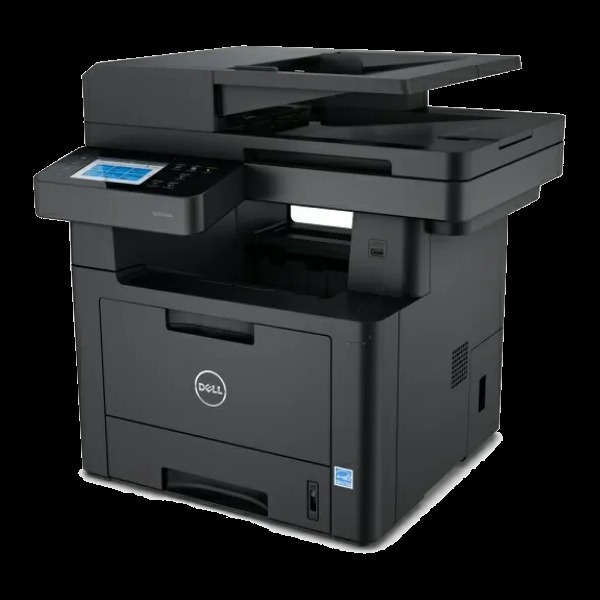
The Dell C2665DNF is the flagship of the C2665 multifunction line: 27-page-per-minute color printing alongside copying, scanning and faxing, with automatic duplexing and a 50-sheet automatic document feeder for unattended multi-page work. NFC tap-to-print, AirPrint and secure print features let it sit comfortably in open offices and regulated environments alike. All four functions draw from one toner stream — the high-yield 593-BBBU black rated at 6,000 pages, with 593-BBBT cyan, 593-BBBS magenta and 593-BBBR yellow at 4,000 pages each.
An MFP at this level is usually the most-visited machine in its office, and its feeder changes the failure mode: a 200-page duplex copy job does not pause politely when a cartridge gives out. Owners of the DNF therefore tend to manage toner by levels rather than by warnings, keeping the high-yield set ahead of the work instead of chasing it.
Toner Cartridges for Dell C2665DNF
| Cartridge | Color | Page Yield |
|---|---|---|
| 593-BBBU / 593-BBBT / 593-BBBS / 593-BBBR — 4 Color Set | Black / Cyan / Magenta / Yellow | See product page |
| C2665dnf High Yield 4 Color Set | Black / Cyan / Magenta / Yellow | See product page |
| C2665dnf Premium Quality High Yield 4 Color Set | Black / Cyan / Magenta / Yellow | See product page |
| 593-BBBU / 593-BBBT / 593-BBBS / 593-BBBR — 4 Color Set | Black / Cyan / Magenta / Yellow | See product page |
| 593-BBBU / 593-BBBT / 593-BBBS / 593-BBBR — 5 Color Set | Black / Cyan / Magenta / Yellow | See product page |
| 593-BBBU / 593-BBBT / 593-BBBS / 593-BBBR — 8 Color Set | Black / Cyan / Magenta / Yellow | See product page |
| 593-BBBT / 593-BBBS / 593-BBBR — 6 Color Set | Cyan / Magenta / Yellow | See product page |
| 593-BBBT / 593-BBBS / 593-BBBR — 3 Color Set | Cyan / Magenta / Yellow | See product page |
| 593-BBBU / 593-BBBT / 593-BBBS / 593-BBBR — 4 Color Set | Black / Cyan / Magenta / Yellow | See product page |
| 593-BBBU / 593-BBBT / 593-BBBS / 593-BBBR — 4 Color Set | Black / Cyan / Magenta / Yellow | See product page |
| 593-BBBU — Black 2 Pack | Black | See product page |
| 593-BBBU — Black 3 Pack | Black | See product page |
| 593-BBBU — Black 5 Pack | Black | See product page |
| 593-BBBU — Black 3 Pack | Black | See product page |
| 593-BBBR (High Yield) | Yellow | 4,000 pages |
| 593-BBBS (High Yield) | Magenta | 4,000 pages |
| 593-BBBT (High Yield) | Cyan | 4,000 pages |
| 593-BBBU (High Yield) | Black | 6,000 pages |
| 593-BBBS | Magenta | 4,000 pages |
| 593-BBBR | Yellow | 4,000 pages |
| 593-BBBT | Cyan | 4,000 pages |
| 593-BBBU | Black | 6,000 pages |
Which cartridge should you buy?
High yield is the only sensible tier for this machine, and it fills this page: 6,000-page black and 4,000-page colors match the DNF's appetite across all four functions. The everyday pattern is single-color replacement — you never need to change all four at once, because each cartridge lives and dies on its own schedule, and uneven consumption between colors is by design rather than a fault. The black multi-packs answer the one predictable imbalance, since copying and faxing make black the fastest-moving slot in most offices. Choose a full set when the machine is being commissioned, or when several slots genuinely approach empty together; the larger formats are for stocking a supply cabinet once and forgetting it. Compatible cartridges are backed by a 1-year warranty and 1-year returns.
Chip, toner and everyday use
Four functions pulling on one toner stream makes the supplies screen worth a weekly glance: the C2665DNF reports each cartridge separately, so the color a long copy run is about to exhaust is visible before the job starts. Fit replacements squarely until the chip engages, and change one cartridge at a time so that, if a level reads oddly afterward, the unit in question is obvious. When one color runs out much faster than the others, resist the urge to replace the set — the remaining three still hold usable life, and single replacements are how this machine is meant to be fed. Spares store best sealed and flat, away from the heat the machine itself vents.
Frequently Asked Questions
My C2665DNF needs new toner — which cartridges should I order?
The machine takes four numbers: 593-BBBU black, 593-BBBT cyan, 593-BBBS magenta and 593-BBBR yellow. Keep that list with the printer; ordering by the number on the spent cartridge removes any guesswork.
Only the black is empty on my C2665DNF. Can I change just that one?
Yes — always. Each of the four cartridges has an independent life and its own slot, so replace only the color the printer flags. The others stay in place with their remaining toner untouched.
One color ran out much faster than the rest. Is that normal?
Completely. Color consumption follows your documents, not a schedule: a month of charts can drain cyan while magenta idles. Buy the single cartridge for the color you actually consumed and let the others finish at their own pace.
Does duplex copying use more toner?
A page uses the same toner whether it is printed one-sided or as half of a duplex sheet — duplexing saves paper, not toner. What it does change is how fast a long job moves through the cartridges, which is why checking levels before a big feeder run is worthwhile.
More printers that use the same cartridges
The flagship MFP drinks from the same cartridge family as the rest of this Dell color line, including the single-function models: Color Laser C2660, Color Laser C2660DN, Color Laser C2665, Dell (593-BBBU, 593-BBBT, 593-BBBS, 593-BBBR).