






 See Compatible Printers
 Read more about our ink!
Dell
Compatible Dell C2660DN Toner Cartridge Cyan (593-BBBT)
- Page Yield:
- Color: 4000
- Availability:
- In Stock
- Shipping:
- Calculated at Checkout

Amazon Price:

- Page Yield:
- Color: 4000
- Availability:
- In Stock
- Shipping:
- Calculated at Checkout
- Compatible Printers
- Specifications
- SKU:
- CS-Dell-C2660DN-C
- Printer Brand:
- Dell
- OEM Number:
- 593-BBBT
- Ink Color:
- Cyan
- Page Yield:
- Color: 4000
- Printer Type:
- Laser Cartridge
- Description
- Reviews

/> 

Clever Supplies brand products are made in the USA! Why pay more for cheaper product with a high defective rate? You will end up having to send it back to the manufacturer. Get a quality product that you KNOW will work. Purchase the Clever Supplies Products Compatible for Dell C2660DN (593-BBBT) Cyan and experience the difference! All Clever Supplies brand products are backed by '100% Quality Satisfaction' 1 year warranty against defects in materials and workmanship for all toner products. Free tech support for a Clever Supplies problems for all Clever Supplies brand products. The use of Clever Supplies brand replacement laser toner cartridges and supplies does not void printer warranty. Premium Quality Replacement Toner Cartridge is made by ISO9001 Certified Factory to Meet or Exceed OEM Standards. These units are manufactured 100% brand new with all new parts including OPC drums, wiper blades, a smart chip and other internal parts, they are an economical alternative to expensive OEM 593-BBBT Compatible Toner Cartridges. This is a Compatible for Delltoner cartridges Cyan guaranteed to perform with Dell Laser Printers. It replaces the original Dell C2660DN toner cartridge cyan (Cyan) . The compatible replacement for 593-BBBT. We offer a 100% Quality Satisfaction Guarantee on our Compatible for 593-BBBT laser toner cartridges and supplies. For use in the following printers: Color Laser C2660dn, Color Laser C2665dnf
Frequently Asked Questions
The blues on our C2660dn output have gone pale — where do we look first?
At the cyan cartridge. Cyan is the foundation of every blue the machine prints, so when the 593-BBBT — Dell order code 593-BBBT, the high-yield cyan for the Color Laser C2660dn — approaches empty, blues wash out first, greens lose their cool edge, and anything teal or sky-toned prints weakly, while reds, yellows and black text remain convincing. Cross-check the printer's toner gauge: a low cyan reading together with that symptom settles the diagnosis, and this cartridge is the replacement.
What does the 4,000-page rating mean for our monthly ordering?
It means cyan stops being a frequent line item. At the rating's 5% coverage basis, one 593-BBBT covers about a year of color printing for an office at 300 color pages a month, and roughly eight months at 500 a month. Because this is the high-yield version of the C2660dn's cyan supply, each changeover is separated by a long interval — useful for a shared workgroup printer where every toner swap interrupts someone. Heavy chart and photo work consumes cyan faster than the rating assumes, so treat those figures as ceilings.
Is $31.82 good value for this cartridge?
Work it out per page: $31.82 across 4,000 rated pages is about 0.80 cents per page, or $7.96 per thousand. That is the arithmetic that makes high yield worthwhile — the same machine fed on standard-yield cyan would cost noticeably more per page and demand more frequent swaps. For a C2660dn or C2665dnf that prints color as part of its daily workload, 0.80 cents a page is a fair, economical figure; a machine that prints color only a handful of times a month would take years to see the benefit, and that is the honest exception.
Do we have to change the other colors when we change the cyan?
No. Each supply in the C2660dn is an independent cartridge — black 593-BBBU, cyan 593-BBBT, magenta 593-BBBS, yellow 593-BBBR — with its own gauge and its own lifespan, because real documents consume the four colors unevenly. Replace the 593-BBBT when it is done and leave the others in place until their gauges call for it. Changing a half-full cartridge early buys nothing and discards toner you have already paid for.
Anything to know about storing a spare 593-BBBT?
Only the basics: keep it sealed in its packaging, lying flat, at ordinary room temperature and out of direct sunlight until the day it goes into the machine. Toner cartridges tolerate office storage well over the timescales involved here, but heat and light degrade them. If your C2660dn is business-critical, holding one spare cyan means an empty cartridge is a brief pause rather than a halted workgroup — and rotating the spare in first-in, first-out keeps stock fresh.
What are we covered by if this compatible cartridge disappoints?
This 593-BBBT is a compatible cartridge built to Dell's specification for the C2660dn and C2665dnf — not a Dell-branded original — and it is backed by our 1-year warranty and 1-year free returns, with the process explained on our shipping and returns page. Support hours are Monday to Friday, 9 AM to 5 PM CST. Delivery comes from the nearest of our Illinois, Pennsylvania, Georgia or California warehouses, and the rest of the C2660dn's supplies are listed on our Dell toner page.
How can we prove the pale blues were the cartridge and not the machine?
Keep the evidence before you swap. Print one page that shows the fault clearly — a chart or document with strong blues and greens — and keep it. Fit the new 593-BBBT, print the identical file again, and lay the two sheets side by side. If the blues come back full and even, the old cyan cartridge was the cause and the matter is closed. If the weakness survives a fresh cartridge in exactly the same places, the fault sits elsewhere in the machine, and having both sheets makes that case to support in a single conversation.
Why does cyan drain faster in some months than others?
Photographs and sky. Cyan is the working color behind blues, teals and greens, and it is laid down heavily by photo images, presentation backgrounds and charts — the big, saturated areas of a page. A month of text documents with a small blue logo barely touches the 593-BBBT; a month of brochures and slide decks can pull it down at several times the rate the 4,000-page standard-coverage rating assumes. That is why cyan intervals vary so much between offices, and why your own fitting dates predict your next change better than any published figure.
We run both a C2660dn and a C2665dnf — can one spare cyan serve both machines?
Yes. The 593-BBBT fits both models — the cartridge does not know or care which of the two machines it is seated in — so a single sealed spare on the shelf covers whichever printer calls for cyan first. That shared coverage is worth factoring into how much stock you hold: two machines do not need two spare cyans unless both print color heavily. Note on the carton which machine the spare eventually went into and when; with shared stock, that small record is what stops the second machine's empty slot from surprising you.
Are there any handling points worth observing when the cyan goes in?
Only simple ones, but they protect the result. Keep the 593-BBBT sealed until the moment of fitting, so nothing contaminates it on a desk. When you seat the cartridge, make sure it goes fully home — a cartridge resting slightly short of its seat can produce weak or uneven color that looks exactly like a faulty unit. Then print a few pages before judging: the first sheet or two after any changeover is a settling sample, and a full-strength, even blue by the third page is the sign the swap is complete and correct.
About This C2660dn Cyan Cartridge (593-BBBT)
One compatible high-yield cyan cartridge for the Dell Color Laser C2660dn and C2665dnf, order code 593-BBBT, rated at 4,000 pages and priced at $31.82 — roughly 0.80 cents per rated page. Made for workgroups that want long intervals between toner changes. Ships from our Illinois, Pennsylvania, Georgia or California warehouse with a 1-year warranty and 1-year free returns.
Related Items


Dell
Compatible Dell C2660DN Toner Cartridges 3 Color Set (593-BBBT, 593-BBBS, 593-BBBR)
/>


Dell
Compatible Dell 593-BBBT Toner Cartridge High Yield Cyan
/>

Dell
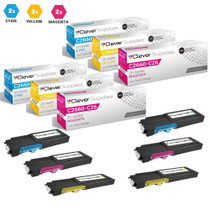
Compatible Dell C2660DN Toner Cartridges 6 Color Set (593-BBBT, 593-BBBS, 593-BBBR)
/>


Dell
Compatible Dell C2660DN Toner Cartridges 8 Color Set (593-BBBU, 593-BBBT, 593-BBBS, 593-BBBR)
/>