






 See Compatible Printers
 Read more about our ink!
Dell
Compatible Dell 1355cnw High Yield Toner Cartridges 4 Color Set
- Page Yield:
- Black: 2,000, Colors: 1,400 Each
- Availability:
- In Stock
- Shipping:
- Calculated at Checkout

Amazon Price:

- Page Yield:
- Black: 2,000, Colors: 1,400 Each
- Availability:
- In Stock
- Shipping:
- Calculated at Checkout
- Compatible Printers
- Specifications
- SKU:
- Dell-1355cnw
- Printer Brand:
- Dell
- OEM Number:
- 331-0778, 331-0777, 331-0780, 331-0779
- Ink Color:
- Black, Cyan, Magenta, Yellow
- Page Yield:
- Black: 2,000, Colors: 1,400 Each
- Printer Type:
- Laser Cartridge Set
- Condition:
- New Compatible
- Description
- Yields up to Black: 2000 Colors: 1400 Each
- Compatible Dell 1355cnw High Yield Toner Cartridges 4 Color Set consistently produces high-resolution printouts with enhanced graphics and sharp text
- Unlike bargain brand toners Dell 1355cnw High Yield Toner Cartridges 4 Color Set is specifically engineered to work in Dell printers for optimum quality and performance
- Packaging: Each
- Compatible with: Dell 1250 1250c 1350 1355 1355cn 1350cnw C1760 and C1760nw etc. laser printer
- Print technology: Laser
- Replaces the Following Manufacturer Numbers: 331-0722 3K9XM DV16F DX7YG 331-0778 4R4G5 331-0723 58P6Y PDVTW XPXY8 331-0777 FYFKF 331-0724 5GDTC H89YG JYX82 331-0780 CMR3C 331-0725 5M1VR DG1TR VKYJT 331-0779 89KJM
- Reviews
-
Great value good product
Great toner use it for my assistant principal's printer.
-
Great Price
So far so good...Amazing Price considering what it costs to get the original Dell cartridges
-
Great Product
Hopefully they work just like the dell ones. can get 4 sets of these for the price of a single dell set.
-
Good Deal
What a deal for something for similar or maybe even better quality then the dell ink I was purchasing!
-
Good Value
love these options they offer in one box! I don't have to buy them all separately.
-
Great value
I would rate these as very good cartridges. The value compared to Dell cartridges is great. I am using tonerandinkjetstore cartridges in all our color laser printers.
-
So far so good
Everything appears to be ok. I have only had them for a couple of weeks so I'm not sure of product life at this point.
-
Works Great
The toners work well and it has always been nice to have a back up when a color ran out.
-
Save money and buy these
These are so much less expensive as Dell and work just as good. Could not be happier.

/> 

Compatible Dell 1355cnw High Yield Toner Cartridges 4 Color Set produces high-resolution printouts sharper images and text.
Dell 1355cnw High Yield Toner Cartridges 4 Color Set yields up to Black: 2000 Colors: 1400 Each. Cartridge is specifically designed to work in Dell printers for optimum quality and performance.
Features:
Frequently Asked Questions
The printer is years old — is it still worth buying toner for a 1355cnw?
Usually, yes — run the comparison that matters. A complete set for this machine costs $46.23 and returns it to full color output with a black rated at 2,000 pages and colors at 1,400 each. A replacement printer costs several times that before its first cartridge is even considered, and a working 1355cnw that still prints cleanly has not stopped earning its place because newer models exist. The sensible test is the machine's output quality and mechanical health, not its age: if the prints are good, toner is the cheapest capability you will ever buy for it.
How much printing does a full set put back in the machine?
The black 331-0778 is rated at 2,000 pages and the cyan 331-0777, magenta 331-0780 and yellow 331-0779 at 1,400 pages each, all at the standard 5% coverage. In a home office or small team setting — the workload this machine typically carries now — that is months of everyday printing rather than weeks. Heavy graphics will pull the real figures below the ratings and plain documents will meet them, but as a planning horizon, a full set is a long runway: most owners of this generation of machine reorder a couple of times a year, not every month.
What exactly is in the box?
Four high-yield compatible cartridges, one per slot: black 331-0778, cyan 331-0777, magenta 331-0780 and yellow 331-0779, $46.23 for the set — about $11.56 per cartridge. The four part numbers are the shared platform across Dell's compact color line, also serving the Color Laser 1250c, 1350cnw, 1355cn, 1755nf, 1755nfw, C1760nw and C1765nf. Each cartridge is keyed to its own color slot, and the part number on the label is the check to make as you install each one.
With a busy team printing wirelessly, which cartridge gives up first?
Most often a color, because wireless printing from laptops and phones brings a heavier color mix than planned office printing — screenshots, web pages and photos all draw on the cyan, magenta and yellow together, and each of those cartridges is rated at 1,400 pages against the black's 2,000. The symptom pattern tells you which: washed-out blues implicate the cyan 331-0777, orange-shifted reds the magenta 331-0780, and prints losing their warmth the yellow 331-0779. The printer's test page shows all four blocks at once and identifies the tired cartridge immediately.
Output is fading evenly across all the colors — is that the set, or the machine?
Even fading across every color at once usually points away from any single cartridge, because four cartridges rarely tire in perfect unison. Run the printer's built-in color calibration routine first — it rebalances the four cartridges and restores even output in many cases, especially after a cartridge change or a long idle stretch. If calibration does not help and one color block on the test page is clearly weaker, that cartridge is the suspect; if all four blocks are uniformly pale while the black stays strong, the set has simply aged together and a fresh set is the fix.
What cover do I get when buying for an older machine?
The same cover as for any machine in this family — the printer's age does not enter into it. Each cartridge carries a 1-year warranty against defects, and the purchase is backed by 1-year free returns if a cartridge does not perform, with terms on our shipping and returns page. These are compatible cartridges, not Dell-manufactured ones, and that cover is what makes feeding an older printer a safe economy rather than a risk. Support is available Monday to Friday, 9 AM to 5 PM CST, and orders ship from our warehouses in Illinois, Pennsylvania, Georgia or California.
How can we work out the yield we are actually getting from each cartridge?
Use the printer's own page counter as your measuring stick. Note the count on the day a cartridge goes in and again on the day it comes out, and the difference is the real yield that cartridge delivered in your mix of work. Set that figure against the ratings — 2,000 pages for the black 331-0778 and 1,400 for each color — and after two or three changes you will know your household's true pace, which is a far better basis for timing the next order than the numbers on the box.
When one color runs out, do the other three have to be changed at the same time?
No. Each cartridge lives in its own slot and empties on its own schedule, so the finished one comes out and its replacement goes in while the other three carry on with whatever life they have left. The set is a buying format, not an installation rule. Changing all four at once would throw away the pages remaining in the healthy cartridges — replace strictly one at a time, as each color gives up, and keep the rest of the set sealed until their turn comes.
What should we do with the empty cartridges once a set is used up?
Put each spent cartridge straight back into its bag or box as it comes out, so loose toner dust stays contained and off desks and hands, and keep the four together until they leave the house. Dispose of them or recycle them under your local rules for printer supplies rather than in pieces over several weeks. Before they go, note the four part numbers — 331-0778, 331-0777, 331-0780 and 331-0779 — somewhere you will find them at reorder time; the empties are the most reliable record of what the machine takes.
Can the paper we load change how this set's output looks?
Yes, more than most owners expect. Paper that has sat in a humid room picks up moisture, and prints on it can come out faint, soft-edged or slightly wavy even with a healthy cartridge installed — an easy effect to mistake for tired toner. Before blaming the set, run the same page on fresh, dry paper from a newly opened ream. Heavy, thick stock also draws more toner per page than plain office paper, so a run of card or photo work will pull the real yield below the 1,400 and 2,000 page ratings faster than documents do.
About This Dell 1355cnw Set
This is a complete four-cartridge compatible toner set for the Dell Color Laser 1355cnw: black 331-0778 rated at 2,000 pages and cyan 331-0777, magenta 331-0780 and yellow 331-0779 rated at 1,400 pages each, priced at $46.23 for all four. It ships from one of our four US warehouses in Illinois, Pennsylvania, Georgia or California and is covered by our 1-year warranty and 1-year free returns. Singles, sets and the rest of the compatible range for this family are on our Dell toner page.
28 Reviews
Related Items
Dell
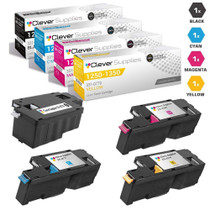
Compatible Dell 1355cnw Premium Quality High Yield Toner Cartridges 4 Color Set
/>

Dell
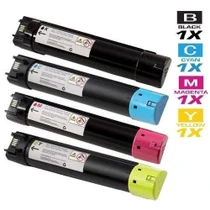
Compatible Dell 5140 Toner Cartridge High Yield 4 Color Set
/>
Dell
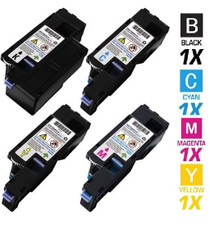
Compatible Dell 1755NF Toner Cartridges High Yield 4 Color Set
/>

Dell
Compatible Dell 1250 High Yield Toner Cartridges 4 Color Set
/>