






 See Compatible Printers
 Read more about our ink!
Dell
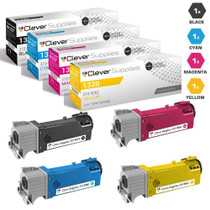
Compatible Dell 1320cn Laser Toner Cartridge 4 Color Set
- Page Yield:
- Black: 2,000, Colors: 2,000 Each
- Availability:
- In Stock
- Shipping:
- Calculated at Checkout

Amazon Price:

- Page Yield:
- Black: 2,000, Colors: 2,000 Each
- Availability:
- In Stock
- Shipping:
- Calculated at Checkout
- Compatible Printers
- Specifications
- SKU:
- Dell-1320cn-4Set
- Printer Brand:
- Dell
- OEM Number:
- 310-9058, 310-9060, 310-9064, 310-9062
- Ink Color:
- Black, Cyan, Magenta, Yellow
- Page Yield:
- Black: 2,000, Colors: 2,000 Each
- Printer Type:
- Laser Cartridge Set
- Condition:
- New Compatible
- Description
- Yields up to Black: 2000 Colors: 2000 Each
- Compatible Dell 1320cn Laser Toner Cartridge 4 Color Set consistently produces high-resolution printouts with enhanced graphics and sharp text
- Unlike bargain brand toners Dell 1320cn Laser Toner Compatible Cartridge 4 Color Set is specifically engineered to work in Dell printers for optimum quality and performance
- Consistent print quality
- High quality of customer service and reduced administration costs
- Packaging: Each
- Compatible with: Dell 1320 and 1320c laser printer
- Print technology: Laser
- Dell 1320cn interacts with the printer providing outstanding results
- Coverage percent: 5%
- Replaces the Following Manufacturer Numbers: 310-9058 DT615 P237C TP112 310-9059 KU052 310-9060 KU051 RY854 TP113 310-9061 KU053 310-9064 KU055 TP115 WM138 310-9065 RY855 310-9062 KU054 RY856 TP114 310-9063 PN124
- Reviews

/> 

Compatible Dell 1320cn Laser Toner Cartridge 4 Color Set delivers consistent quality with high-resolution printouts sharper images and text
Dell 4 color set toner cartridge consistently produces high-resolution printouts with enhanced graphics and sharp text. Toner cartridge is compatible with 1320 and 1320c laser printers and yields up to Black: 2000 Colors: 2000 Each.
Features:
Frequently Asked Questions
How far does a 2,000-page rating really go in a working Dell 1320cn?
Honestly: it depends on your monthly volume, and for this machine class the rating is short. At 200 pages a month, one cartridge's rating stretches about ten months; at 500 a month, about four. Each cartridge in this set — 310-9058 black, 310-9060 cyan, 310-9064 magenta, 310-9062 yellow — is rated at 2,000 pages, and networked machines like the 1320cn tend to collect print jobs from several desks, which shortens the calendar further.
Why is the yield only 2,000 pages?
Because the 1320cn is a compact color laser with compact cartridges — physical size caps how much toner a cartridge can hold. This set does not pretend otherwise: $40.95 buys four cartridges at $10.24 each, so the economics work through a low set price rather than a marathon rating.
Do color pages use up the set faster than black-and-white pages?
Yes. A text page draws almost entirely on the 310-9058 black, while a color page draws on the 310-9060 cyan, 310-9064 magenta and 310-9062 yellow together. Offices mixing both will find the black's 2,000-page rating consumed by volume and the colors' ratings consumed by coverage density.
Can I swap only the cartridge that the printer flags as empty?
Absolutely — the four slots work independently. Keep in mind that on an older set the remaining cartridges are usually not far behind the first empty one, which is why many 1320cn owners change the flagged cartridge now and keep the rest of a fresh set within reach.
How should I store the cartridges I am not installing yet?
Keep them sealed in their bags, flat, at room temperature, out of direct sunlight and away from heaters. Stored that way, a spare 310-9060 or 310-9062 keeps its rated life until the day its slot needs it — there is no benefit to opening cartridges early.
What coverage do these compatible cartridges carry?
A one-year warranty plus one-year free returns, as laid out in our shipping & returns policy. We ship from warehouses in IL, PA, GA and CA, and support answers Monday–Friday, 9 AM–5 PM CST.
Does double-sided printing change how the 2,000-page rating maps onto our paper use?
Yes, in a way that surprises people: the rating counts printed pages, and one duplex sheet carries two of them. A cartridge rated at 2,000 pages therefore covers roughly 1,000 double-sided sheets. On a networked 1320cn doing mostly duplex work, the paper stack shrinks at half the speed the page counter climbs — plan cartridge changes by the counter, not by how fast the paper tray empties.
How can we measure what a cartridge actually delivers in our office, instead of trusting the box?
Note the printer's page counter, or simply the date, when a cartridge goes in, and read it again when the cartridge comes out. The difference is your real yield under your real coverage — the only number worth planning with. Do it separately for the 310-9058 black and one of the colors and you will see your office's own ratio, which is what should drive the next order, not the printed rating.
Two cartridges flag empty in the same week — should they be changed together or one at a time?
One at a time, with a test page between them. The slots are independent, so there is no technical reason to pair the changes, and swapping singly means that if output looks odd afterward you know exactly which cartridge is responsible. Change the flagged unit, print something familiar, confirm it looks right, and only then deal with the second one.
A cartridge flags empty in the middle of a long print run — can the job be finished first?
Often, yes. Removing the unit, rocking it gently to redistribute the toner that remains, and reseating it commonly buys enough pages to finish a short run — the rating's tail is rarely a hard stop. Treat that as a bridge, not a reprieve: order or fit the replacement the same day, because a cartridge borrowing from its last toner will not survive the next long run.
About This Dell 1320cn 4 Color Set
This set restocks the Dell 1320cn's four slots in one box: 310-9058 (black), 310-9060 (cyan), 310-9064 (magenta) and 310-9062 (yellow), each rated at 2,000 pages, for $40.95. The ratings are modest and we present them that way — this is small-machine toner, priced per set so that staying stocked costs little even when a networked printer chews through cartridges at group pace. More options for Dell machines are collected on our Dell toner page.
Related Items
Dell
Compatible Dell 1320cn Premium Quality Laser Toner Cartridge 4 Color Set
/>


Dell
Compatible Dell Color Laser S2825 Laser Toner Cartridges 4 Color Set
/>

Dell
Compatible Dell Color Laser H625 Laser Toner Cartridges 4 Color Set
/>

Dell
Compatible Dell Color Laser H825CDW Laser Toner Cartridges 4 Color Set
/>