






 See Compatible Printers
 Read more about our ink!
Hewlett Packard
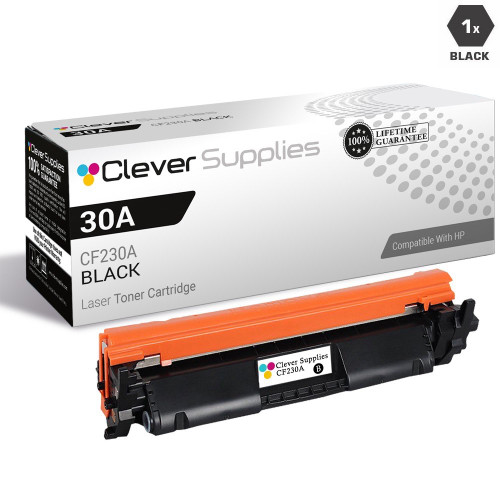
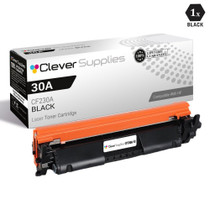
CS Compatible Replacement for HP M227 Toner Cartridges Black (CF230A)

Amazon Price:

- Page Yield:
- Black: 1600
- Availability:
- In Stock
- Shipping:
- Calculated at Checkout
- Compatible Printers
- LaserJet M203d
- LaserJet M203dw
- LaserJet MFP M227d
- LaserJet MFP M227fdn
- LaserJet MFP M227fdw
- LaserJet MFP M227sdn
- LaserJet Pro M203dn
- LaserJet Pro M203dw
- LaserJet Pro MFP M227d
- LaserJet Pro MFP M227fdn
- LaserJet Pro MFP M227fdw
- LaserJet Pro MFP M227sdni>
- Specifications
- SKU:
- CS-HP-30A-M227-BK
- Printer Brand:
- Hewlett Packard
- OEM Number:
- CF230A
- Ink Color:
- Black
- Page Yield:
- Black: 1600
- Printer Type:
- Laser Cartridge
- Description
- Reviews

/> 

Clever Supplies brand products are made in the USA! Why pay more for cheaper product with a high defective rate? You will end up having to send it back to the manufacturer. Your time is valuable. Get a quality product that you KNOW will work. Purchase the Clever Supplies Compatible for HP M227 (CF2M227), Black Toner Cartridge and experience the difference! All Clever Supplies brand products are backed by '100% Quality Satisfaction' 1 year warranty against defects in materials and workmanship for all toner products. Free tech support for any problems for all Clever Supplies brand products. The use of Clever Supplies brand replacement laser toner cartridges and supplies does not void printer warranty. Premium Quality Replacement Toner Cartridge is made by ISO9001 Certified Factory to Meet or Exceed OEM Standards. These units are manufactured 100% brand new with all new parts including OPC drums, wiper blades, a smart chip and other internal parts, they are an economical alternative to expensive OEM CF2M227, Compatible Toner Cartridges. The Compatible Toner Cartridges will produce the same amount of page yield as an OEM cartridge would. This is a Compatible for HPM227 Toner Cartridges Black guaranteed to perform with HP Laser Printers. It replaces the original HP M227 toner cartridges Black. The compatible replacement for CF2M227. The use of compatible replacement Cartridges and supplies does not void Printer Warranty. Our Compatible for CF2M227. Cartridge is a replacement for OEM HP . We offer a 100% Quality Satisfaction Guarantee on our Compatible for CF2M227 Laser Toner Cartridges and supplies. For use in the following printers: Laserjet Pro M203, M203DW; LaserJet Pro MFP M227, M227FDN, M227FDW
Frequently Asked Questions
What cartridge does the LaserJet Pro M227 multifunction printer use?
It uses the CF230A black cartridge, sold under the 30A family name — the same unit that feeds the M203 printers in this HP line. The code is on the label of the cartridge inside the machine, and this listing is that cartridge, rated at 1,600 pages. Multifunction machines in this family, including the M227 series, all draw from this one toner code, the same code the LaserJet M203d runs on, which keeps a mixed fleet on a single spare.
Does copying and faxing use toner from the same cartridge?
Yes. On the M227, printing, copying and received faxes all draw on the one CF230A cartridge — there is no separate copy toner. Scanning is the exception: sending a page to email or a folder uses no toner at all. Offices that copy heavily often wonder why the cartridge drains faster than their print count suggests; the copier's impressions count against the same 1,600-page reserve, so plan the rating across all three jobs.
Copies look pale but prints from the computer look fine. Is the cartridge at fault?
Probably not. When the same page prints crisply from a computer but copies faintly, the problem is usually the scanner glass or the original, not the toner — the cartridge lays the same toner down either way. Clean the glass, especially the narrow strip used by the document feeder, and copy again. If prints are faint too, rock the cartridge side to side to redistribute the toner before blaming the cartridge itself.
How long should 1,600 pages last on a machine that prints, copies and faxes?
Shorter than on a print-only desk, because every copied page spends toner as well. A small office making 300 combined impressions a month gets roughly five months from a cartridge; a registration desk copying forms all day can halve that. The machine's supply status page counts total impressions, which is the figure to watch — it is the honest measure of how much of the cartridge is left.
What is the price, and how does delivery work?
This CF230A is $28.52 from Clever Supplies. It ships from our Illinois, Pennsylvania, Georgia or California warehouse, whichever serves your address fastest, and the shipping and returns page carries the complete delivery and returns terms.
What if the cartridge underperforms?
Every unit is backed by a 1-year warranty and 1-year free returns. A cartridge that leaks, streaks or fails early is replaced or refunded; support is staffed Monday through Friday, 9 AM to 5 PM CST and will walk through the quick checks that separate a cartridge fault from a dirty scanner glass before authorising the return.
Why did the cartridge level drop over a weekend when nobody was printing?
The fax side of the M227 does not keep office hours. Faxes that arrive on Saturday print on Saturday, drawing on the same CF230A as everything else, and a busy fax line can spend a visible slice of the cartridge while the office is dark. If Monday's level looks lower than Friday's memory of it, incoming faxes are the first explanation to reach for — not a fault, and not a mystery leak.
How should the cost of this cartridge be figured on a multifunction machine?
Per impression, across all three jobs. The $28.52 CF230A is rated at 1,600 pages — about 1.8 cents each — and a copied page or a received fax page spends exactly what a printed page spends. Scanning to email or a folder is the one free function. Budget the cartridge against the machine's total impression count, and its appetite stops being a surprise.
Does a multifunction printer change the spare-cartridge logic?
Yes — one empty cartridge stops three jobs at once. A print-only desk can limp along for a day; an M227 with no toner cannot print, cannot copy, and cannot put a received fax on paper. Keep the sealed spare in the same room as the machine, and make fitting it the trigger to order the next one, so the cupboard is never the reason the whole front desk is standing idle.
Prints and copies have both gone faint together. Where do I start?
With the cartridge, because both jobs share it. When every kind of output fades at once, toner settling is the usual cause: take the CF230A out, rock it gently side to side to level the powder, and judge the result on a printed page rather than a copy — the print path removes the scanner glass from the evidence. Even output means life remains; the same fade means the cartridge is nearly done.
About This CF230A Cartridge for the M227
One cartridge runs the whole M227: print jobs from the network, walk-up copies at the glass, and the faxes that still arrive on paper. This CF230A — 1,600 pages, 30A on the order list — is built for exactly that combined workload, and its single code means the spare in the cupboard fits every M203 and M227 machine in the building. At $28.52 with a year of warranty and returns cover, it is the straightforward way to keep a multifunction printer fed.
Related Items


Hewlett Packard
CS Compatible Replacement for HP M227 Toner Cartridges Black (CF232A)
/>

Hewlett Packard
CS Compatible Replacement for HP M227FDN Toner Cartridges Black (CF230A)
/>

Hewlett Packard
CS Compatible Replacement for HP M227FDW Toner Cartridges Black (CF230A)
/>
Hewlett Packard
CS Compatible Replacement for HP 30A Toner Cartridges Black (CF230A)
/>