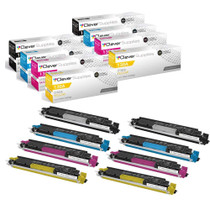
With the HP 130A Color LaserJet Series, users can enjoy a versatile lineup of printers, including the PRO M176, PRO M176N, PRO MFP M177FW, PRO MFP M176, PRO MFP M177, M176, M177, and M177FW models, catering to various printing needs with efficiency and reliability. Whether it's for personal or professional use, these printers offer high-quality prints with ease of use and seamless integration into any environment. Compatible with these printers are the CF350A Black, CF351A Cyan, CF353A Magenta, and CF352A Yellow cartridges, recognized as the HP 130A toner cartridge and toner cartridge. These cartridges ensure consistent and vibrant color output for all printing tasks, providing reliable performance and impressive results. The LaserJet Pro 100 COLOR MFP M176 and PRO 100 COLOR MFP M177 series printers offer multifunction capabilities, including printing, scanning, copying, and optional faxing, making them ideal for busy office environments. With their user-friendly design and advanced features, these printers streamline workflows and enhance productivity. With the HP 130A cartridges, users can expect sharp and clear text, as well as accurate color reproduction for graphics and images. The CF350A Black cartridge delivers deep blacks for professional-looking documents, while the CF351A Cyan, CF353A Magenta, and CF352A Yellow cartridges ensure vibrant and true-to-life colors for impressive prints. Investing in the HP 130A Color LaserJet Series printers and cartridges provides users with reliable printing solutions that meet the demands of today's fast-paced work environments. Whether it's for small businesses, home offices, or corporate settings, these printers deliver exceptional performance and quality prints every time.
Frequently Asked Questions
My printer says "Pro 100 Color MFP M176" — is this its set?
Yes. That long name is the formal label for the M176, and this is its complete toner set: black CF350A, cyan CF351A, yellow CF352A, and magenta CF353A — the 130A cartridge family. Match any one of those numbers on your supply screen and you have the right box.
What does the set include, in plain terms?
Four cartridges — one for each slot in the machine. The black handles text, forms, and faxes; the three colors combine for color documents and copies. Replace them individually as each runs out, or all together for a full refresh.
How much printing does a set represent?
Roughly 1,300 pages from the black cartridge and roughly 1,000 pages from each color. An office printing bulletins, letters, and color handouts will see the black go first, as it does in nearly every M176.
Our machine copies far more than it prints — does that matter?
Only for pacing. Copies draw on the same four cartridges as prints do, page for page — the black copier load is usually why the CF350A empties ahead of the colors. Scanning documents to a computer, by contrast, uses no toner at all.
How much is the set for the Pro 100 Color MFP M176?
$92.56 for the complete four-cartridge set in this listing.
What if we need help or a cartridge fails?
Every cartridge carries a 1-year warranty and 1-year free returns, and our support team is on hand Monday–Friday, 9 AM–5 PM CST. Orders ship from our IL, PA, GA, and CA warehouses — the shipping & returns page lays out timing and returns.
When we refresh all four slots, what sequence gives the cleanest result?
Change the cartridges one at a time, closing the access door between each so the machine registers them individually, and finish with the CF350A black. Then print one color page you know well. Registering each 130A cartridge in turn avoids confusing the supply readings, and the final known page judges the whole refreshed set at once instead of slot by slot.
Why does the black in this set empty ahead of the colors in a copy-heavy office?
Because the copier's default work is black work: forms, letters, and sign-in sheets copied all day spend the CF350A on every sheet, while the colors are drawn only when the original itself carries color. An office that copies far more than it prints should expect to top up black between full sets — that is the normal rhythm of the Pro 100 Color MFP M176, not uneven wear.
What is the best proof page for the three color cartridges?
A color handout or notice your office issues regularly — something with a photo or a bold colored heading. The CF351A, CF352A, and CF353A combine on exactly that kind of page, and a familiar design exposes a weak channel as an obvious color shift. Judging by a page with a history beats judging by a built-in pattern you have no baseline for.
Two cartridges from the set are installed and two are not — how should the rest be kept?
Sealed in the set carton, flat, in the same cabinet as the machine's other supplies, with a note of which numbers are already in use. Keeping the unused CF352A or CF353A in their original carton protects the seals and keeps the set's bookkeeping visible: one glance shows what the machine still has waiting for it.
About This Pro 100 Color MFP M176 Set
Under its formal name sits the same dependable LaserJet Pro MFP M176 that runs countless small offices, and this set is its full supply in one purchase. One order covers the HP machine end to end — black for the paperwork, colors for everything that has to be seen — with no second order hiding behind the first.







 See Compatible Printers
 Read more about our ink!