







 See Compatible Printers
 Read more about our ink!
Hewlett Packard
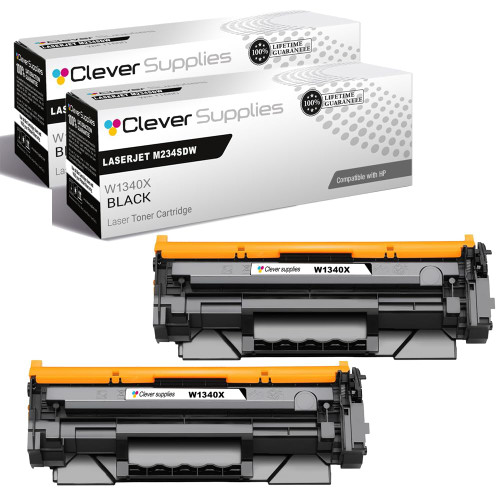
Compatible HP 134X (W1340X) Toner Cartridge 2 Black
- Page Yield:
- Black: 2400
- Availability:
- In Stock
- Shipping:
- Free Shipping

Amazon Price:

- Page Yield:
- Black: 2400
- Availability:
- In Stock
- Shipping:
- Free Shipping
- Compatible Printers
- Specifications
- SKU:
- CS-HP-134X-LASERJET-M234SDW-2BK
- Printer Brand:
- Hewlett Packard
- OEM Number:
- W1340X
- Ink Color:
- Black
- Page Yield:
- Black: 2400
- Printer Type:
- Laser Cartridge
- Condition:
- New Compatible
- Description
- Reviews



Ensure high-volume productivity with the HP 134X toner cartridge, featuring the HP 134X W1340X BLACK. This high-yield, compatible HP cartridge is built to deliver bold black text and exceptional clarity for all your printing tasks. Designed for durability and performance, the HP 134X toner cartridge offers more pages per cartridge, making it ideal for busy offices and frequent print jobs. Whether you're handling large reports or everyday business documents, this cartridge delivers consistent, professional-quality output. Compatible with LASERJET M209DW, LASERJET M234DW, and LASERJET M234SDW printers, this toner integrates effortlessly for smooth operation and reliable performance. Its easy installation helps reduce downtime and supports efficient workflows. Count on the HP 134X toner cartridge to deliver outstanding results with every print. With a higher yield and sharp print quality, it's a dependable choice for keeping your productivity high and your prints sharp.
Cross-reference: HP W1340X, the 134X high-yield toner cartridge (2,400 pages), is the same cartridge Canon sells as Canon Cartridge 071 (5645C001AA, 1,200 pages) and Cartridge 071H (5646C001AA, 2,500 pages) for the Canon imageCLASS LBP122dw, MF272dw, MF273dw and MF275dw printers (ISO/IEC standard yields).
Frequently Asked Questions
Why does a shipping desk keep two cartridges ready?
Labels cannot wait. A faded barcode fails at the carrier's scanner and the parcel comes back, so a dispatch desk runs one W1340X in the printer and keeps the second from the pack within arm's reach. Each cartridge is rated at 2,400 pages of label stock.
Faded labels started failing scans. Is toner really the cause?
Very often. Scanners read contrast, and a cartridge near the end lays down gray where the bars should be black. Rock the cartridge side to side and reprint a label: if the bars come back solid and scan cleanly, the diagnosis was right and the remaining life is short.
Do labels use more toner than office pages?
Mostly less per sheet — a label covers little of its backing — but the density demand is higher, because a label that prints pale is a label that fails. Printers in this family, including the LaserJet M209dw, draw every label from the same single cartridge, so its condition is the whole story.
How should the spare be stored in a warehouse?
Sealed in its box on a shelf away from loading-bay doors, forklift heat and direct sun through skylights. Warehouses are dusty places; the sealed packaging is the protection, so keep the spare boxed until the moment it is fitted and it will start life clean.
What is the ordering rhythm for a two-pack user?
When the spare goes into the printer, order the next pack. The working cartridge has a long rated life ahead of it at that moment, which gives the replacement pack plenty of time to arrive — the rhythm keeps one cartridge working and one waiting, permanently.
What cover does the pack carry?
Both cartridges are covered by a 1-year warranty and 1-year free returns, detailed on our shipping and returns page. Packs are sent from warehouses in Illinois, Pennsylvania, Georgia and California, and our support team is available Monday through Friday, 9 AM to 5 PM CST.
How can the desk spot a fading cartridge before labels start failing?
Keep one known-good label taped beside the printer — printed when a fresh W1340X went in — and compare a new label against it whenever output looks doubtful. The reference makes gray bars obvious at a glance, days before the carrier's scanner starts rejecting parcels, and the spare from the pack can be fitted on your schedule, not the courier's.
When should the desk check that the spare is really there?
Before the busiest dispatch periods, and whenever the working cartridge is fitted. Those are the two moments that matter: a quick shelf check ahead of a peak confirms the second cartridge is sealed and within reach, and fitting the spare is itself the signal to order the next pack, so cover never silently runs out.
What does each cartridge in the pack cost the business?
About $31.96 — half of the $63.91 two-pack — for a W1340X rated at 2,400 pages, roughly 1.3 cents per page at standard coverage. Labels use little of their backing sheet, so the effective cost per parcel is small; the expensive label is the faded one that comes back, which is what the spare exists to prevent.
What should happen to the spent cartridge in a busy warehouse?
Move it out of the label area once its replacement has printed a batch of labels that scan cleanly. Until that proof run, it stays as the fallback; afterwards it can go with the warehouse's ordinary disposal or recycling. Keeping the empty away from fresh label stock avoids any mix-up during a rushed dispatch session.
About This HP 134X Black Toner Cartridge 2-Pack
This compatible HP 134X (W1340X) two-pack, at $63.91, sits in the HP toner cartridges range at Clever Supplies. It is written for dispatch work, where print quality is measured by a scanner's verdict: solid black bars, first-time reads, and a spare close enough that standards never slip.
Compatibility runs to exactly three machines — the LaserJet M209dw, the LaserJet M234dw and the LaserJet M234sdw. If your printing is occasional, the standard 134A (W1340A) two-pack fits the same machines and is rated at 1,150 pages. A 134X (W1340X) single cartridge is listed as well for one-off replacements.
Related Items


Hewlett Packard
Compatible HP 134X (W1340X) Toner Cartridge 2 Black



Hewlett Packard
Compatible HP 134X (W1340X) Toner Cartridge Black


Hewlett Packard
Compatible HP 134X (W1340X) Toner Cartridge 2 Black

Hewlett Packard
Compatible HP 134X (W1340X) Toner Cartridge 2 Black