






 See Compatible Printers
 Read more about our ink!
Dell
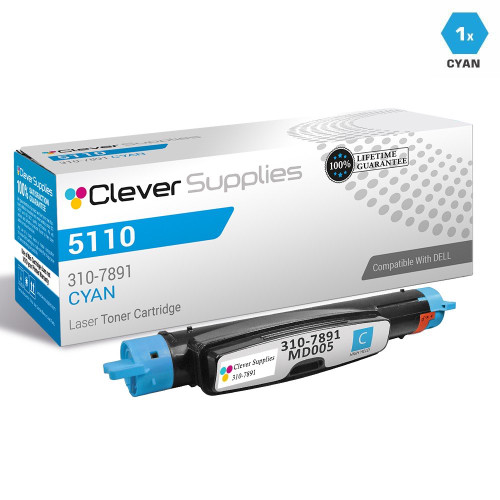
Compatible Dell 5110 Toner Cartridge Cyan (310-7891)
- Page Yield:
- Color: 12000
- Availability:
- In Stock
- Shipping:
- Free Shipping

Amazon Price:

- Page Yield:
- Color: 12000
- Availability:
- In Stock
- Shipping:
- Free Shipping
- Compatible Printers
- Specifications
- SKU:
- CS-Dell-5110-C
- Printer Brand:
- Dell
- OEM Number:
- 310-7891
- Ink Color:
- Cyan
- Page Yield:
- Color: 12000
- Printer Type:
- Laser Cartridge
- Description
- Reviews

/> 

Clever Supplies brand products are made in the USA! Why pay more for cheaper product with a high defective rate? You will end up having to send it back to the manufacturer. Get a quality product that you KNOW will work. Purchase the Clever Supplies Products Compatible for Dell 5110 (310-7891) Cyan and experience the difference! All Clever Supplies brand products are backed by '100% Quality Satisfaction' 1 year warranty against defects in materials and workmanship for all toner products. Free tech support for a Clever Supplies problems for all Clever Supplies brand products. The use of Clever Supplies brand replacement laser toner cartridges and supplies does not void printer warranty. Premium Quality Replacement Toner Cartridge is made by ISO9001 Certified Factory to Meet or Exceed OEM Standards. These units are manufactured 100% brand new with all new parts including OPC drums, wiper blades, a smart chip and other internal parts, they are an economical alternative to expensive OEM 310-7891 Compatible Toner Cartridges. This is a Compatible for Delltoner cartridges Cyan guaranteed to perform with Dell Laser Printers. It replaces the original Dell 5110 toner cartridge cyan (Cyan) . The compatible replacement for 310-7891. We offer a 100% Quality Satisfaction Guarantee on our Compatible for 310-7891 laser toner cartridges and supplies. For use in the following printers: Color Laser 5110cn
Frequently Asked Questions
The cartridge I pulled from our 5110 is marked 310-7891 — is this listing that same cartridge?
Yes. The number in parentheses in this listing's title, 310-7891, is the Dell part number for the cyan cartridge used by the Dell 5110. If the cartridge you removed is stamped 310-7891, this is the matching replacement — checking the part number on the old cartridge is the most reliable way to order the right cyan unit without guesswork.
How many pages does this cartridge cover?
It is rated at up to 12,000 pages, based on the standard 5% coverage measurement used across the toner industry. Offices printing mostly documents with modest color will land close to that figure; heavy photo and graphics work will use the cyan supply sooner.
What is the per-page cost at this price?
At $69.55 and up to 12,000 pages, cyan works out to approximately 0.58 cents per page. That makes it easy to budget color printing for a 5110: track your monthly color page count and you can predict your cyan spend within a few dollars.
When should I order the next one?
A good rule is to reorder when the printer first reports low cyan rather than waiting for it to run dry — with up to 12,000 pages per cartridge, most offices only face this decision a few times a year. Keeping one spare on the shelf means a faded-print morning never turns into a stopped workday.
Is this a genuine Dell product?
This is a compatible cartridge, not a Dell original. It is built to the 310-7891 specification for the Dell 5110 and delivers comparable color and yield, backed by a one-year warranty. If anything goes wrong, our shipping & returns policy gives you one-year free returns.
Where does it ship from, and when is support available?
Your cartridge ships from the nearest of our Illinois, Pennsylvania, Georgia and California warehouses. Our support team is on hand Monday through Friday, 9 AM to 5 PM CST for order or product questions, and the rest of our Dell range lives on the Dell toner page.
How should a spare 310-7891 be kept so it is ready when cyan runs down?
Sealed in its bag, flat, at room temperature and away from sunlight and heat — the same conditions the cartridge was shipped under. Toner is a dry powder and does not dry out in storage, so a spare bought today keeps its full up-to-12,000-page capacity across the months a 5110 typically takes to work through the installed unit. Store it where the printer lives rather than in a remote stockroom, and the eventual change stays the few-minutes job it should be instead of a search through the building.
What does low cyan look like on the page before the printer stops?
Cyan thins out gradually, and the symptoms land in the blue-green half of the palette: skies wash out to a pale gray-blue, greens drift yellow and dull, and corporate blues stop matching the artwork on screen. Reds and yellows stay strong, which is what tells you the problem sits in this one slot. Because the fade is gradual, an office often adapts to it for weeks without noticing — comparing a fresh print against an older copy of the same document is the quickest way to catch a 310-7891 that is quietly running down.
Prints have faded right before a big run and there is no spare on the shelf — is there a stopgap?
Yes, a short one. Remove the 310-7891 and rock it gently from side to side several times to redistribute the toner that has settled away from the feed area, then refit it firmly. Output usually recovers enough to carry a working day or finish the run in progress. It buys time, not toner: once the cartridge has been shaken once, treat the next fade as final, and put the replacement on order the same day rather than waiting for the printer to stop mid-job.
How do we confirm a new cyan cartridge is printing properly?
Print a page with solid areas of blue and green — a chart, a test page or a familiar branded document — and check that the color is full-strength and even, with no pale bands running across it. Judge on the second or third page rather than the first, since a cartridge just out of its box can take a page to settle into full density. Even color by page three means the swap is done; banding that survives taking the 310-7891 out and reseating it points at the cartridge itself.
About This Dell 5110 Cyan Toner Cartridge (310-7891)
This compatible cyan toner cartridge for the Dell 5110 carries Dell part number 310-7891 and is rated at up to 12,000 pages. Ordering by part number takes the guesswork out of restocking: match the 310-7891 marking on the cartridge you removed and you have the right cyan replacement. Priced at $69.55 — about 0.58 cents per page — it is covered by a one-year warranty with one-year free returns, and ships from our warehouses in Illinois, Pennsylvania, Georgia and California.
Related Items
Dell
Compatible Dell 5110-HY Toner Cartridge Cyan (310-7891)
/>


Dell
Compatible Dell 310-7891 Toner Cartridge Cyan
/>

Dell
Compatible Dell 310-7891 Toner Cartridge High Yield Cyan
/>


Dell
Compatible Dell 5110 (310-7892) Toner Cartridge Cyan