




ImageRunner 1740
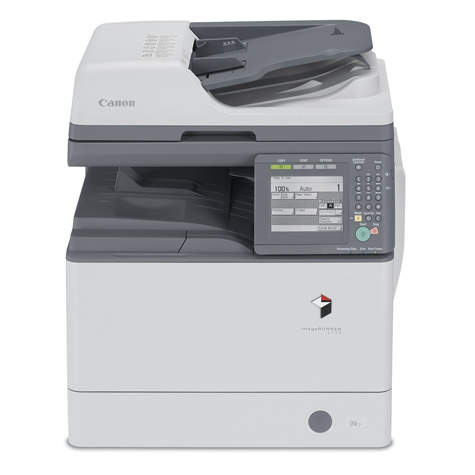
Departments that have outgrown the 30-page class step up to the Canon imageRUNNER 1740: 42 pages per minute, with copy, print and scan fitted as standard and fax left off the base configuration. The engine runs on the GPR-39 cartridge, rated up to 15,100 pages — the same supply that supply paperwork may list under its other designation, GPR39BK.
The design assumes an office adding capacity before it adds connections: automatic duplexing is standard, while the network print kit is an option to fit at the point where shared printing becomes necessary. Until then the 1740 serves as a fast departmental copier and print station for a team whose volume has clearly justified the bigger engine — the kind of shared workload that would keep a slower machine queued all morning.
Toner Cartridges for the imageRUNNER 1740
| Cartridge | Color | Page Yield |
|---|---|---|
| GPR39BK (single) | Black | Rated 15,100 pages |
| GPR39BK 2-pack | Black | Rated 15,100 pages per cartridge |
| GPR39BK 3-pack | Black | Rated 15,100 pages per cartridge |
| GPR39BK 5-pack | Black | Rated 15,100 pages per cartridge |
| GPR39BK 10-pack | Black | Rated 15,100 pages per cartridge |
| GPR-39 | Black | Rated 15,100 pages |
| GPR-39 3-pack | Black | Rated 15,100 pages per cartridge |
| GPR-39 5-pack | Black | Rated 15,100 pages per cartridge |
| GPR-39 Premium Quality 5-pack | Black | Rated 15,100 pages per cartridge |
Which cartridge should you buy?
At 42 pages per minute the machine covers ground quickly, yet a 15,100-page yield still stretches a long way, so choose the pack by how painful an empty machine would be. A self-sufficient department can run on singles and reorder in good time. A busier floor — one where the copier queue is a standing feature of the morning — should hold the 2-pack or 3-pack, and a stockroom serving several departments can take the 5-pack or 10-pack and fold toner into a quarterly order. There is no second yield tier to calculate; the cartridge is the cartridge.
Chip, toner and everyday use
High-speed engines empty cartridges in bursts: one reporting week can consume what a quiet month would not, so check the spare shelf before the big jobs rather than after them. Keep the replacement cartridge in its packaging, stored flat and out of direct light, until fitting day. When the old unit finally comes out, give the new one a gentle side-to-side rock before it goes in — that settles the toner bed evenly, so the first pages off a fresh cartridge print at full density from the start.
Frequently Asked Questions
What toner does the imageRUNNER 1740 use?
The Canon GPR-39 black cartridge, rated up to 15,100 pages and also designated GPR39BK in supply listings.
Does the base 1740 send and receive faxes?
No — fax is not part of the base configuration. Departments that need it built in step up to the imageRUNNER 1740IF, which adds the fax board to this same platform.
Is network printing built into the 1740?
It is an option rather than standard equipment: Canon's network print kit adds shared printing when the office is ready for it. Automatic duplexing, on the other hand, is standard.
How many pages does one cartridge yield?
Up to 15,100 pages at five percent coverage — a long interval, though heavy departmental volume at this speed works through it steadily.
More printers that use the same cartridges
A single GPR-39 supply is shared right across the 1700 series: ImageRunner 1750IF, ImageRunner 1750I, ImageRunner 1750, ImageRunner 1740IF, ImageRunner 1740I, ImageRunner 1730IF, ImageRunner 1730I, ImageRunner 1730.