




HL-L8250CDN
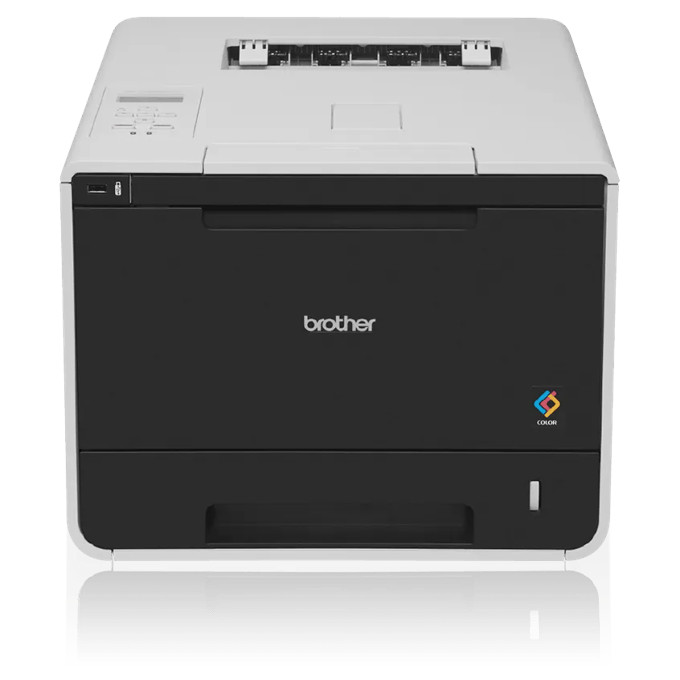
The Brother HL-L8250CDN is a color laser printer whose toner shelf is built as a three-step ladder. The first step is the standard-yield TN331BK in black, matched by TN331C in cyan, TN331M in magenta and TN331Y in yellow. The second step is the high-yield TN336BK, rated for about 4,000 pages, with TN336C, TN336M and TN336Y at about 3,500 pages apiece. Brother also documents a super high-yield TN339 line for this model at roughly 6,000 pages per cartridge; that line is not among the listings on this page, which concentrates on the TN331 and TN336 ranges. Imaging comes from the DR331CL drum unit set, rated for about 25,000 pages.
On a shared workgroup machine the four colors never run down evenly. Black usually empties first because everyday office output is mostly text, while a color-heavy month can drain one color long before the others. That is why this page sells every cartridge on its own as well as in sets: a single slot can be refilled the day it runs dry, and the rest of a set stays sealed in the supply cabinet instead of being opened early.
Toner Cartridges for HL-L8250CDN
| Cartridge | Color | Page Yield |
| TN331 | Black | See product page |
| TN331 | Cyan | See product page |
| TN331 | Magenta | See product page |
| TN331 | Yellow | See product page |
| TN336BK | Black | ~4,000 pages |
| TN336C | Cyan | ~3,500 pages |
| TN336M | Magenta | ~3,500 pages |
| TN336Y | Yellow | ~3,500 pages |
Drum unit for this model:
- DR331CL Genuine OEM Drum Unit Set- 25,000 pages — about 25,000 pages
Listings that carry this model in their name:
- HL-L8250CDN 4 Color Set (TN331BK, TN331C, TN331M, TN331Y)
- HL-L8250CDN Black (TN331BK)
- HL-L8250CDN Cyan (TN331C)
- HL-L8250CDN Magenta (TN331M)
- HL-L8250CDN Yellow (TN331Y)
Genuine Brother singles also stocked:
- TN336BK Black Genuine OEM - 4,000 pages
- TN336C Cyan Genuine OEM - 3,500 pages
- TN336M Magenta Genuine OEM - 3,500 pages
- TN336Y Yellow Genuine OEM - 3,500 pages
- TN331BK Black Genuine OEM - 2,500 pages
- TN331C Cyan Genuine OEM - 1,500 pages
- TN331M Magenta Genuine OEM - 1,500 pages
- TN331Y Yellow Genuine OEM - 1,500 pages
Multi-packs and color sets stocked for the same cartridge families:
- TN-336 5 Color Set (TN336BK, TN336C, TN336M, TN336Y)
- TN331 2 Black (TN331BK)
- TN331 3 Black (TN331BK)
- TN331 5 Color Set (TN331BK, TN331C, TN331M, TN331Y)
- TN331 8 Color Set (TN331BK, TN331C, TN331M, TN331Y)
- TN331 3 Color Set (TN331C, TN331M, TN331Y)
- TN331 6 Color Set (TN331C, TN331M, TN331Y)
- TN331 5 Black (TN331BK)
- TN331 4 Color Set (TN331BK, TN331C, TN331M, TN331Y)
- TN331 (TN331Y TN336Y) Yellow
- NT436 (TN336BK TN336C TN336M TN336Y) 4 Color Set
- TN331 (TN331BK) Black 2 Pack
- TN331 (TN331BK,TN331C,TN331Y,TN331M) 4 Color Set
- TN336BK TN336C TN336M TN336Y Black Cyan Magenta Yellow Genuine OEM s 4 Color Set - Black: 4,000 pages, Color: 3,500 pages each
- TN336BK Black Genuine OEM 2 Pack - 4,000 pages
- TN331C TN331M TN331Y Cyan Magenta Yellow Genuine OEM 3 Color Set - 1,500 pages each
Which cartridge should you buy?
Match the step of the ladder to how this printer actually works. The standard-yield TN331 line suits an HL-L8250CDN that prints in short bursts — a few letters, labels and invoices a day — because each cartridge costs less upfront and the toner inside is less likely to sit unused for years. Once the machine is producing color handouts, reports or marketing pieces every week, the high-yield TN336 line is the better buy: every cartridge carries more toner, so the cost per page drops and replacements come around less often. Buying by color rather than by full set matters here too. If only magenta is low, a single TN336M restores the machine; a four-color set only pays when several slots are close to empty at the same time.
Chip, toner and everyday use
Each cartridge carries a chip the printer reads to track toner level and confirm the cartridge type, so a new cartridge should register as full as soon as it is seated. Push it in until it clicks into its color slot; a cartridge resting slightly proud of its seat is the most common reason a fresh install still shows the old low-toner warning. Yield figures are estimates based on 5% page coverage, and dense color pages use noticeably more. When output first turns faint, take the cartridge out and rock it gently side to side to redistribute the toner — that often recovers a few hundred pages while the replacement ships. Keep spare cartridges sealed, flat and away from heat until the day they are needed.
Frequently Asked Questions
What toner does the Brother HL-L8250CDN use?
It uses the TN331 standard-yield and TN336 high-yield toner families in black, cyan, magenta and yellow, plus the DR331CL drum unit set rated at about 25,000 pages. Brother's documentation for the model also lists a super high-yield TN339 line, which is not stocked on this page.
Is there a super high-yield cartridge for this printer?
Brother rates a TN339 line for this model at about 6,000 pages in every color, but no TN339 listing is sold here. The highest-yield cartridges stocked on this page are the TN336 family — about 4,000 pages in black and 3,500 in each color.
Does the HL-L8250CDN use a separate drum unit?
Yes. Toner and imaging are separate on this machine: the DR331CL drum unit set handles imaging for roughly 25,000 pages, spanning many toner changes, and is replaced on its own cycle when streaks or spots begin to appear.
Only one color ran out. Do I have to replace all four?
No. Each color is an independent cartridge in its own slot, so you can replace just the empty one — a single TN336Y, for example — and leave the others until they run low in turn.
More printers that use the same cartridges
The same TN331/TN336 cartridge families also fit these models:
Brother-TN336, Brother-TN339, DCP-L8400, DCP-L8400CDN, DCP-L8450, DCP-L8450CDN, DCP-L8450CDW, HL-L8250, HL-L8350, HL-L8350CDW, HL-L8350CDWT, HL-L9200CDW, HL-L9200CDWT, MFC-L8600, MFC-L8600CDW, MFC-L8650, MFC-L8650CDW, MFC-L8850, MFC-L8850CDW, MFC-L9550CDW, MFC-L9550CDWT.