




WorkCentre 3215NI
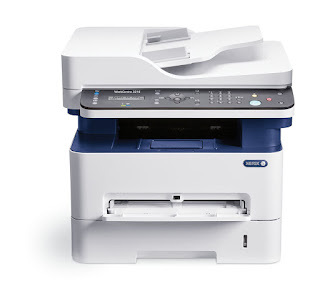
The Xerox WorkCentre 3215NI packs print, copy, scan and fax into a space-saving monochrome laser multifunction aimed at small and home offices. Keep it fed with the 106R02775 toner cartridge and it handles everyday document work without fuss; when you want longer runs between swaps, step up to the high-yield 106R02777. Its imaging runs through the separate 101R00474 drum unit.
In a home office the printer is also the copier, the scanner and the fax, usually tucked into a corner with no supply room behind it. The 3215NI's two-yield toner choice and separate drum suit that reality: buy the cartridge size that matches your month, and let the drum wear on its own schedule in the background.
Toner Cartridges for WorkCentre 3215NI
| Cartridge | Color | Page Yield |
|---|---|---|
| 106R02775 — standard cartridge, single | Black | See product page |
| 106R02777 — high-yield cartridge, single | Black | High yield — see product page |
| 106R02777 — high-yield 3 pack | Black | High yield — see product page |
| 106R02777 — premium quality high-yield 3 pack | Black | High yield — see product page |
| WorkCentre 3215NI listing — high-yield single | Black | High yield — see product page |
| WorkCentre 3215NI listing — high-yield 3 pack | Black | High yield — see product page |
Drum unit, replaced separately from the toner:
- 101R00474 drum unit — replaced on its own schedule, when print quality starts to fade.
Which cartridge should you buy?
For this machine the yield decision comes first. The standard 106R02775 suits a home office that prints in small batches. The high-yield 106R02777 — also sold in 3 packs, including a premium-quality version, and in listings named for the 3215NI — suits a desk that prints every day, because each change of cartridge comes further apart. The drum is the second, quieter decision: the 101R00474 only needs replacing when print quality starts to fade, so there is no need to stock it like toner. Compatible supplies here include a 1-year warranty and 1-year returns.
Chip, toner and everyday use
Changing toner on the 3215NI means opening the top cover, lifting out the old cartridge and clicking the new one into place. Give the new cartridge a gentle rock first so the toner levels out, especially if it has been standing in a cupboard. Yield ratings assume about 5 percent coverage, so a week of contracts will move the gauge faster than a week of short notes. When the drum eventually comes due, handle its replacement by the edges and keep it out of strong light while it is exposed. A test page after any swap confirms the machine is ready for the next job.
Frequently Asked Questions
What toner does the WorkCentre 3215NI use?
The standard cartridge is the 106R02775, and the high-yield alternative is the 106R02777. Both fit this machine, and both are listed here as compatibles, singly and in 3 packs.
When should the drum unit be replaced?
The 101R00474 drum wears on its own schedule, separate from toner. The signal to change it is print quality starting to fade — not an empty toner cartridge.
Does the 3215NI take the same cartridges as the WorkCentre 3215?
Yes — the WorkCentre 3215 and the other models listed below share this toner and drum family, which keeps things simple if you run more than one of them.
Standard or high yield for a home office?
If printing comes in occasional small batches, the standard 106R02775 is the tidy choice. If the machine prints daily, the high-yield 106R02777 means fewer swaps and fewer orders across the year.
More printers that use the same cartridges
These Xerox models use the same toner and drum family as the WorkCentre 3215NI: Phaser 3052, Phaser 3260, Phaser 3260DI Toner Cartridges, Phaser 3260DNI Toner Cartridges, WorkCentre 3215, WorkCentre 3225, WorkCentre 3225DNI.