




Phaser 3052
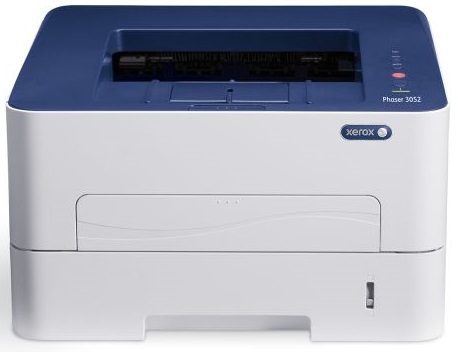
Compact and no-nonsense, the Xerox Phaser 3052 is a monochrome laser printer sized for desktops and small offices. It prints with the 106R02775 black cartridge, and there is a high-yield alternative for busier desks, the 106R02777. Behind both sits a separate drum unit, the 101R00474, which is swapped on its own schedule instead of with every cartridge.
This is a printer for teams that produce documents rather than marketing brochures: letters, reports, forms and labels in clean black and white. Its small footprint lets it live on a desk corner or a side table, and because both cartridge options drop in the same way, supply swaps stay quick and inexpensive in time if not in thought.
Toner Cartridges for Phaser 3052
Every listing below is the Phaser 3052 cartridge family — the standard and high-yield cartridges share the same housing, and each listing covers both part numbers.
| Cartridge | Color | Page Yield |
|---|---|---|
| 106R02775 / 106R02777, single cartridge | Black | See product page |
| 106R02775 / 106R02777, 2 pack | Black | See product page |
| 106R02775 / 106R02777, 4 pack | Black | See product page |
Which cartridge should you buy?
Start with how much the printer actually works. A lightly used desk machine does fine on the standard cartridge, replaced as needed. If the 3052 is the default printer for a small team, the high-yield version is the smarter default: it runs longer between changes, so the printer spends less time flashing a low-toner warning and you spend less time ordering. Pack size is the second decision. Singles suit one personal printer; a 2 pack keeps a spare beside the machine; a 4 pack fits a shared office that would rather stock once a quarter than once a month. When in doubt, pair the high-yield cartridge with a spare — the combination removes most supply interruptions from a small office entirely.
Chip, toner and everyday use
Each cartridge carries a chip the printer reads on install, so a fresh unit registers its level as soon as it seats. Keep unopened cartridges in their bags, stored flat at room temperature, and fit one promptly once opened. Remember that the drum unit ages separately from the toner: if output quality drops while plenty of toner remains, check the drum before blaming the cartridge. Rated yields are estimates worked out at standard coverage, so dense pages will always land short of the headline figure.
Frequently Asked Questions
What toner does the Phaser 3052 use?
It takes the 106R02775 black cartridge as its standard supply, with the 106R02777 as the high-yield option. Both fit the same slot and are stocked above as singles and multi-packs.
Does the Phaser 3052 need a separate drum?
Yes — print quality comes from the 101R00474 drum unit, a separate part replaced on its own longer cycle. A fading page with a fresh cartridge usually points at the drum, not the toner.
Which pack sizes are stocked for this model?
The Phaser 3052 cartridges come as a single, a 2 pack and a 4 pack. Busy shared machines are best served by the 4 pack; a personal desk printer rarely needs more than a single plus a spare.
Where do I find the page yield of each cartridge?
Each product listing shows the rated yield for that cartridge. Treat the figure as an estimate at standard page coverage — real output moves up or down with how dense your pages are.
More printers that use the same cartridges
The same two cartridges also feed several sister machines, so one supply shelf can cover a mixed fleet: Phaser 3260, Phaser 3260DI, Phaser 3260DNI, WorkCentre 3215, WorkCentre 3215NI, WorkCentre 3225, WorkCentre 3225DNI.