Frequently Asked Questions
What does "Premium Quality" actually mean on this listing?
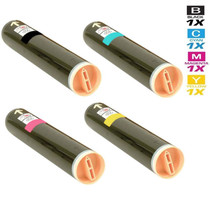
It is a label on the listing, not a different cartridge. This Premium set contains the same four cartridges as the standard Phaser 6128 set — black 106R01455, cyan 106R01452, magenta 106R01453 and yellow 106R01454 — at the same $83.25 price and under the same warranty and returns terms. We would rather say that plainly than invent a difference that is not there.
We print photo-heavy listing flyers. How far do the color ratings really go?
Cyan, magenta and yellow are each rated at 2,500 pages and black at 3,100 pages, measured at standard coverage. A full-page property photo lays down far more toner than a text sheet, so a flyer-heavy week consumes the color ratings noticeably faster than the headline numbers suggest. For planning purposes, treat the ratings as a ceiling for mixed office work, not a promise for photo runs.
Which four part numbers should I read off the machine?
Open the supplies status screen and look for 106R01455 for black, 106R01452 for cyan, 106R01453 for magenta and 106R01454 for yellow. Those are the numbers this set is built around. If your machine shows a different series of numbers, stop and match those instead — the badge on the front of the printer is not the authority, the supply numbers are.
Magenta ran dry in the middle of a flyer run. Do I lose the whole set?
No. The cartridges are independent sealed units in separate slots. Replace the magenta on its own, leave black, cyan and yellow where they are, and the run can continue. Nothing about a single empty color obliges you to change the rest of the set.
How are orders shipped, and what if something arrives wrong?
Stock ships from the nearest of our IL, PA, GA or CA warehouses, and the full delivery and returns picture is on our shipping and returns page. Every cartridge carries a 1-year warranty with 1-year free returns, so a wrong or faulty unit is a straightforward exchange rather than a sunk cost.
Who do I talk to if a color starts printing streaky?
Our support team answers Monday through Friday, 9 AM to 5 PM CST, and the rest of the Xerox lineup lives on the brand page. Before you call, note which of the four cartridges was most recently changed — that single detail speeds up any troubleshooting conversation considerably.
We have an open-house weekend coming up. How do we check toner before a big flyer run?
Open the supplies status screen on Friday, before the run starts. It reports each cartridge separately — black 106R01455, cyan 106R01452, magenta 106R01453 and yellow 106R01454 — so you can see exactly which channel is sitting low. Swap the low one before three hundred flyers are queued, not in the middle of them. Remember that the 2,500-page color ratings assume standard coverage, so check with a margin for photo-heavy pages.
One color looks washed out on flyers, but no empty warning has appeared. Is there anything to try first?
Yes. A cartridge near the end of its life can distribute its remaining toner unevenly, which reads as washed-out color before the machine calls it empty. Pull that cartridge out, rock it gently from side to side a few times to redistribute the toner inside, and seat it again. Output often evens up for a while. Treat that as a bridge, not a refill — keep the replacement from the set ready, because the wash will come back.
We ordered two sets at once to be safe. How should the spare set be kept?
Leave all four cartridges sealed in their carton on a cool, dry shelf, away from direct sunlight and heat sources. Open a cartridge only when the machine calls for that color, and work through the older set first so your stock rotates instead of aging in place. Sealed toner waits patiently — it is the opened cartridge sitting in a drawer that ages badly, not the sealed one in its box.
What do we do with the empties once a set has been used up?
Slip each spent cartridge into the box its replacement came out of and keep it upright. Hold on to the empties until the fresh cartridges have printed cleanly for a few days — if a question ever arises about a faulty unit under the 1-year warranty, the old cartridge and its part number are your evidence. Once the new set is proven, the empties can go out through your local recycling or e-waste options.
About This Phaser 6128 Premium Four-Color Toner Set
Built for the Phaser 6128MFP family of desktop color machines, this set pairs a 3,100-page black cartridge with cyan, magenta and yellow cartridges rated at 2,500 pages each — a sensible balance for an office whose color work comes in bursts of flyers, packets and presentation pages. The Premium wording changes nothing about what is in the box: same cartridges, same $83.25, same coverage. Check the four supply numbers, order once, and keep the spare set sealed until the machine asks for it.







 See Compatible Printers
 Read more about our ink!