






 See Compatible Printers
 Read more about our ink!
Xerox
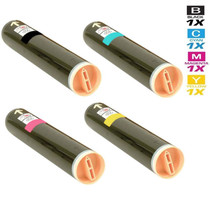
Compatible Xerox Phaser 6000 Premium Quality Laser Toner Cartridges 4 Color Set
- Page Yield:
- Black: 2,000, Colors: 1,000 Each
- Availability:
- In Stock
- Shipping:
- Free Shipping

Amazon Price:

- Page Yield:
- Black: 2,000, Colors: 1,000 Each
- Availability:
- In Stock
- Shipping:
- Free Shipping
- Compatible Printers
- Specifications
- SKU:
- Phaser-6000-Pre
- Printer Brand:
- Xerox
- OEM Number:
- 106R01630, 106R01627, 106R01628, 106R01629
- Ink Color:
- Black, Cyan, Magenta, Yellow
- Page Yield:
- Black: 2,000, Colors: 1,000 Each
- Printer Type:
- Laser Cartridge Set
- Condition:
- New Compatible
- Description
- Yields up to Black: 2000 Colors: 1000 Each
- Compatible Xerox Toner Cartridges can produce renown Xerox quality printing and reliability
- Unlike bargain brand toners compatible Xerox Toner Cartridges are designed to work specifically in Xerox printers for exceptional reliability that helps reduce maintenance costs and service calls
- Most reliable printing you can count on page after page
- Accept no imitations
- Ink/Toner Color: 4 Color Set
- Ink/Toner Pack Size: 4/Set
- Compatible with: Xerox Phaser: 6000 6010 WorkCenter: 6015 6015n series printers
- Supply Type: Toner
- Cartridge Yield Type: Standard
- Ink/Toner Cartridge Type: Compatible
- Reviews
-
Good product
Compatible Toner Cartridge for use in my Printers...Good productQualityShipped FastGood Business.
-
Awesome price
I only use compatible toner cartridges and have never had a problem. tonerandinkjetstore.com's price was better than other store and I saved so much $$$$.
-
Worked flawlessly
I ordered this for my Xerox Phaser 6000 and it worked flawlessly from the start no any problems or worries about it since. Thanks for the great product.

/> 

Compatible Xerox Phaser 6000 Premium OEM Quality Laser Toner Cartridges 4 Color Set is designed and tested to ensure optimum performance and outstanding productivity
Xerox 4 color set toner cartridge is designed to deliver the best image quality and reliable printing. Toner cartridge is compatible with Xerox Phaser: 6000 6010 WorkCenter: 6015 6015n series printers and yields up to Black: 2000 Colors: 1000 Each.
Features:
Frequently Asked Questions
What makes this the Premium Quality set — is anything actually different?
Honestly, no. The Premium Quality listing and the standard listing carry the same four cartridges, the same part numbers, the same page ratings and the same $68.36 price. Nothing about the toner, the yield or the terms changes between the two — pick whichever listing you landed on and you receive the identical set.
Why would a home user keep a whole spare set on the shelf?
Because a compact printer tends to announce an empty color at the worst moment — the evening a report, a concert ticket or a school project has to print. A sealed spare set in the cupboard turns that into a two-minute swap instead of a delivery wait. On a Phaser 6000 that prints in short daily bursts, one set in the machine and one in reserve can cover a household for a very long stretch.
How should the spare cartridges be stored until they are needed?
Leave them sealed in their packaging, lying flat at normal room temperature and out of direct sunlight. A drawer or cupboard near the printer is ideal. Toner is a dry powder, so a sealed cartridge keeps patiently for a long time — just resist opening the bag early, since the seal is what keeps everything clean and protected until install day.
Which numbers should I check on the shelf box before reordering?
The four that define this family: yellow is 106R01629, magenta is 106R01628, cyan is 106R01627 and black is 106R01630. If the numbers on the box in your cupboard read that way, a reorder of this set restocks exactly what your printer has been running on — no guesswork about generations or look-alike cartridges.
Does this set also cover the other small models in the range?
Yes — it is the shared supply for the whole compact platform: the Phaser 6010, the networked Phaser 6010N, and the multifunction WorkCentre 6015, WorkCentre 6015V/B and WorkCentre 6015V/N. One spare on the shelf can rescue any of them, which is handy in homes and small offices running two different Xerox machines from this family.
How are warranty and returns handled on this set?
The cartridges are covered by a 1-year warranty, with free returns for a full year as described on the shipping and returns page. Your order ships from the nearest of our Illinois, Pennsylvania, Georgia and California warehouses, and if anything puzzles you during the swap, support is available Monday to Friday, 9 AM to 5 PM CST.
What does the swap itself involve, from start to finish?
Open the front cover, take hold of the old cartridge's handle and pull it straight out of its slot. Take the matching new cartridge from its bag, remove the protective seal exactly as its packaging directs, and slide it into the slot marked for its color until it seats. Close the cover and print a page. Repeat only for colors the printer has actually flagged — on this platform each cartridge is a separate, one-minute job with no tools involved.
How can a household learn its own real toner rhythm?
Keep a tiny log where the spare set lives: each time a cartridge is changed, write the date and the color on the box or on a note in the drawer. After the first set or two, a pattern emerges that no rating can give you — black 106R01630 finishing on a rough cycle, the colors 106R01627, 106R01628 and 106R01629 lasting far longer between turns. That log is what turns the next reorder from a guess into a calendar entry.
When should the bag and seal come off a spare cartridge?
At the fitting moment, and not a day sooner. The sealed bag keeps the toner contained and the cartridge protected from dust and knocks while it waits; opening it early buys nothing and risks a spill in the drawer. The seal on the cartridge itself comes off as part of the swap, following the directions on the packaging. A spare that stays sealed until the printer asks for it is a spare that behaves exactly like a fresh delivery.
After changing one color, how do we confirm it is printing as it should?
Print something that uses all four colors — the printer's own test or demo page is ideal, or a familiar document with a color photo or chart on it. Look at the color you just replaced: its areas should print solid and even, with no pale band or streak. Compare it against the other three colors on the same page; if the new cartridge's color matches their strength, the swap is proved and the job is done.
About This Phaser 6000 Premium Toner Set
This listing is written for the Phaser 6000 owner who treats toner like batteries — something to have in the drawer before it is needed. Inside are the platform's four cartridges: black 106R01630 rated at 2,000 pages, and cyan 106R01627, magenta 106R01628 and yellow 106R01629 at 1,000 pages apiece. The Premium Quality name changes nothing about what arrives; it is the same dependable set at the same $68.36, bought ahead of the empty-cartridge message rather than because of it.
21 Reviews
Related Items

Xerox
Compatible Xerox Phaser 7760YDN Premium Quality Laser Toner Cartridges 4 Color Set
/>

Xerox
Compatible Xerox Phaser 7760DXM Premium Quality Laser Toner Cartridges 4 Color Set
/>

Xerox
Compatible Xerox Phaser 6600YDN Premium Quality Laser Toner Cartridges 4 Color Set
/>

Xerox
Compatible Xerox Phaser 7100 Premium Quality Laser Toner Cartridges 4 Color Set
/>