




Xpress M2870FD
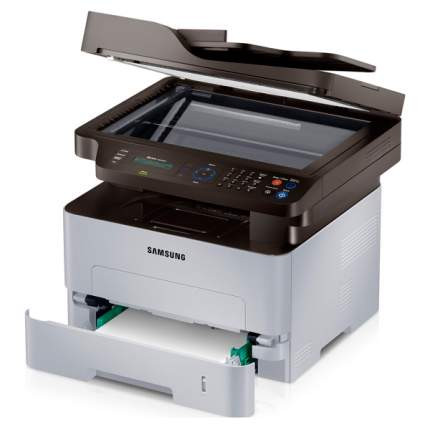
Some machines earn their place by doing one job quietly for years, and the Xpress M2870FD is that kind of multifunction: a monochrome all-in-one with fax that prints incoming pages double-sided without anyone standing over it. It feeds on one cartridge family, the standard MLT-D115S or the high-yield MLT-D115L, rated at about 3,000 pages. This page stocks the high-yield side of that family in single and multi-pack compatible listings, so the machine that handles your faxes never has to wait on a toner order.
Fax traffic is the hidden workload here. Every received page is a printed page, and a busy fax line can consume as much toner as the staff who deliberately print. Automatic duplexing on incoming faxes halves the paper pile, and pairing that habit with a 3,000-page cartridge means the M2870FD mostly looks after itself: fewer swaps, fewer interruptions, and a running cost per page that stays low month after month.
Toner Cartridges for Xpress M2870FD
| Cartridge | Color | Page Yield |
|---|---|---|
| MLT-D115L High Yield Toner Cartridge | Black | 3,000 pages |
| MLT-D115L High Yield Toner Cartridge — 3 Pack | Black | 3,000 pages per cartridge |
| MLT-D115L Premium High Yield Toner Cartridge — 5 Pack | Black | 3,000 pages per cartridge |
| Xpress M2870FD High Yield Toner Cartridge | Black | 3,000 pages |
| Xpress M2870FD High Yield Toner Cartridges — 5 Pack | Black | 3,000 pages per cartridge |
Which cartridge should you buy?
Two cartridges fit this machine. The MLT-D115S is the standard fill: cheaper to buy, sooner to empty. The MLT-D115L carries roughly 3,000 pages of toner and works out cheaper on every printed sheet. Everything on this page is the L cartridge, in several pack sizes, because a fax-equipped machine rarely turns out to be a light printer once the line gets busy. If your M2870FD mostly idles and receives the odd page, a standard cartridge is a perfectly sensible choice elsewhere; if faxes and everyday office printing share the machine, buy the high-yield version and, if the volume is steady, a multi-pack, so a replacement is always already in the building.
Chip, toner and everyday use
An unattended machine deserves a spare on the shelf: when the M2870FD stops mid-fax-run at 4 p.m., nobody wants to wait for a delivery. When you do swap, seat the cartridge firmly until it clicks home, and if the printer ever fails to recognize a fresh one, wipe the chip contacts with a dry, lint-free cloth and try again. Near the end of a cartridge, a gentle side-to-side rock redistributes the remaining powder and often restores even coverage for the last stretch of pages. Every compatible cartridge here is covered by a 1-year warranty and 1-year returns.
Frequently Asked Questions
MLT-D115S or MLT-D115L — which suits the Xpress M2870FD better?
They install identically and print the same quality; the difference is capacity. The MLT-D115L holds about 3,000 pages worth of toner, so it costs less per page and needs changing far less often. The standard S cartridge asks less money upfront. A machine that receives faxes all day leans heavily toward the L; a rarely used unit can live happily on the S.
Do received faxes really use much toner?
Yes — a fax is a print job the sender starts for you, and every page lands on your toner bill. Junk faxes are the purest waste, so enable the machine's junk-fax blocking if it is offered, and set transmission and activity reports to print only on errors rather than after every call. Where your setup allows receive-to-memory or fax-to-email forwarding, pages you never needed on paper stop consuming toner altogether.
Why have prints from my M2870FD gone pale?
Check the settings first: a toner-save or draft mode left switched on will print pale indefinitely. At normal density, take the cartridge out and rock it gently from side to side to level the powder, then reseat it. If the fading is even across the page after that, the cartridge is genuinely spent; a defect that repeats in the same spot points to wear on the drum surface built into the cartridge, which only a replacement cures.