






 See Compatible Printers
 Read more about our ink!
Hewlett Packard
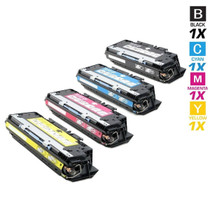
CS Compatible Replacement for HP CP3525n Toner Cartridges 4 Color Set
- Page Yield:
- Black: 5,000, Color: 7,000 Each Pages
- Availability:
- In Stock
- Shipping:
- Free Shipping

Amazon Price:

- Page Yield:
- Black: 5,000, Color: 7,000 Each Pages
- Availability:
- In Stock
- Shipping:
- Free Shipping
- Compatible Printers
- Color LaserJet CM3530
- Color LaserJet CM3530fs
- Color LaserJet CP3525
- Color LaserJet CP3525dn
- Color LaserJet CP3525n
- Color LaserJet CP3525x
- Color LaserJet CP3530
- LaserJet CM3530
- LaserJet CM3530fs
- LaserJet CP3525
- LaserJet CP3525dn
- LaserJet CP3525n
- LaserJet CP3525x
- LaserJet CP3530i>
- Color LaserJet CM3530FS MFP
- Color LaserJet CM3530MFP
- Color LaserJet CP3520
- HP 504A
- Specifications
- SKU:
- CP3525n
- Printer Brand:
- Hewlett Packard
- OEM Number:
- CE250A, CE251A, CE253A, CE252A
- Ink Color:
- Black, Cyan, Magenta, Yellow
- Page Yield:
- Black: 5,000, Color: 7,000 Each Pages
- Printer Type:
- Laser Cartridge Set
- Condition:
- New Compatible
- Description
- Yields up to Black: 5000 Color: 7000 Each Pages.
- Manufactured specifically for HP printers Compatible HP toner cartridges offer fast hassle-free printing
- HP CM3525n Toner Cartridges 4 Color Set deliver consistent yields and provide high-quality results
- Streamline your printing needs with the time-saving reliability of Compatible HP LaserJet toner cartridges
- Compatible with: HP: Laser printer: Color LaserJet CP3525 CP3525dn CP3525x CM3530 CM3530fs
- Cartridge yield type: Standard
- Print technology: Laser
- Page yield footnote: Approximate average yield based on ISO/IEC 19798 actual yield varies considerably based on content of printed pages and other factors
- You can print a wide variety of documents - from professional full-color marketing materials to economical black-and-white pages
- HP colorsphere toner and intelligence built into the cartridge enable fast high-quality consistent results
- Trouble-free printing can save time increase productivity and lowers overall costs of printing
- Manufactured specifically for HP printers Compatible HP toner cartridges offer fast hassle-free printing
- Toner cartridges deliver consistent yields and provide high-quality results
- Streamline your printing needs with the time-saving reliability of Compatible HP LaserJet toner cartridges
- Operating temperature range: 10 - 30 deg C storage temperature range: -20 - 40 deg C storage humidity range: 10 - 80% RH
- Includes: Toner cartridge Recycling guide
- Warranty: 6 months limited
- Operating temperature range: 10 - 30 deg C storage temperature range: -20 - 40 deg C storage humidity range: 10 - 80% RH
- Includes: Toner cartridge Recycling guide
- Warranty: 6 months limited
- Reviews
-
great replacement
These cartridges are a great replacement. You need to search how to reset the printer so that it doesn't keep thinking the toner is gone because there is not a new chip on these cartridges and the problems will be fixed.
-
so far so good
So far this ink cartridge has worked wonderfully. You can't beat the price. It was shipped quickly and works great! I have just started using it so I cannot review the product as far as longevity of the ink supply but so far so good.
-
great all around
fast shipping so far so good... prints well recommended

/> 

Compatible HP CM3525n Toner Cartridges 4 Color Set produce superior quality and consistency for a wide array of printing needs
HP CM3525n Toner Cartridges 4 Color Set features latest laser print technology and offers fast reliable trouble-free printing. Cartridge is compatible with HP color LaserJet CP3525 CM3530 CM3530fs CP3525dn CP3525X printers and yields up to Black: 5000 Color: 7000 Each Pages.
Features:
Frequently Asked Questions
What is included?
Four cartridges — the CE250A black, CE251A cyan, CE252A yellow and CE253A magenta of the 504A family — sealed individually and sold together for $125.76. This listing is named for the CP3525n, and the set refreshes that networked printer's complete toner row in one box.
The n model has no automatic duplex. Does that affect which set I need?
Not at all. Duplexing is a paper-path feature; the toner row is the same across the CP3525 line. Whether your machine flips pages automatically or you turn a stack over by hand, it drinks from the same CE250A, CE251A, CE252A and CE253A cartridges.
How much printing does the set represent?
Per cartridge: 5,000 pages from the CE250A black and 7,000 pages from each of the CE251A, CE252A and CE253A colors. Manual two-sided printing does not change those numbers — a sheet printed on both sides has simply carried two pages' worth of toner.
Why does the black run out first on a networked printer?
Because a networked printer collects everyone's text work. Ten people sending ordinary documents will draw the black down far faster than the colors, which wait for the occasional chart or color letterhead. That imbalance is normal for this set, and it is why the colors are rated the way they are.
How do I tell which cartridge a warning refers to?
The message names the color, and the supplies status page — printed from the panel or viewed through the printer's web page — shows all four levels side by side. Replace the named cartridge from this set and leave the others sealed until their turn.
Is there a sensible place to keep the unopened cartridges?
Near the printer, flat and sealed, away from windows. Heat and sunlight are the enemies of stored toner; a drawer in the same office is perfect, and it keeps the swap a one-trip job when the warning appears.
A page starts fading before the spare is fitted — can I stretch the cartridge?
Usually, briefly. Take the named cartridge out and rock it gently from side to side; the toner inside redistributes and even coverage comes back for a while. Treat that as a bridge, not a repair — the CE251A, CE252A or CE253A behind the warning really is near its end. The sealed replacement from this set is already in the drawer by the printer, so the shake only has to cover the walk over and the two-minute swap.
How do I judge the first pages after a fresh color goes in?
Reprint something familiar — a chart, a page with your color letterhead, a document you have seen a hundred times — and hold it against an older copy. Because the four cartridges age at different rates on the CP3525n, a known page is the fastest way to confirm the new CE252A or CE253A is laying its color down evenly and that the weakness you saw came from the old cartridge, not the machine.
Where do the spent cartridges go in a small office?
Back into the packaging the replacements arrived in, with the code noted on the box, and out of the office together rather than one at a time into desk bins. Keeping the four empties corralled in the set's carton until they leave does two things: the codes stay readable for the next order, and a used cartridge never gets picked up and refitted by mistake — a real risk when sealed and spent units share one drawer.
A cartridge came out early with life still in it. Can it serve again?
Yes, if you treat it as a labeled bridge spare. Write the color code and the date on a note taped to it, lay it flat in the same drawer as the sealed stock, and keep its opening covered. When its channel next runs low at an awkward moment, that part-used CE250A or color can carry the printer through the day while the sealed stock stays sealed — just do not let it sit unlabeled, or nobody will trust it later.
About This CP3525n Four-Color Set
The Color LaserJet CP3525n brought networked color to offices that did not need a finisher or a duplexer — just a dependable shared printer. This set keeps it dependable: the CE250A black rated at 5,000 pages under the text load, with CE251A cyan, CE252A yellow and CE253A magenta rated at 7,000 pages each standing behind the color work.
The set carries a 1-year warranty and 1-year free returns. Orders are sent from the closest of our IL, PA, GA and CA warehouses, and delivery specifics live on the shipping & returns page. Our support hours are Monday–Friday, 9 AM–5 PM CST. Browse the rest of the family under HP.
3 Reviews
Related Items
Hewlett Packard
CS Compatible Replacement for HP 3500n Toner Cartridges 4 Color Set
/>


Hewlett Packard
CS Compatible Replacement for HP 3550n Toner Cartridges 4 Color Set
/>

Hewlett Packard
CS Compatible Replacement for HP 5550dn Toner Cartridges 4 Color Set
/>