




Color LaserJet CP4025DN
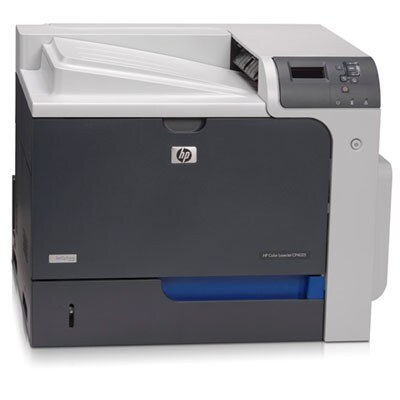
Duplexing and networking, standard in the box — the Color LaserJet CP4025DN was the office-ready member of its workgroup color family, built for two-sided printing shared across a team. It takes four cartridges: the CE260A black, which HP sells under the 647A name, the high-yield CE260X (649X) black, and the colors — CE261A (648A) cyan, CE262A yellow and CE263A magenta.
Two-sided printing changes the toner math in a good way: duplex output puts text on both faces of the sheet, so a CP4025DN department goes through paper slower and reads denser documents, while the cartridges themselves deplete by coverage, not by page count. In practice the black cartridge does most of the work — reports, contracts, internal drafts — and the colors are spent on the smaller run of client-facing pages. That split is visible all over this shelf: extra blacks, high-yield blacks, and full sets for the days when several slots run low together.
Toner Cartridges for Color LaserJet CP4025DN
| Cartridge | Color | Page Yield |
|---|---|---|
| CE260A | Black | See product page |
| CE260X | Black, high yield | See product page |
| CE261A | Cyan | See product page |
| CE262A | Yellow | See product page |
| CE263A | Magenta | See product page |
| 647A and 648A 4 Color Set | Black, cyan, yellow, magenta | See product page |
| 649X and 648A 4 Color Set | High-yield black plus colors | See product page |
| CP4025DN 4 Color Set | Black, cyan, yellow, magenta | See product page |
| CP4025dn 5 Color Set | Black, cyan, yellow, magenta | See product page |
| CP4025dn Black | Black | See product page |
| CP4025dn Cyan | Cyan | See product page |
| CP4025dn Magenta | Magenta | See product page |
One listing needs a caution flag: an Enterprise CP4025dn listing carries the CE261A code — the cyan cartridge everywhere else on this page — but is described as yellow. Code and color disagree, so verify the marking on the cartridge in your printer before ordering it.
Which cartridge should you buy?
The one real decision on this page is the black. The standard CE260A is the economical pick for a printer that idles between modest jobs; the high-yield CE260X earns its premium on a shared machine that prints through the day, because every avoided cartridge swap is also an avoided interruption for the whole team. The colors come only in standard yield, and they should be bought one at a time — the CP4025DN tracks each cartridge separately, so a low magenta is not a reason to touch a healthy cyan. When the printer is new to your office, or three slots flag low in the same week, a 4 Color Set gives you a clean baseline; the 5 Color Set adds a spare black for duplex-heavy departments.
Chip, toner and everyday use
Every cartridge in this family is chipped, and the CP4025DN reads the chip to confirm the code and gauge the level — which is why the supplies menu can tell you exactly which slot is low before print quality ever dips. Install with the seal fully removed and the cartridge pushed home until it clicks; a short-seated cartridge is the usual story behind a 'not recognized' message. Yield ratings assume standard test coverage, so presentation decks with full-bleed color charts will empty the color cartridges well ahead of the black. If one color starts striping, rock that cartridge gently to level the toner and order its replacement the same day.
Frequently Asked Questions
How do I tell which of the four cartridges needs replacing on the CP4025DN?
Open the supplies menu on the control panel. It reports the remaining level of the CE260A or CE260X, the CE261A, the CE262A and the CE263A individually — replace only the one flagged low and leave the other three printing.
Do I need to enable anything for two-sided printing on the CP4025DN?
No. The duplexer is built into this model, so two-sided output is just a choice in the print dialog; the printer flips each sheet itself. The DN at the end of the name is the promise of exactly that, plus the network connection.
When does the CE260X make more sense than the CE260A?
When the printer works all day. The CE260X is the high-yield version of the same black cartridge — identical fit, longer life — so busy shared machines swap it far less often. For occasional printing, the standard CE260A is the simpler, cheaper choice.
My CP4025DN says a new cartridge is not recognized. What should I check?
Confirm the protective seal and clips are completely off, that the code matches this family, and that the cartridge is fully seated. A cartridge from another HP family will not register in the CP4025DN even if it looks similar on the desk.
More printers that use the same cartridges
The CP4025DN shares its cartridge family with a wide band of CP4025 and CP4525 machines: Color CP4000, Color CP4025, Color CP4025dn, Color CP4025n, Color CP4500, Color CP4525, Color CP4525dn, Color CP4525n, Color CP4525xh, Color Enterprise CP4025, Color Enterprise CP4025n, Color Enterprise CP4525, Color Enterprise CP4525dn, Color Enterprise CP4525n, Color Enterprise CP4525xh, Color LaserJet CP4000, Color LaserJet CP4025, Color LaserJet CP4025N, Color LaserJet CP4500, Color LaserJet CP4525, Color LaserJet CP4525DN, Color LaserJet CP4525N, Color LaserJet CP4525XH, Color LaserJet Enterprise CP4025, Color LaserJet Enterprise CP4025DN, Color LaserJet Enterprise CP4025N, Color LaserJet Enterprise CP4525, Color LaserJet Enterprise CP4525DN, Color LaserJet Enterprise CP4525N, Color LaserJet Enterprise CP4525XH, HP 647A & 648A.