




Color LaserJet 9500HDN
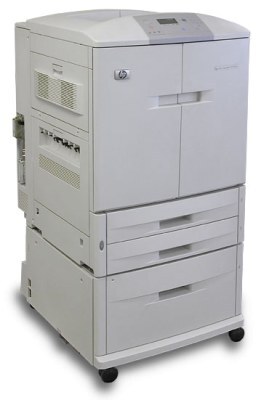
High capacity, duplex, networking: the badge on the Color LaserJet 9500HDN spells out the fullest specification in the 9500 family — extra paper capacity, two-sided printing built in, and Ethernet for a shared department. Its engine drinks the same HP 822A toner as every other 9500: C8550A black beside C8551A cyan, C8552A yellow and C8553A magenta. The HDN's bigger appetite changes how much you order, never which codes you order.
A machine like this sits at the center of a busy color department's day. Reports, handouts and double-sided drafts pour through it from a dozen desks, and black does most of that work while the colors wait for the jobs that need them. Throughput at this level turns toner into a stockroom question rather than a shopping question: the departments that keep an HDN fed treat the four codes as standing inventory, with the next black already on the shelf before the current one fades.
Toner Cartridges for Color LaserJet 9500HDN
| Code | Color | Yield |
|---|---|---|
| C8550A | Black | See product page |
| C8551A | Cyan | See product page |
| C8552A | Yellow | See product page |
| C8553A | Magenta | See product page |
For a full change in one visit, the standard 4-color set bundles one of each code, and the premium 4-color set covers the same C8550A–C8553A range in the premium line.
Which cartridge should you buy?
On a shared departmental machine, plan around black. Text and duplex drafts burn through the C8550A long before the colors move, so most HDN owners reorder black on its own and let each color run until its own warning appears. Keep one complete set in reserve for the day two channels fade together — with a network printer, an empty slot stalls everyone's queue, not one desk. Singles are the economical answer for the color that actually emptied; the set is insurance. If your department prints color daily rather than weekly, hold the spare set as policy, not as an afterthought, and rotate it into the machine first so stock never sits past its best.
Chip, toner and everyday use
The supply chip in each cartridge reports its level to the printer, which is what lets a department see a low black coming before the morning rush. When you swap one in, seat it firmly until it clicks and give the printer a moment to recognize the new code. A cartridge that prints light near the end of its life often recovers after a gentle side-to-side rock redistributes the toner inside. Store the reserve set boxed and upright in the supply cabinet, first in, first out, and write the arrival month on the carton if your stockroom turns over slowly.
Frequently Asked Questions
Does the Color LaserJet 9500HDN print two-sided automatically?
Yes — the duplex unit is built into this configuration, so choosing the two-sided option in your print dialog flips each sheet without anyone standing at the tray. It works with plain paper from the main tray.
What toner cartridges does the 9500HDN use?
The HP 822A set: C8550A black, C8551A cyan, C8552A yellow and C8553A magenta. They are the same codes the whole 9500 family uses; the HDN badge changes the printer's hardware, not its supplies.
How do I know which cartridge to reorder for the HDN?
Match the code on the label of the cartridge you pull out — the printer's warning names the color, and the code on the old cartridge removes all doubt. On this page, black is C8550A and the colors are C8551A, C8552A and C8553A.
Does heavy duplex printing change which toner I should stock?
No. Two-sided work uses the same four cartridges; it simply leans harder on black. Departments that duplex most of their output usually keep an extra black in the cabinet and restock colors as each one fades.
More printers that use the same cartridges
Every other member of the 9500 line runs on this identical cartridge set: HP 822A, Color LaserJet 9500N, Color LaserJet 9500MFP, Color LaserJet 9500GP, Color LaserJet 9500.