





 See Compatible Printers
 Read more about our ink!
Dell
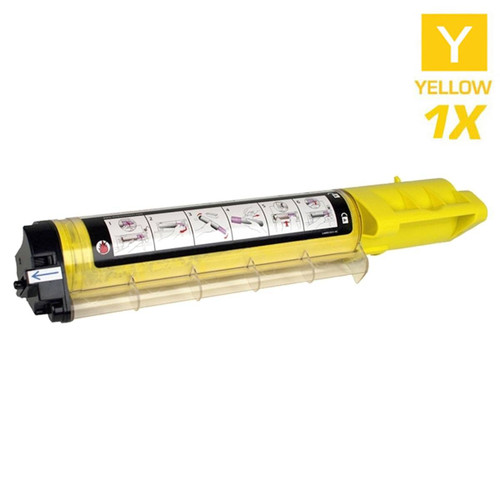
Compatible Dell 341-3569 Yellow Toner Cartridge (WH006/ TH208)
- Page Yield:
- 2,000 Pages
- Availability:
- In Stock
- Shipping:
- Calculated at Checkout

Amazon Price:

- Page Yield:
- 2,000 Pages
- Availability:
- In Stock
- Shipping:
- Calculated at Checkout
- Compatible Printers
- Color Laser 3010cni>
- Color Laser 3010
- Color Laser 3010CN
- Dell (341-3568, 341-3571, 341-3570, 341-3569)
- Specifications
- SKU:
- 341-3569
- Printer Brand:
- Dell
- OEM Number:
- 341-3569, TH208
- Ink Color:
- Yellow
- Page Yield:
- 2,000 Pages
- Printer Type:
- Laser Cartridge
- Condition:
- New Compatible
- Description
- Yields up to 2000 pages
- Compatible Dell 341-3569 Yellow Toner Cartridge (WH006 TH208) consistently produces high-resolution printouts with enhanced graphics and sharp text
- Unlike bargain brand toners Dell 341-3569 Yellow Toner Cartridge (WH006 TH208) is specifically engineered to work in Dell printers for optimum quality and performance
- Packaging: Each
- Compatible with: Dell 3010 3010cn laser printer
- Print technology: Laser
- Coverage percent: 5%
- Reviews
-
Works great
Been using in my Dell 341-3569 printer for over a couple of years now and has worked great.
-
Worked wonderfully
Ah back in business!!! I hate running out of ink. These arrived quickly and are not refills. All new and juicy full.
-
Works but...maybe not on glossy paper
Ok great for price...maybe... They do require you to slide the clip down to lock in place which is not a big deal. The problem I am having is when I use 40# laser glossy brochure paper. The toner does not dry. Tried tweeking setting and I had to put the p
-
Very cost effective and efficient
Took a chance on this product but didn't want to pay the big bucks for OEM goodies. I am so glad I did! Saved a bundle of cash and the products have worked wonderfully for the past several months. I will continue to use these as my permanent replacements!
-
Another repeat customer
I have had excellent luck with these cartridges - they work great. I have had my Dell 341-3569 for several years and have always used the Dell cartridges. The yellow seems to always run out first so get an extra.
-
Works just fine
Works just fine no problem installing or subsequent printing
-
Does not work
My dell printer got errors knowing it was not a dell oem toner Had to return it to vender Dont buy
-
These are great
We purchase these all the time. They may not last quite as long as the real deal but they last long enough to make them an excellent value. They always work we get a massive amount of copies and the price cannot be beat.

/> 

Dell 341-3569 Yellow Toner Cartridge (WH006 TH208) delivers consistent quality with high-resolution printouts sharper images and text
Dell 341-3569 Yellow toner cartridge consistently produces high-resolution printouts with enhanced graphics and sharp text. Toner cartridge is compatible with Dell 3010 3010cn printers and yields up to 2000 pages.
Features:
Frequently Asked Questions
Why does the yellow cartridge always seem to run out without warning?
Yellow is the quietest worker in the Dell 3010. It rarely prints on its own — it hides inside greens, warm highlights and skin tones — so its decline does not announce itself the way fading black text does. By the time prints visibly shift cold and blue, the 341-3569 is usually nearly empty. If your office depends on color output looking right, yellow is the cartridge worth checking first whenever colors start drifting.
How far ahead does one 341-3569 let us plan?
With a 2,000-page rating, the planning math is simple. An office printing around 25 color pages a week gets well over a year from one yellow cartridge; at 100 color pages a week it is closer to five months. Those are 5%-coverage figures, so presentation-heavy work shortens them — but for most small offices, yellow is a once-or-twice-a-year purchase rather than a monthly worry.
What does this cartridge cost per page, honestly?
The 341-3569 is $37.16 rated at 2,000 pages, which is about 1.86 cents per page, or $18.58 per 1,000 pages. We will not dress that up as the cheapest printing around — compact cartridges for printers like the 3010 cost more per page than high-yield cartridges for big workgroup machines. What you are paying for is a fairly priced single cartridge that lets you replace yellow alone instead of buying a whole set.
Does it make sense to keep a spare yellow on the shelf?
For most 3010 owners, yes — precisely because yellow gives so little warning before it goes. A spare 341-3569 stored upright in its packaging, away from heat and direct sunlight, keeps fine until the day the installed cartridge fades, and it turns a mid-week color problem into a two-minute swap. If your color printing is rare and non-urgent, ordering when you see the first color shift works just as well.
Why does this cartridge also appear under WH006 and TH208?
Those are alternate Dell part numbers for the same yellow cartridge. The 341-3569, WH006 and TH208 all identify the yellow toner for the Dell 3010, so a cartridge pulled from your printer stamped with any of the three numbers is replaced by this one.
What cover comes with this cartridge?
It is a compatible cartridge — not a Dell original — and it carries our one-year warranty plus a full year of free returns, detailed on our shipping & returns page. We ship from warehouses in Illinois, Pennsylvania, Georgia and California, and our support team is on hand Monday to Friday, 9 AM to 5 PM Central for questions before or after you order.
How can we check the yellow before a big color job goes to print?
Print one test page carrying warm tones — a photo with skin tones, or a document with greens and warm highlights. Yellow hides inside those colors, so it is where a shortage shows first: if the page comes out looking cold and bluish, the 341-3569 is nearly empty even if nothing has warned you. Checking before the run costs one page; discovering it halfway through costs the whole job.
Can yellow be changed on its own in the middle of a working day?
Yes — that is the point of this listing. The 341-3569 is sold singly precisely so you replace yellow alone instead of buying a whole set when one color gives out. The swap itself is a couple of minutes of work, the other three cartridges stay exactly where they are, and the printer is back in service before the coffee is. There is no need to wait for a quiet period or a service visit.
We fitted a new yellow and the colors still look wrong — what next?
Yellow is the first suspect when 3010 colors drift, not the only one. If a fresh 341-3569 has not restored the balance, another color may be the one that has faded, and guessing your way through the set gets expensive. Talk to our support team first — they answer Monday to Friday, 9 AM to 5 PM Central and can help pin down which cartridge is actually at fault. And if the new yellow itself is defective, the one-year warranty and free returns cover it.
What do we do with the empty yellow cartridge?
Hold on to the spent 341-3569 until the replacement has settled in and printed cleanly for a few days, then send the empty for recycling rather than into the general trash. Office-supply retailers and local recycling programs routinely accept toner cartridges, and keeping the empty in its box in the meantime keeps any residual toner dust contained and the supply cupboard tidy.
About This Dell 341-3569 Yellow Toner Cartridge
The Dell 341-3569 (also referenced as WH006 and TH208) is the yellow toner cartridge for the Dell 3010 color laser printer, rated at 2,000 pages and priced at $37.16 — roughly 1.86 cents per page. This compatible version matches the original's fit and rated yield, and it is backed by a one-year warranty with one-year free returns from Clever Supplies. More Dell cartridges are collected on our Dell page.
8 Reviews
Related Items

Dell
Compatible Dell 341-3568/ 341-3571/ 341-3570/ 341-3569 Laser Toner Cartridge 4 Color Set
/>



Dell
Compatible Dell 5210 Toner Cartridge Black (341-2916)
/>

Dell
Compatible Dell 310-7895 Toner Cartridge Yellow
/>
Dell
Compatible Dell 332-0402 Toner Cartridge Yellow
/>