Frequently Asked Questions
Nobody tracks usage on our 3115 MFP — people just walk up and copy. What does that do to toner planning?
It makes the multifunction's appetite invisible until a cartridge stops mid-copy. Walk-up work — copies, scans sent to print, faxes received and printed — all draws on the same four cartridges as network print jobs: the 310-8092 black, the 310-8094 cyan, the 310-8096 magenta and the 310-8098 yellow, each rated at 8,000 pages. Because that usage never appears in anyone's print queue, offices consistently underestimate it. The practical answer is structural: renew all four slots as a set on the machine's own signals, and the untracked workload stops being able to ambush you cartridge by cartridge.
What is included in this set?
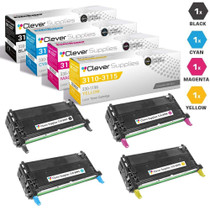
The complete set of four high-yield compatible cartridges for the 3115 MFP: black 310-8092, cyan 310-8094, magenta 310-8096 and yellow 310-8098, each rated at 8,000 pages at the standard 5% coverage. Every function the machine performs — printing, copying, scan-to-print — is powered by these four slots, so one set restores the whole machine rather than one pathway through it.
Our meter readings and our toner purchases never agree. Where do the missing pages go?
Into functions nobody logs. Incoming faxes print themselves. A scan sent to the printer instead of to email becomes a printed page. Someone copies a document six times because the first copy is for a colleague. Every one of those sheets is output from the same four cartridges, yet none of it appears in a print report, so purchases look mysterious against the numbers IT can see. The black 310-8092 absorbs the bulk of it, and any color in the original pulls on the 310-8094, 310-8096 and 310-8098 as well. Once you accept that the machine's real output is bigger than its print queue, the consumption stops looking wrong — it was simply uncounted.
How does the price work out?
The set is $312.58 — about $78.15 per cartridge, or roughly 0.98 cents per page against each cartridge's 8,000-page rating. For an MFP, read that as the cost of all output, not just printing: every copy that leaves the machine carries the same per-page economics. One set price covering every function is also the simplest possible budgeting story for a shared office machine.
What happens if a cartridge in the set turns out to be a dud?
You are not stuck with it. Each of the four cartridges is covered for a year against defects, and a cartridge that does not perform as it should can be returned free within that year — the exact terms are set out on our shipping and returns page. These are compatible cartridges rather than Dell-manufactured ones, and on a machine the whole office leans on, that returns window is what keeps a single bad unit from becoming an office-wide problem.
Where does the set ship from, and can we get installation help?
From the closest of our four US warehouses — Illinois, Pennsylvania, Georgia or California. Support is available Monday to Friday, 9 AM to 5 PM CST if a change does not go smoothly. You will find the wider compatible range for the 3115 MFP and its sister models on our Dell toner page.
When is the best moment to change all four cartridges on a walk-up machine?
Pick a quiet window — early morning or the end of the day — and leave a short note on the machine saying the set was renewed and when. Walk-up users cannot plan around a change they do not know is happening, and a dated note also gives the next person a reference point when a cartridge eventually flags low again.
Is there a simple way to date the set once it is installed?
Write the install date on a small label and fix it inside the supply cabinet or on the machine itself. Because an MFP's copying, fax printing and scan-to-print work never shows up in anyone's queue, dates and the machine's own page counter are the only reliable history you have. That one label turns the next renewal from guesswork into a reading.
Do color copies really draw on all three color cartridges?
Yes. A color original copied at the glass is reproduced with the 310-8094 cyan, 310-8096 magenta and 310-8098 yellow working together, in whatever proportions the original's colors demand — and none of that appears in a print report. A week of heavy color copying can move the color cartridges noticeably while the office's print counts look unchanged, which is normal MFP behavior rather than a leak.
What should trigger the next order for this machine?
The machine's own low-toner message for any slot. On a printer whose workload is partly invisible, watching levels beats watching reports: when the 3115 MFP first reports a cartridge low, that is the dependable signal to order, because the remaining toner in that slot can disappear quickly under walk-up use. Waiting for visibly faded output means the machine may already be stopping mid-copy.
About This Dell 3115 MFP Set
This is the complete four-cartridge compatible high-yield toner set for the Dell 3115 MFP: the 310-8092 black, the 310-8094 cyan, the 310-8096 magenta and the 310-8098 yellow, each rated at 8,000 pages, priced at $312.58 for the set. It ships from one of our warehouses in Illinois, Pennsylvania, Georgia or California, and it is covered by our 1-year warranty and 1-year free returns.







 See Compatible Printers
 Read more about our ink!