







 See Compatible Printers
 Read more about our ink!
Hewlett Packard
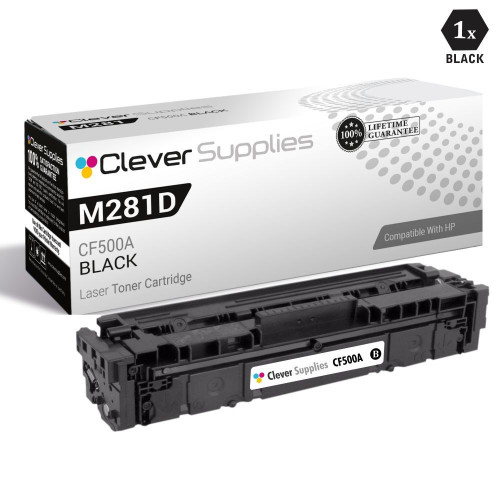
CS Compatible Replacement for HP M281dw Toner Cartridges Black (CF500A)

Amazon Price:

- Page Yield:
- Black: 3200
- Availability:
- In Stock
- Shipping:
- Calculated at Checkout
- Compatible Printers
- Color LaserJet M254dw
- Color LaserJet M281cdw
- Color LaserJet M281dw
- Color LaserJet M281fdwi>
- HP 202X
- Specifications
- SKU:
- CS-HP--X-M281dw-BK
- Printer Brand:
- Hewlett Packard
- OEM Number:
- CF500A
- Ink Color:
- Black
- Page Yield:
- Black: 3200
- Printer Type:
- Laser Cartridge
- Condition:
- New Compatible
- Description
- Reviews

/> 

Clever Supplies brand products are made in the USA! Why pay more for cheaper product with a high defective rate? You will end up having to send it back to the manufacturer. Get a quality product that you KNOW will work. Purchase the Clever Supplies Products Compatible for HP M281dw (CF500X) Black and experience the difference! All Clever Supplies brand products are backed by '100% Quality Satisfaction' 1 year warranty against defects in materials and workmanship for all toner products. Free tech support for a Clever Supplies problems for all Clever Supplies brand products. The use of Clever Supplies brand replacement laser toner cartridges and supplies does not void printer warranty. Premium Quality Replacement Toner Cartridge is made by ISO9001 Certified Factory to Meet or Exceed OEM Standards. These units are manufactured 100% brand new with all new parts including OPC drums, wiper blades, a smart chip and other internal parts, they are an economical alternative to expensive OEM CF500X Compatible Toner Cartridges. This is a Compatible for HP toner cartridges Black guaranteed to perform with HP Laser Printers. It replaces the original HP M281dw toner cartridge Black. The compatible replacement for CF500X. We offer a 100% Quality Satisfaction Guarantee on our Compatible for CF500Xlaser toner cartridges and supplies. For use in the following printers:Color LaserJet M281dw, Color LaserJet M281dw
Frequently Asked Questions
Is this the right black cartridge for the M281dw?
Yes. The Color LaserJet Pro MFP M281dw runs on the CF500A black from the 202A family, and this listing is that cartridge for this machine. The code on the spent unit matches the code on this box — confirm it as you pull the old one out and the replacement is settled.
Does copying use this cartridge too, or only printing?
Copying uses it exactly as printing does — a photocopy is a print made from a scan, and every copy of a letter or form draws black toner from this cartridge. Scanning itself uses no toner at all: a page scanned to email or a folder costs nothing in supplies. So an M281dw that spends its mornings copying invoices is spending this cartridge, even if nobody prints from a computer.
What about faxes — do they draw on it?
Received faxes print, and printing uses black toner, so yes: a fax-heavy day is a black-cartridge day. Incoming faxes are almost always plain text pages, which is the lightest kind of coverage, but a busy fax line still adds up across a month. Outgoing fax scans, like other scans, use no toner until something is printed.
How far does 3,200 pages go in a copy-heavy office?
The 3,200-page rating counts printed pages at standard coverage, and copies count one-for-one against it. An office copying and printing 300 pages a month should see roughly ten months; double the volume and halve the span. Because copying is walk-up work, nobody logs it — the supply gauge on the touchscreen is the honest record.
How do I change the black cartridge?
Lift the scanner assembly as the machine directs, open the cartridge access, and take the black unit out by its handle. Peel the sealing strip from the new cartridge, rock it gently side to side, slide it into the black bay, and close everything down. The MFP checks itself and is ready for prints, copies and faxes again within moments.
What does the $32.98 price include by way of cover?
The cartridge, rated at 3,200 pages, with a 1-year warranty and 1-year free returns under our shipping and returns policy if it arrives damaged or disappoints early. Dispatch is from warehouses in Illinois, Pennsylvania, Georgia and California, and support runs Monday through Friday, 9 AM to 5 PM CST.
One side of my pages prints lighter than the other. Is the cartridge finished?
Usually not yet. Over its life the toner inside settles toward one end of the cartridge, and the print thins on the starved side first. Take the CF500A out, tilt it gently end to end a few times to level the contents, refit it and print again. If the density evens out, real pages remain and the fade was distribution, not emptiness. If the one-sided lightness returns within days, the cartridge is genuinely at the end of its 3,200-page rating and the next one should go in.
How should a spare for this multifunction machine be kept?
Sealed, flat, in a cool dry cupboard near the machine, with the arrival month written on the carton. A spare matters more on an MFP than on a plain printer: when the black bay empties, printing, copying and fax printing all stop together, so the cost of an empty shelf is the whole machine, not one job. A dated spare of CF500A sitting by the M281dw turns that stoppage into a two-minute swap, and the date keeps the spare honest if a second one ever joins it.
What should I do with the empty cartridge after the swap?
Put it in the carton the fresh cartridge arrived in, straight away. The box contains the residue, keeps the spent unit from marking anything it touches, and makes it obvious to everyone that this cartridge is done — an unboxed empty left by an MFP has a way of being refitted by the next person in a hurry. Gather office empties in one spot and hand them to the cartridge recycling collection your workplace uses; the cartridge's work ends at the swap.
The first pages after a swap look a little light. Should I worry?
Not immediately. A fresh cartridge settles in over its first pages, and output that looks slightly light at the very start usually evens out as the toner distributes through the unit. Print a handful of ordinary pages — a letter, a copy at the glass — and judge those rather than the first sheet. If the lightness persists across a short run, take the cartridge out and rock it gently once. Still light after that, and it is a support conversation under the 1-year warranty rather than something to live with.
About This Black Cartridge for the M281dw
An MFP spends its black cartridge three ways — prints from the network, copies at the glass, and faxes off the line — and only scanning is free. This compatible CF500A is rated at 3,200 pages for $32.98 and feeds all three jobs from the one bay. If the M281dw is the office's shared workhorse, the black is the cartridge to watch and the one worth keeping a spare of; the HP color cartridges for the same machine are stocked in our store for the rest of the set.
Related Items


Hewlett Packard
CS Compatible Replacement for HP M254dw Toner Cartridges Black (CF500A)
/>

Hewlett Packard
CS Compatible Replacement for HP 202A Toner Cartridges Black (CF500A)
/>


Hewlett Packard
CS Compatible Replacement for HP M281dw Toner Cartridges 4 Color Set (CF500A, CF501A, CF503A, CF502A)
/>
Hewlett Packard
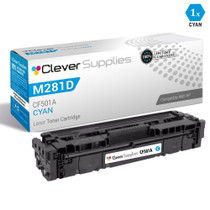
CS Compatible Replacement for HP M281dw Toner Cartridges Cyan (CF501A)
/>