






 See Compatible Printers
 Read more about our ink!
Xerox
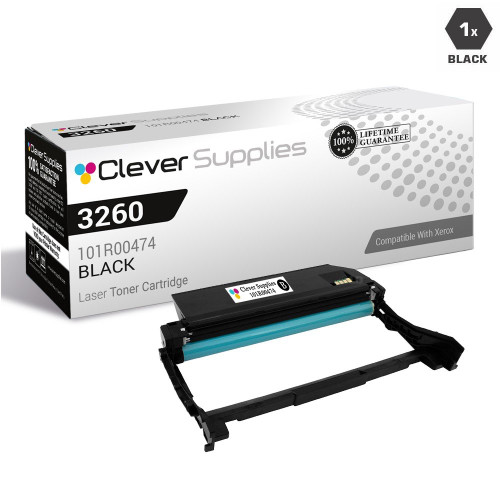
Compatible Xerox 3260 Drum Cartridges Black (101R00474)
- Page Yield:
- 10000
- Availability:
- In Stock
- Shipping:
- Calculated at Checkout

Amazon Price:

- Page Yield:
- 10000
- Availability:
- In Stock
- Shipping:
- Calculated at Checkout
- Compatible Printers
- Phaser 3260
- Phaser 3260 /DNI
- Phaser 3260/DI
- WorkCentre 3215
- WorkCentre 3215/NI
- WorkCentre 3225/DNIi>
- Specifications
- SKU:
- CS-Xerox-Drum-3260-BK
- Printer Brand:
- Xerox
- OEM Number:
- 101R00474
- Ink Color:
- Black
- Page Yield:
- 10000
- Printer Type:
- Laser Cartridge
- Condition:
- New Compatible
- Description
- Reviews

/> 

Clever Supplies brand products are made in the USA! Why pay more for cheaper product with a high defective rate? You will end up having to send it back to the manufacturer. Your time is valuable. Get a quality product that you KNOW will work. Purchase the Clever Supplies Compatible for Xerox 3260 (101R00474) Black Drum Cartridge and experience the difference! All Clever Supplies brand products are backed by '100% Quality Satisfaction' 1 year warranty against defects in materials and workmanship for all Drum products. Free tech support for any problems for all Clever Supplies brand products. The use of Clever Supplies brand replacement laser Drum cartridges and supplies does not void printer warranty. Premium Quality Replacement Drum Cartridge is made by ISO9001 Certified Factory to Meet or Exceed OEM Standards. These units are manufactured 100% brand new with all new parts including OPC drums, wiper blades, a smart chip and other internal parts, they are an economical alternative to expensive OEM 101R00474 Compatible Drum Cartridges. The Compatible Drum Cartridges will produce the same amount of page yield as an OEM cartridge would. This is a Compatible for Xerox 3260 Black Drum Cartridge guaranteed to perform with Xerox Laser Printers. It replaces the original Xerox 3260 Black Drum Cartridge. The compatible replacement for 101R00474. The use of compatible replacement Cartridges and supplies does not void Printer Warranty. Our Xerox Compatible Cartridge is a replacement for OEM Xerox. We offer a 100% Quality Satisfaction Guarantee on our Compatible for 101R00474 Laser Drum Cartridges and supplies. For use in the following printers: Phaser 3260, Phaser 3260/DI, Phaser 3260/DNI, WorkCentre 3215, WorkCentre 3215/NI, WorkCentre 3225, WorkCentre 3225/DNI
Frequently Asked Questions
The title says "Drum Cartridges" — how many units am I actually getting?
One. Despite the plural wording in the listing name, this is a single 101R00474 drum unit for $32.88 — the word "Cartridges" is carried over from the product line naming, not a count of what is in the box. If you want spares on the shelf, the multi-packs of this same unit are listed separately; this page is the one-unit option, which is all a printer takes at a time.
I fitted a new toner cartridge and the marks on the page are still there — why?
Because the marks were never the toner's fault. Toner supplies the powder; the image itself is formed on the drum unit behind it. When the drum's surface wears, it leaves repeating spots, streaks or a gray haze on every page — and a fresh toner cartridge images through the same worn surface, so the fault survives the swap. A drum that prints clean for thousands of pages and then starts marking everything is a drum at the end of its rated life, which is exactly what this replacement is for.
How long should one drum last in a Phaser 3260?
The unit is rated for up to 10,000 pages of imaging life. In a small office printing a couple of hundred pages a month, that stretches across several years; in a heavier setting it is consumed sooner. Either way the rating is a page count, not a calendar — and because the drum and toner wear independently, the drum typically outlasts several toner cartridges before it needs changing.
Is there anything I should be careful about when fitting it?
Two things. The drum's green surface is light-sensitive, so keep the unit in its packaging until the moment you fit it, and do not leave it sitting in bright light. And never touch that green surface with your fingers — skin oils mark it permanently, and the mark will print on every page from then on. Handle the unit by its frame, slide it straight in, and the job is done in minutes.
Which machines use this drum?
One drum covers both models in this range: the Phaser 3260 and the WorkCentre 3215. The WorkCentre adds scanning and copying on top of the same print engine, which is why a home office with one of each still only needs to stock this one drum part.
What cover and delivery does it come with?
A one-year warranty and free returns for a year come with every unit, with the details on the shipping and returns page. We ship from warehouses in IL, PA, GA and CA, and our support team is available Monday to Friday, 9 AM–5 PM CST. More for these printers is listed on the Xerox toner page.
How can I keep track of how much life is left in the drum I have now?
Work from pages, not from the calendar. When you fit a 101R00474, note the date and roughly how much the printer has printed, then check in whenever output starts to look tired. The unit is rated for up to 10,000 pages, so a printer doing a couple of hundred pages a month is using a small slice of that each month — which is why these drums are usually judged by how the pages look long before anyone counts anything.
Copies from our WorkCentre 3215 — do they wear this drum the same way printing does?
Yes. The WorkCentre 3215 copies on the same print engine the Phaser 3260 prints with, and every copied page is imaged on the drum just as a printed page is. A 3215 that spends its day copying will work through a 101R00474 faster than its print-job count alone suggests, so on that machine the drum's 10,000-page rating is being spent by copies and prints together.
I have just fitted the new drum — what should the first pages tell me?
Print a few pages that include solid areas and fine text, and compare them with the marked pages that prompted the change. The repeating spots, streaks or gray haze should be gone from the first sheet onward, because the new surface is imaging the page now. Keep the packaging until you have seen that clean output; if the same marks survive a fresh drum, the cause sits elsewhere in the machine and is worth a call to support.
What should I do with the old drum once it comes out?
Slide it straight into the packaging the new 101R00474 arrived in, handling it by its frame so the green surface stays untouched and covered. That keeps toner residue contained and the light-sensitive surface shielded while it waits. From there it can go out with your office consumables or electronics recycling rather than sitting exposed on a shelf — a worn drum has finished its working life and gains nothing from being kept in the open.
About This 3260 Drum Unit (101R00474)
The model-named single: one compatible 101R00474 black drum unit, sold under the 3260 name at $32.88, rated for up to 10,000 pages of imaging life. The listing title says "Cartridges" — the box holds one drum, which is all the printer accepts at once, and it serves the WorkCentre 3215 as well as the Phaser it is named after.
Related Items


Xerox
Compatible Xerox 3260 Drum Cartridges Black 3 Pack (101R00474)
/>



Xerox
Compatible Xerox 3260 Drum Cartridges Black 2 Pack (101R00474)
/>


Xerox
Compatible Xerox 3260 Drum Cartridges Black 5 Pack (101R00474)
/>

Xerox
Compatible Xerox 3260 Drum Cartridges Black 10 Pack (101R00474)
/>