





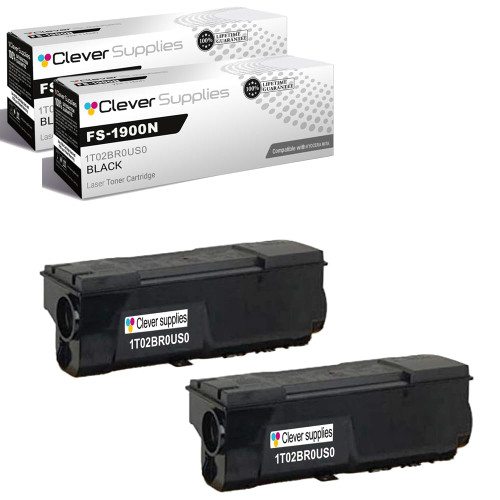


 See Compatible Printers
 Read more about our ink!
Kyocera-mita
Compatible Kyocera-Mita FS-1800 (1T02BR0US0) Toner Cartridge Black 2 Pack

Amazon Price:

- Page Yield:
- Black: 20000
- Availability:
- In Stock
- Shipping:
- Free Shipping
- Compatible Printers
- Specifications
- SKU:
- CS-Kyocera-FS-1800-FS-1900N-2BK
- Printer Brand:
- Kyocera-Mita
- OEM Number:
- 1T02BR0US0
- Ink Color:
- Black
- Page Yield:
- Black: 20000
- Printer Type:
- Laser Cartridge
- Condition:
- New Compatible
- Description
- Reviews



Deliver sharp, dependable printing compatible with Kyocera FS-1800 toner cartridge, including the compatible with Kyocera FS-1800 1T02BR0US0 BLACK. This genuine compatible with Kyocera cartridge is designed to produce crisp black text and consistent results for all your everyday business printing needs. Engineered for professional performance, the compatible with Kyocera FS-1800 toner cartridge offers excellent reliability and clean, high-quality output from start to finish. It's the ideal choice for handling reports, forms, and internal office documents with precision. Compatible with multiple printers including FS-1800, FS-1800N, FS-1900, FS-1900N, FS-3800, and FS-3800N, this toner cartridge installs easily and integrates smoothly into your compatible with Kyocera system for hassle-free operation. Rely on the compatible with Kyocera FS-1800 1T02BR0US0 BLACK for consistent performance and long-lasting results. Perfect for work environments that demand quality and reliability, this cartridge helps keep productivity high and output sharp.
Frequently Asked Questions
We run long jobs back to back — will print stay even from the first page of a run to the last?
Yes, that steady output is what this cartridge is built for. Each unit in this 2 pack is rated at 20,000 pages, and on long runs of letters, forms and reports the density stays consistent instead of fading as the job goes on. If a very long run ever does start to look lighter near the end, pull the cartridge and rock it gently to level the toner, then carry on.
What exactly shows up when this 2 pack arrives?
Two cartridges, each sealed in its own packaging, both carrying the same part number. The price for the pair is $112.37. Most shops put one straight into the machine and keep the second on the shelf by the printer, so a swap never means waiting on a delivery.
How do I double-check the part number before I open a box?
Read it off the label of the cartridge you are replacing, or from the printer's supply status page: it should read 1T02BR0US0. That one number is what both cartridges in this pack are, so if it matches, you can open and install with confidence.
A cartridge gives out in the middle of a job — can I swap it and finish the run?
You can. Pause the work, open the cover, lift the empty unit out and seat the fresh one until it locks. The printer picks the job back up where it stopped, and pages already printed are unaffected. The whole exchange takes a couple of minutes and needs no tools.
Which machines take this cartridge?
The FS-1800, FS-1800N, FS-1900, FS-1900N, FS-3800 and FS-3800N. Shops often keep one of these as an overflow or backup printer alongside newer machines, and this is the black toner all six of them share.
What protection comes with the pack if a cartridge misbehaves?
Both units are covered by a 1-year warranty with 1-year free returns. Help is available Monday through Friday, 9 AM to 5 PM CST if you want to talk a problem through first, and delivery and return arrangements are set out on our shipping and returns page.
What does this pair cost per page across its working life?
The two cartridges hold 40,000 rated pages between them for $112.37, so the toner cost of each page lands near 0.28 cents. For a workgroup printer that produces shared documents all day, that is the figure to use when the cost of running the machine is divided between departments — small per page, and predictable across the whole life of the pack.
Several people share this network printer — how do we know when the spare's turn has come?
Check the supply status page the printer itself reports; it shows the remaining level of the fitted 1T02BR0US0 without anyone opening the machine. On a shared device, making that check part of a weekly routine means the swap gets planned instead of discovered halfway through someone's deadline run, and the person who spots the low level can flag it to the whole group.
Is it better to swap before a big job rather than during it?
When a long run is scheduled and the level is already low, yes. Fitting the fresh cartridge at a quiet moment takes two minutes and removes the interruption entirely, whereas a mid-run change splits the job and invites a forgotten reprint. Keep the removed cartridge if it still has life in it — rocked gently, it can serve later for short everyday jobs.
Once both cartridges in the pack are spent, how do they leave the building?
Together is easiest. Keep each empty in its own packaging as it comes out of the machine, store the pair somewhere out of the way, and send both out in a single recycling handover. Batching them means one collection instead of two, and boxed empties stay clean and clearly marked as spent, so nobody mistakes one for the shelf spare.
About This 2 Pack
This is a two-cartridge pack of the Kyocera-Mita 1T02BR0US0 black toner, sold for $112.37 and made for the FS-1800, FS-1800N, FS-1900, FS-1900N, FS-3800 and FS-3800N. Orders leave from our warehouses in IL, PA, GA and CA, and the pack suits any workplace that would rather change a cartridge and keep printing than stop and wait for a delivery.
Related Items

Kyocera-mita
Compatible Kyocera-Mita FS-1800 (1T02BR0US0) Toner Cartridge Black 2 Pack



Kyocera-mita
Compatible Kyocera-Mita FS-1800 (1T02BR0US0) Toner Cartridge Black 2 Pack

Kyocera-mita
Compatible Kyocera-Mita FS-1800 (1T02BR0US0) Toner Cartridge Black

Kyocera-mita
Compatible Kyocera-Mita FS-1800 (1T02BR0US0) Toner Cartridge Black