







 See Compatible Printers
 Read more about our ink!
Hewlett Packard
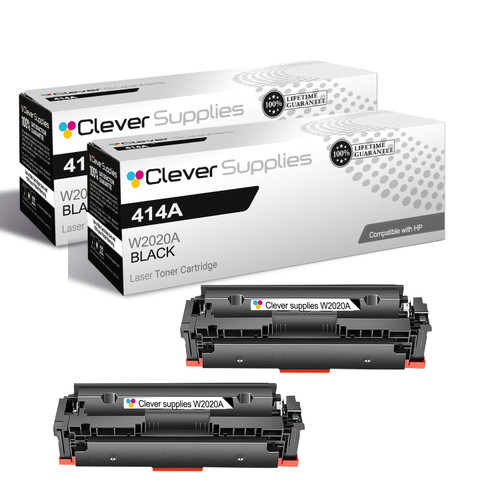
Compatible HP M479fdn (W2020A) Toner Cartridge 2 Black

Amazon Price:

- Page Yield:
- Black: 2400
- Availability:
- Y
- Shipping:
- Free Shipping
- Compatible Printers
- Color Pro M479fdw
- Color Pro M479fdn
- Color Pro M479
- Color Pro MFP M454dw
- Color Pro MFP M454dn
- Color Pro MFP M454
- Color Enterprise M455dn
- Color Enterprise MFP M480f
- Color Pro M479fdw, M479fdn, M479
- Color Pro MFP M454dw, M454dn, M454
- M454
- M454dn
- M479
- M479fdn
- Specifications
- SKU:
- CS-HP-M479fdn-2BK
- Printer Brand:
- Hewlett Packard
- OEM Number:
- W2020A
- Ink Color:
- Black
- Page Yield:
- Black: 2400
- Printer Type:
- Laser Cartridge
- Condition:
- New Compatible
- Description
- Reviews



Ensure vibrant and reliable printing results with the HP 414A, including the W2020A Black, W2021A Cyan, W2023A Magenta, and W2022A Yellow toner cartridges. These high-quality cartridges are designed to deliver sharp text and brilliant color output for all your printing needs. Built for efficiency, the HP 414A toner cartridge and HP 414A toner cartridge are engineered to produce consistent, professional results from the first page to the last. Whether you're printing marketing materials or everyday office documents, these cartridges keep performance high. Compatible with a range of printers, including the Color Pro M479fdn, M479fdn, M479 MFP, and M454dw, this toner set ensures seamless operation and outstanding print quality. Each cartridge is specifically designed to integrate flawlessly with your HP device for optimal performance. Ideal for businesses and busy work environments, these cartridges also work with the Color Enterprise M455dn and MFP M480f models. Count on the W2020A Black, W2021A Cyan, W2023A Magenta, and W2022A Yellow cartridges to keep your documents looking sharp, colorful, and professional every time.
Cross-reference: HP W2020A, the 414A black toner cartridge (2,400 pages), is the same cartridge Canon sells as Canon Cartridge 055 (black 3016C001AA, cyan 3015C001AA, magenta 3014C001AA, yellow 3013C001AA) and Cartridge 055H high capacity (black 3020C001AA, cyan 3019C001AA, magenta 3018C001AA, yellow 3017C001AA) for the Canon Color imageCLASS MF741Cdw, MF743Cdw, MF745Cdw and MF746Cdw and the Color imageCLASS LBP664Cdw printers. Canon rates Cartridge 055 black at 2,300 pages and each color at 2,100 pages, and Cartridge 055H colors at 5,900 pages each (ISO/IEC standard).
Frequently Asked Questions
What does this pack contain for the MFP M479fdn?
Two W2020A black cartridges — the black member of HP's 414A family, and the cartridge the M479fdn's supplies status page names for its black slot. The pair is priced at $165.87. Both cartridges are the same standard unit, each rated at roughly 2,400 pages.
Why does a multifunction machine get through black faster than expected?
Because three jobs draw on the one cartridge. Printing uses it, copying uses it, and incoming faxes print in black only — while scanning, the one toner-free function, uses none. Offices are often surprised by the black level until they add the copy and fax traffic on top of the print count; the W2020A carries all three streams.
Does the second cartridge work in our M479fdw as well?
Yes — the Color LaserJet Pro M479fdw takes the identical W2020A black, as do the M454 and M455 printers and the M480f. The whole 414A platform shares this cartridge, so a two-pack bought for the fdn model is equally valid stock for any of its relatives.
How should we run the pair day to day?
One cartridge in the machine, one sealed beside it. When output from the installed cartridge fades, swap in the spare and place the next order the same day — that keeps a buffer in place permanently instead of letting the shelf reach zero between orders.
If a long copy run starts fading halfway through, what can we do?
Pause, take the cartridge out, and rock it gently side to side to redistribute the toner, then reinstall. That usually recovers even coverage for the rest of the run. If the fade returns at once, the cartridge is truly spent — which is when the second cartridge in this pack earns its place.
What warranty and shipping terms apply to the pack?
The cartridges are covered by a 1-year warranty with free returns within the first year — full details on our shipping & returns page. We dispatch from warehouses in IL, PA, GA, and CA, and support is staffed Monday–Friday, 9 AM–5 PM CST. For the whole family side by side — 414A against 414X, singles against the four-color set, with the cost per page of each — see our Best HP 414A & 414X (W2020–W2023) Toner Cartridges guide.
What does this pair cost per printed page?
The two W2020A cartridges are rated at roughly 2,400 pages each, so the $165.87 pack holds about 4,800 rated pages of black — roughly 3.5 cents per page, or $82.94 per cartridge. On the M479fdn that figure has to cover three streams at once, since prints, copies and received faxes all spend the same cartridge, but as a planning number it is the honest way to compare this pack against buying singles.
Our pages are dense forms and fax cover sheets — will we really see 2,400 pages?
Probably not the full figure, and that is normal. The rating assumes 5% of the page is covered; dense forms, bold headers and shaded boxes cover considerably more, so each page spends more toner. Judge the pair by the swap interval you actually observe on the M479fdn rather than the box number — in a form-heavy office a shorter real cycle reflects your pages, not a short cartridge.
How can we learn this machine's real black rhythm?
When the first cartridge from this pack goes in, write the date on the second cartridge's carton. When the swap eventually comes, the gap between that date and the install date is your machine's true black cycle — measured across your own mix of prints, copies and faxes. One recorded cycle tells you more about when to reorder than any rating, and the second pair you buy can be timed from it.
Should the first cartridge be thrown out the moment the spare goes in?
Not immediately. Keep the pulled W2020A, marked spent, until the spare has printed a few days of clean work — if anything looks wrong with the new unit, the old one is your comparison point. Once the spare has proven itself, the empty can leave with the office's cartridge recycling. What it should never do is sit unmarked beside the machine, where a busy colleague could reinstall it by mistake.
About This 2-Pack for the M479fdn
This two-cartridge pack from our HP range is sized for a machine that never does just one job. The M479fdn prints, copies, and faxes from a single black cartridge, so its toner level is really three departments' usage added together — and a spare on the shelf is the difference between a routine swap and a stalled front desk. Store the reserve sealed and flat, away from heat and sunlight, and it will wait patiently for its turn.
Related Items


Hewlett Packard
Compatible HP M479fdn (W2020A) Toner Cartridge Black



Hewlett Packard
Compatible HP MFPM480f (W2020A) Toner Cartridge 2 Black


Hewlett Packard
Compatible HP M479fdn (W2020A, W2021A, W2023A, W2022A) Toner Cartridge 4 Color Set

Hewlett Packard
Compatible HP M479fdw (W2020A) Toner Cartridge Black